Page 3 of 3
Re: Scheduled Task Shutdown not working
Posted: 14 Feb 2025, 20:04
by FredMutter
journalctl|grep cron
Feb 14 12:12:19 TNAS cron[3272]: (CRON) INFO (pidfile fd = 3)
Feb 14 12:12:19 TNAS cron[3272]: (*system*) INSECURE MODE (group/other writable) (/etc/crontab)
Feb 14 12:12:19 TNAS cron[3272]: (CRON) INFO (Running @reboot jobs)
Feb 14 12:12:29 TNAS sysinit[3948]: /etc/tos/scripts/powertimer: line 114: /etc/cron: No such file or directory
Feb 14 12:13:02 TNAS cron[3272]: (*system*) INSECURE MODE (group/other writable) (/etc/crontab)
fmutter@TNAS:/etc# more /etc/crontab
30 23 * * 0 fmutter /sbin/poweroff
30 23 * * 1 fmutter /sbin/poweroff
30 23 * * 2 fmutter /sbin/poweroff
30 23 * * 3 fmutter /sbin/poweroff
30 23 * * 4 fmutter /sbin/poweroff
30 23 * * 5 fmutter /sbin/poweroff
30 23 * * 6 fmutter /sbin/poweroff
as I wrote in one of my fist messages this line is very suspicious => /etc/tos/scripts/powertimer: line 114: /etc/cron:
Re: Scheduled Task Shutdown not working
Posted: 14 Feb 2025, 20:32
by Gremlin
Not that I am concerned, Just for giggles:
{Machine start-up @ 09:00 via > Hardware&Power > Power > Scheduled}
Code: Select all
Me@NAS-T2:/# journalctl | grep cron
Feb 14 09:02:08 NAS-T2 cron[2871]: (CRON) INFO (pidfile fd = 3)
Feb 14 09:02:08 NAS-T2 cron[2871]: /var/spool/cron: No such file or directory
Feb 14 09:02:08 NAS-T2 cron[2871]: /var/spool/cron: created
Feb 14 09:02:08 NAS-T2 cron[2871]: crontabs: No such file or directory
Feb 14 09:02:08 NAS-T2 cron[2871]: crontabs: created
Feb 14 09:02:08 NAS-T2 cron[2871]: crontabs: chowned
Feb 14 09:02:08 NAS-T2 cron[2871]: (CRON) INFO (Running @reboot jobs)
Feb 14 09:02:40 NAS-T2 sysinit[3998]: /etc/tos/scripts/powertimer: line 114: /etc/init.d/cron: No such file or directory
Feb 14 09:03:01 NAS-T2 cron[2871]: (*system*) RELOAD (/etc/crontab)
Me@NAS-T2:/#
Re: Scheduled Task Shutdown not working
Posted: 15 Feb 2025, 14:44
by FredMutter
Gremlin wrote: ↑14 Feb 2025, 20:32
Not that I am concerned, Just for giggles:
{Machine start-up @ 09:00 via > Hardware&Power > Power > Scheduled}
Nope I started my NAS manually at 9:00

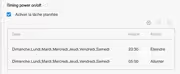
It should start at 5:50
Re: Scheduled Task Shutdown not working
Posted: 20 Apr 2025, 09:08
by tc0566
Ok So I have pretty much the same issue except mine doesn't power on sometimes. Does anyone have a solution? TOS 6.0.650
Re: Scheduled Task Shutdown not working
Posted: 20 Apr 2025, 10:56
by TMLila
FredMutter wrote: ↑03 Feb 2025, 19:12
>set the 'Scheduled task' setup within the GUI and it will work (all other things being equal).
This is my problem since 2 weeks it doesn't work: it was my first screenshot. And I really don't know why.
1. I analyzed cron and confirmed that it executes my own cron tasks correctly.
2. However, the GUI-scheduled shutdown task doesn’t work, even though the system crontab file exists (as shown in my second screenshot).
3. Docker isn’t the cause, since I manually shut it down, yet the GUI shutdown task still fails to execute.
4. I suppose cron is not running anymore as root and can therefore not read the system crontab file.
Because I have only one TOS I cannot compare my analysis with another installation
Thank you for your feedback. We have confirmed that the 'Scheduled Task ' feature currently has some issues. Our team is actively working on improvements, and a fixed version will be released in a future update.
Re: Scheduled Task Shutdown not working
Posted: 20 Apr 2025, 14:02
by FredMutter
TMLila wrote: ↑20 Apr 2025, 10:56
FredMutter wrote: ↑03 Feb 2025, 19:12
>set the 'Scheduled task' setup within the GUI and it will work (all other things being equal).
This is my problem since 2 weeks it doesn't work: it was my first screenshot. And I really don't know why.
1. I analyzed cron and confirmed that it executes my own cron tasks correctly.
2. However, the GUI-scheduled shutdown task doesn’t work, even though the system crontab file exists (as shown in my second screenshot).
3. Docker isn’t the cause, since I manually shut it down, yet the GUI shutdown task still fails to execute.
4. I suppose cron is not running anymore as root and can therefore not read the system crontab file.
Because I have only one TOS I cannot compare my analysis with another installation
Thank you for your feedback. We have confirmed that the 'Scheduled Task ' feature currently has some issues. Our team is actively working on improvements, and a fixed version will be released in a future update.
I already applied the hotfix (wrong file rights on the crond file)