Re: TOS 7.0.0804 (x86) Official Release Update
Posted: 01 Sep 2026, 22:43
Bug Reports, Operation Guides, and Experience Sharing
https://forum.terra-master.com/en/
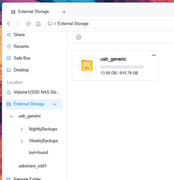
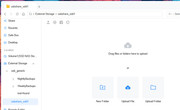
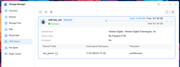
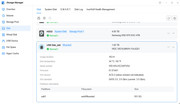
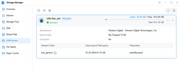
I already modified my custom tasks and all is working normally again. Regarding the "additional partition", it is shown in the middle screenshot of the group of 3 screenshots that I had attached. You will see that on the left under "External Storage" that I have only one attached USB drive which I use in conjunction with USB Copy. Under "External Storage" there is a "usb_generic" partition that holds the Nightly and Weekly backups that USB Copy creates. Below all that you can see a "usbshare_sdd1" which I am not sure if it is an additional partition or an additional folder. Either way when I select it you can see that in the main window it is ready to accept files. I do not remember the external usb drive being configured in this way under TOS 6. Under TOS 6 I recall only 1 file area all for the use of USB Copy. I simply do not understand why it shows in this way and was hoping for an explanation as to its purpose. I am attaching 2 additional screenshots with this post. The first shows that under "Storage Manager Disk" the external storage shows as mounted USB Disk_sdd with only 1 partition namely sdd1. The second sreenshot shows that under "Storage Manager USB Device" the mounted USB Disk_sdd has only one "Shared Folder" namely usb_generic. So what storage purpose or function does "usbshare_sdd1" serve since it is only visible in file manager. File manager properties shows the location of "usbshare_sdd1" as /Volume1/@usb/usbshare_sdd1 and the location of usb_generic as /Volume1/@usb/usb_generic. Thank you for any further enlightenment you can offer.TMzethar wrote: ↑01 Sep 2026, 15:01TOS7 uses new path names. However, some old path names from TOS6 may still remain. This is a display issue that is currently being fixed; please wait for a future TOS update.fbfragomeni wrote: ↑10 Aug 2026, 01:08I have an additional observation after the TOS 7 update that hopefully someone can explain. While under TOS 6, I used USB Copy to make backups of Volume1 to an attached USB storage device. USB Copy as part of its functionality created the backup scheduled tasks for me. I then created custom scheduled tasks to clean up old backups. All worked perfectly under TOS 6. Now under TOS 7 the USB Copy backup tasks still work properly but my custom backup clean up tasks did not. In troubleshooting this issue I found that under TOS 6 the attached USB storage device was mounted solely as usbshare_sdc1 but now under TOS 7 it was mounted as both usbshare_sdd1 and usb_generic folders. See attached screenshots. USB Copy backup tasks were automatically modified to point to the new usb_generic folder. However, my custom backup clean up tasks were not automatically modified. I had to manually modify the scripts that those clean up tasks ran. Also, the new usbshare_sdd1 seems to be empty and available as storage for any other files I may have. Basically, it looks like my external USB storage has 2 partitions but as you can see from the last picture it only has 1 partition occupying the entire disk. Thank you for any enlightenment you can shed on this.
Sorry, due to changes in USB path names after upgrading to TOS7, you will need to modify your original custom tasks.
Regarding the “additional partition” you mentioned, it does not appear to be mentioned in the screenshot you provided.
Thank you for your detailed feedback!