Page 12 of 14
Re: TOS 7.0.0804 (x86) Official Release Update
Posted: 07 Aug 2026, 16:56
by athurdent
TMzethar wrote: ↑07 Aug 2026, 16:32
Put simply, "Docker Apps" are just a simplified way to install commonly used Docker images and containers.
The images come from public registries like Docker Hub and are maintained by the publishers. Like everywhere else in the Docker ecosystem, nobody can audit third‑party images at the source‑code level. The App Center just handles the installation setup—templating things like the image, ports, and volume mounts. Before you install, you'll see the exact image and version tag so you can check them before proceeding.
The way it's currently presented to the user, those images look pretty official in the App Center - one would expect TerraMaster to have audited them (same way as one expects Apple or Google to audit apps in their stores, good as possible).
As that doesn't seem to be the case/intention, I'd suggest moving those to an extra "unofficial" category, add a 3rd-party (warning) sign and also offer official images where available. On the Docker Hub I'd e.g. always prefer AdGuard Home from publisher Adguard (
https://hub.docker.com/u/adguard ) over images published from other individuals.
Just my 2 cents to keep TerraMaster from potential bad press - I really like TOS7 and the F8 SSD!
Re: TOS 7.0.0804 (x86) Official Release Update
Posted: 07 Aug 2026, 17:47
by TMzethar
athurdent wrote: ↑07 Aug 2026, 16:56
The way it's currently presented to the user, those images look pretty official in the App Center - one would expect TerraMaster to have audited them (same way as one expects Apple or Google to audit apps in their stores, good as possible).
As that doesn't seem to be the case/intention, I'd suggest moving those to an extra "unofficial" category, add a 3rd-party (warning) sign and also offer official images where available. On the Docker Hub I'd e.g. always prefer AdGuard Home from publisher Adguard (
https://hub.docker.com/u/adguard ) over images published from other individuals.
Just my 2 cents to keep TerraMaster from potential bad press - I really like TOS7 and the F8 SSD!
We appreciate your suggestion and the clarification you have provided. We will deliberate and decide on a suitable approach.
Re: TOS 7.0.0804 (x86) Official Release Update
Posted: 07 Aug 2026, 20:28
by fbfragomeni
TMzethar wrote: ↑07 Aug 2026, 14:37
It seems like the permission conversion may have only been partially completed. You also mentioned that "the system automatically completed the permission conversion for shared folders."
Could you confirm whether you actually saw a prompt indicating that the permission conversion was completed? Did you perform any shutdown or restart during the conversion process? Or can you think of any other actions that might be relevant?
We'll keep an eye out for similar feedback from other users.
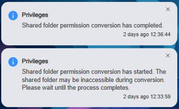
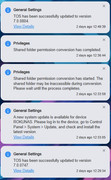
The permission conversion for shared folders ran automatically as part of the update process. I did not perform any manual permission conversion. I actually saw the prompt indicating that the permission conversion was completed. I attached a screenshot of that prompt. This is a new NAS with just a couple gigabytes of files on it so both updates and permission conversion did not take long as you can see from the second screenshot. I did not perform any shutdown or restart during the conversion. I did not perform any action other that to initiate the update and sit and wait for the prompt to say it completed. Everything seems to be working well as of now so the entire process seems to have been successful except for that small permission hiccup that took a while to troubleshoot. It will be interesting to see if any other user provides similar feedback. Thank you, TMzethar.
Re: TOS 7.0.0804 (x86) Official Release Update
Posted: 08 Aug 2026, 10:02
by TMzethar
Thanks for the extra details. We'll monitor this and keep testing to see if we can replicate it.
Re: TOS 7.0.0804 (x86) Official Release Update
Posted: 08 Aug 2026, 23:13
by Fantoot
I lost access to my F4-424 Max after upgrading to 7.0.0804. I can see the device in the network with IP address. Pinging was successful but I'm getting 502 Bad Gateway nginx/1.18.0 (Ubuntu) error when trying to log-in access my device.
Support is recommending removing all HDs and SSD, booting, then inserting HDD/SSD but I'm concerned about losing my data. You should've tested the upgrade properly to avoid this. and should have notified owners abut this nonsense.
Re: TOS 7.0.0804 (x86) Official Release Update
Posted: 09 Aug 2026, 16:15
by TMzethar
Fantoot wrote: ↑08 Aug 2026, 23:13
I lost access to my F4-424 Max after upgrading to 7.0.0804. I can see the device in the network with IP address. Pinging was successful but I'm getting 502 Bad Gateway nginx/1.18.0 (Ubuntu) error when trying to log-in access my device.
Support is recommending removing all HDs and SSD, booting, then inserting HDD/SSD but I'm concerned about losing my data. You should've tested the upgrade properly to avoid this. and should have notified owners abut this nonsense.
It’s possible that the services related to the TOS web interface haven’t fully started yet, or that other running services are using a significant amount of RAM, leaving insufficient RAM available for the TOS web interface. It’s also possible that an error has occurred; we cannot determine the exact cause at this time. You can try logging into the terminal via an HDMI monitor and enabling the SSH service:
systemctl start ssh.service
Then, contact us online to schedule an appointment with an engineer who can help you troubleshoot the issue remotely.
https://salesiq.zohopublic.com/signatur ... 97d0be8892
Please be sure to include your forum ID and the URL of this post so we can identify you.
Re: TOS 7.0.0804 (x86) Official Release Update
Posted: 09 Aug 2026, 17:32
by adam12345
Fantoot wrote: ↑08 Aug 2026, 23:13
I lost access to my F4-424 Max after upgrading to 7.0.0804. I can see the device in the network with IP address. Pinging was successful but I'm getting 502 Bad Gateway nginx/1.18.0 (Ubuntu) error when trying to log-in access my device.
Support is recommending removing all HDs and SSD, booting, then inserting HDD/SSD but I'm concerned about losing my data. You should've tested the upgrade properly to avoid this. and should have notified owners abut this nonsense.
are you using a bond prehaps?
Re: TOS 7.0.0804 (x86) Official Release Update
Posted: 10 Aug 2026, 00:40
by athurdent
According to my firewall/application monitoring, starting with the update from TOS6 to 7, my NAS began connecting to
www.baidu.com pretty frequently.
I cannot find any reason for this, could you guide me on possible causes? Thanks!
Re: TOS 7.0.0804 (x86) Official Release Update
Posted: 10 Aug 2026, 01:08
by fbfragomeni
TMzethar wrote: ↑08 Aug 2026, 10:02
Thanks for the extra details. We'll monitor this and keep testing to see if we can replicate it.
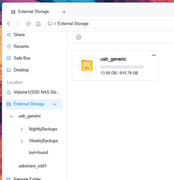
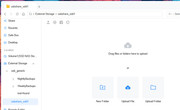
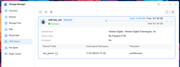
I have an additional observation after the TOS 7 update that hopefully someone can explain. While under TOS 6, I used USB Copy to make backups of Volume1 to an attached USB storage device. USB Copy as part of its functionality created the backup scheduled tasks for me. I then created custom scheduled tasks to clean up old backups. All worked perfectly under TOS 6. Now under TOS 7 the USB Copy backup tasks still work properly but my custom backup clean up tasks did not. In troubleshooting this issue I found that under TOS 6 the attached USB storage device was mounted solely as usbshare_sdc1 but now under TOS 7 it was mounted as both usbshare_sdd1 and usb_generic folders. See attached screenshots. USB Copy backup tasks were automatically modified to point to the new usb_generic folder. However, my custom backup clean up tasks were not automatically modified. I had to manually modify the scripts that those clean up tasks ran. Also, the new usbshare_sdd1 seems to be empty and available as storage for any other files I may have. Basically, it looks like my external USB storage has 2 partitions but as you can see from the last picture it only has 1 partition occupying the entire disk. Thank you for any enlightenment you can shed on this.
Re: TOS 7.0.0804 (x86) Official Release Update
Posted: 10 Aug 2026, 06:06
by Fantoot
I don't think its a RAM problem. I got access via connecting a monitor and keyboard. I need someone to contact me and walk me through a soltion