Page 12 of 20
Re: TOS 7 Is Now Out of Beta — Official Release
Posted: 19 Jul 2026, 21:28
by MikeZhang
Please open the link below to schedule remote session, let us check for you
https://salesiq.zohopublic.com/signatur ... 97d0be8892
Re: TOS 7 Is Now Out of Beta — Official Release
Posted: 20 Jul 2026, 22:48
by GGI
F2-223 (no SSDs, 2x4TB HDDs in TRAID) - downloaded the package, uploaded using the system/apply package.
System told me it was unzipping the package, had a count down, then nothing more.
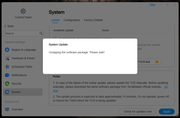
When I refreshed my page, I am still sitting at the desktop of TOS6 and there is no indication that anything is happening.
Did the install fail? Do I need to try it again? Should I be seeing something in the way of a progress indicator?
Just wondering how the upgrade is supposed to look?
Re: TOS 7 Is Now Out of Beta — Official Release
Posted: 21 Jul 2026, 12:02
by TMzethar
GGI wrote: ↑20 Jul 2026, 22:48
Did you follow the instructions regarding F2-223 on the first page?
For F2-223, F2-423, F4-223, F4-423, T6-423, T9-423, T12-423, U4-423, U8-423, and U12-423 users: If your system is currently installed on, or you plan to install it on, an M.2 NVMe SSD, please follow the guide to adjust the BIOS boot order before updating: viewtopic.php?t=9417.
viewtopic.php?t=9417
Re: TOS 7 Is Now Out of Beta — Official Release
Posted: 21 Jul 2026, 12:36
by GGI
Hello, I did read but it specifically said for those systems with a M.2 NVMe SSD. I do not have any of those. My system has 2 4TB Western Digital NAS drives. Everything was set up as default, I did nothing to any drive boot orders.
Re: TOS 7 Is Now Out of Beta — Official Release
Posted: 21 Jul 2026, 14:42
by TMzethar
GGI wrote: ↑21 Jul 2026, 12:36
When the problem happens, please grab a system report right away (before shutting down) via Technical Support > Report Issues. Also, locate the update log here:
/homes/superusername/update_before_reboot_xxxx-xx-xx-xx-xx-xx.log
Then email both files to our support team as attachments, and make sure to include the link to this thread and your forum name so we can match it up.
Re: TOS 7 Is Now Out of Beta — Official Release
Posted: 22 Jul 2026, 03:16
by GGI
TMzethar wrote: ↑21 Jul 2026, 14:42
GGI wrote: ↑21 Jul 2026, 12:36
When the problem happens, please grab a system report right away (before shutting down) via Technical Support > Report Issues. Also, locate the update log here:
/homes/superusername/update_before_reboot_xxxx-xx-xx-xx-xx-xx.log
Then email both files to our support team as attachments, and make sure to include the link to this thread and your forum name so we can match it up.
I am not sure what the root cause was, but when I was originally running the update I was using the "upload from TNAS" option and then selecting the update file. That's when it would "unzipping" but never finish. This time, I tried uploading from my computer (the file was in the exact same place), and it uploaded, unzipped, and updated successfully. It is currently processing the permissions...
Thank you for your support and patience.
Re: TOS 7 Is Now Out of Beta — Official Release
Posted: 23 Jul 2026, 19:36
by Takeiteasy
Dear Support Team,
On July 13th, I contacted you in the forum here about the problems I'm experiencing with my NAS F4-424 Max after the correct update from TOS 6 to TOS 7. I also sent you a support email with a download link to a video showing the NAS startup process and all system messages and error messages.
To date, I have received no response regarding a solution to the problem, and the NAS is unusable for me because it no longer functions.
So, what is Terra-Master doing to resolve this issue? Since the update, the NAS is not accessible on the network after being switched on because it no longer obtains an IP address. I can see this in my network management.
Therefore, the usual remote access for support is not possible.
Is there anything I can do beforehand to make the NAS accessible on the network again, so that it can be assigned an IP address?
This would allow support to remotely access the NAS to read, analyze, and resolve system errors.
After 14 days of downtime, I would like to be able to put the NAS back into operation and use it again.
Tank you
Re: TOS 7 Is Now Out of Beta — Official Release
Posted: 23 Jul 2026, 22:20
by Gremlin
Did you ever check your Tos7 update with the MD5 hash? You seem to have had download issues previously, it might be worth checking.
How about posting what you see in Tnas-PC or mobile apps for others to see what you are seeing.This is a community forum. (If you only want terramaster support you can contact then directly and/or make an issue specific post as a new topic in the forum rather than keep tacking on to
(what is now) an old thread. There have been a few updates since Tos7 was released to the public.
Re: TOS 7 Is Now Out of Beta — Official Release
Posted: 24 Jul 2026, 00:51
by Takeiteasy
Gremlin, Thank for the reply, unfortunately I can't provide anything via the app because it can no longer detect the NAS. The reason is that after the seemingly successful update (the TOS 7 interface briefly appeared after the update), the NAS crashed and nothing has worked since – no IP address, no login option, it's not even visible in my UniFi network management. I've tried a reset by pressing the reset button for 30 seconds, a new empty hard drive, and replacing the original USB stick with another new one containing the correct boot image, but the error persists. Volume 1 could not be unmounted. The update was performed using the correct file, as posted here.
Re: TOS 7 Is Now Out of Beta — Official Release
Posted: 24 Jul 2026, 01:16
by nightskyre
GGI wrote: ↑20 Jul 2026, 22:48
F2-223 (no SSDs, 2x4TB HDDs in TRAID) - downloaded the package, uploaded using the system/apply package.
System told me it was unzipping the package, had a count down, then nothing more.
When I refreshed my page, I am still sitting at the desktop of TOS6 and there is no indication that anything is happening.
Did the install fail? Do I need to try it again? Should I be seeing something in the way of a progress indicator?
Just wondering how the upgrade is supposed to look?
This is pretty much exactly what happened to me. I have the log files, if someone can direct me where to send them?