Page 2 of 5
Re: TOS 7.0.0448 Beta (X86) is Released for Update
Posted: 18 Mar 2026, 23:21
by DanB
Running 7.0.0448 on my F8 SSD Plus. Trying to add Cloudflare R2 storage - in CloudSync. The configuration seems to be ok (access + secret key + URL) - but I get the error "failed to connect". Is there any Log?
Re: TOS 7.0.0448 Beta (X86) is Released for Update
Posted: 19 Mar 2026, 02:20
by samius
clipboard doesn't work in the VM through noVNC.
i used middle mouse button.
VM also warns me that one host is in "offline" mode. What does this mean? The host is accessible over the network.

Re: TOS 7.0.0448 Beta (X86) is Released for Update
Posted: 19 Mar 2026, 15:56
by Phil
DanB wrote: ↑18 Mar 2026, 23:21
Running 7.0.0448 on my F8 SSD Plus. Trying to add Cloudflare R2 storage - in CloudSync. The configuration seems to be ok (access + secret key + URL) - but I get the error "failed to connect". Is there any Log?
What is your CloudSync application version number? If it's not the latest version, we recommend updating to the latest version. After updating, be sure to restart the CloudSync service in the Application Center.
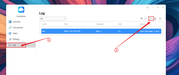
Regarding logs: You can create and export logs in the CloudSync interface for analysis.Please refer to the image.
Re: TOS 7.0.0448 Beta (X86) is Released for Update
Posted: 19 Mar 2026, 16:01
by Lex
Thanks to the support team, they helped me solve the problem, but the incorrect path remains
Re: TOS 7.0.0448 Beta (X86) is Released for Update
Posted: 19 Mar 2026, 16:20
by Phil
samius wrote: ↑18 Mar 2026, 21:40
File not found
https://toshelp.terra-master.com/faq/category/vms
Please try using this link again.
Re: TOS 7.0.0448 Beta (X86) is Released for Update
Posted: 19 Mar 2026, 17:00
by Phil
samius wrote: ↑19 Mar 2026, 02:20
clipboard doesn't work in the VM through noVNC.
i used middle mouse button.
VM also warns me that one host is in "offline" mode. What does this mean? The host is accessible over the network.
Thank you for your feedback.
The clipboard not working in noVNC is not a problem with your virtual machine (VM) itself. Our testing indicates that this issue is likely due to a limitation of the noVNC client program you are using. You can try typing directly within the noVNC window.
Regarding the issue of the virtual machine indicating that the host is in "offline" mode, we have identified this false alarm. This "offline" status message does not affect the normal operation and use of your virtual machine. This issue will be fixed in a future update; please wait for the next version release. You can also try modifying the virtual machine configuration to see if it restores the normal interface.
Re: TOS 7.0.0448 Beta (X86) is Released for Update
Posted: 19 Mar 2026, 17:34
by Phil
rfbjr wrote: ↑18 Mar 2026, 21:36
Just noticed on all three of my devices (I'm tired of saying NAS(s), NAS's

)
After applying v448
The email notification settings for the warning and information in all categories were turned off. Is this something new or a mistake?
Before I had every category set to notify for notification and email.
Thank you for your feedback. This is not a new feature design. Under normal circumstances, system updates do not reset users' pre-configured notification settings. We tested your situation and could not reproduce your issue. If the problem persists after resetting, or recurs in a future update, please let us know.
Your feedback is very important to us in optimizing the update process. We will continue to monitor this situation and focus on checking configuration inheritance in subsequent version testing. We sincerely apologize for any inconvenience caused.
Re: TOS 7.0.0448 Beta (X86) is Released for Update
Posted: 19 Mar 2026, 17:39
by Phil
rfbjr wrote: ↑18 Mar 2026, 21:43
Another thing

With the usual email announcement of the next release could you do something like indicated (**)
I never remember what the current version is I have installed, I usually just launch it on my PC, and it tells me to download a new update.
Client Downloads:
1.
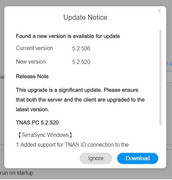
**Download TNAS PC 5.2.520 for Windows OS.
2. Download TNAS PC 5.2.520 for macOS (x86 and ARM architectures).
3. Download TNAS PC 5.2.520 for macOS (ARM architecture).
4. Download TNAS PC for Linux.
5. Download TNAS Mobile 3.X for Android.
Thank you for your valuable suggestion! We have noted your specific suggestion in detail and forwarded it to our product team. Please feel free to raise any further ideas you may have.
Re: TOS 7.0.0448 Beta (X86) is Released for Update
Posted: 19 Mar 2026, 17:51
by bartmans99
Phil wrote: ↑19 Mar 2026, 17:34
rfbjr wrote: ↑18 Mar 2026, 21:36
Just noticed on all three of my devices (I'm tired of saying NAS(s), NAS's
)
After applying v448
The email notification settings for the warning and information in all categories were turned off. Is this something new or a mistake?
Before I had every category set to notify for notification and email.
Thank you for your feedback. This is not a new feature design. Under normal circumstances, system updates do not reset users' pre-configured notification settings. We tested your situation and could not reproduce your issue. If the problem persists after resetting, or recurs in a future update, please let us know.
I had the samen issue after update to 448 beta. Settings on the notifications were reset to 'everything on', instead my previous setup.
Re: TOS 7.0.0448 Beta (X86) is Released for Update
Posted: 19 Mar 2026, 17:59
by Gremlin
rfbjr wrote: ↑18 Mar 2026, 21:43
This works for me:
In TNAS-pc (WIN11) > Settings > Scan for updates (even if it says 'new update')