Page 2 of 2
Re: [Help] Boot Truenas
Posted: 27 Jul 2025, 23:43
by lurgainn
TMlinda wrote: ↑27 Jul 2025, 21:57
Or you can try to consult TrueNas official, follow the official TrueNas instructions to create a USB drive, and enable the TrueNAS USB drive as a boot drive.
English is not my original language, and therefore maybe I'm not very clear, but I thought I have already explained that this is exactly what I did.
From the official page of Truenas installation I followed all the various methods listed there. So I used "dd", and after the failure, I followed the Ventoy method, and then the others.
Just an hour ago I put my hands on a PC with installed Windows 10, so I was able to use rufus 4.9, but the results are the same: with the pendisk inserted the NAS start with the "Terramaster" logo, and after a few seconds it display the BIOS page, and in the "Boot" there isn't any UEFI disk available, just a generic "USB drive".
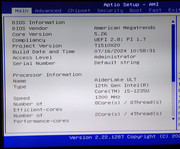
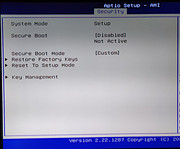
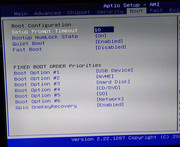
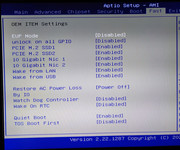
These are my BIOS settings:
Re: [Help] Boot Truenas
Posted: 28 Jul 2025, 15:38
by TMjack
Hello! We have successfully completed the installation of the TrueNAS system on the F4-424 Max device. Here, we would like to specifically remind you to pay attention to the following two points:
If you are operating in a Windows environment, you need to use the UltraISO software to accurately burn the TrueNAS system image file onto a USB drive.Do not use the dd command to burn the TrueNAS system image file to a USB drive.
Do not use Live Boot methods such as Ventoy to install TrueNAS, as the latest version of TrueNAS does not support installation via this method.
Re: [Help] Boot Truenas
Posted: 29 Jul 2025, 01:10
by lurgainn
TMjack wrote: ↑28 Jul 2025, 15:38
you need to use the UltraISO software
Thanks so much!! Luckily a friend of mine has an old bought copy of UltraISO. Using that software I was able to boot from the pendisk and now I have TrueNAS installed on my Terramaster F4-424 Max
Thanks again,
cheers