[Help] Boot Truenas

Initialization of newly purchased TNAS or re-installation of your TNAS
User avatar
lurgainn
Posts: 8
Joined: 16 Jul 2025, 20:12
Italy

Re: [Help] Boot Truenas

Post by lurgainn »

TMlinda wrote: 27 Jul 2025, 21:57 Or you can try to consult TrueNas official, follow the official TrueNas instructions to create a USB drive, and enable the TrueNAS USB drive as a boot drive.
English is not my original language, and therefore maybe I'm not very clear, but I thought I have already explained that this is exactly what I did.
From the official page of Truenas installation I followed all the various methods listed there. So I used "dd", and after the failure, I followed the Ventoy method, and then the others.
Just an hour ago I put my hands on a PC with installed Windows 10, so I was able to use rufus 4.9, but the results are the same: with the pendisk inserted the NAS start with the "Terramaster" logo, and after a few seconds it display the BIOS page, and in the "Boot" there isn't any UEFI disk available, just a generic "USB drive".
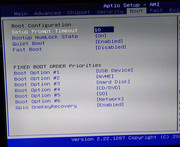
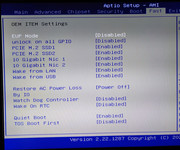
These are my BIOS settings:
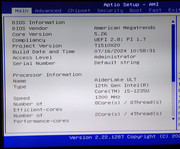
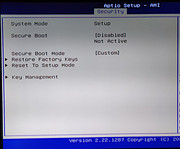
Image

Image

Image

Image
User avatar
TMjack
TM Support
Posts: 194
Joined: 27 Oct 2020, 08:41

Re: [Help] Boot Truenas

Post by TMjack »

Hello! We have successfully completed the installation of the TrueNAS system on the F4-424 Max device. Here, we would like to specifically remind you to pay attention to the following two points:

If you are operating in a Windows environment, you need to use the UltraISO software to accurately burn the TrueNAS system image file onto a USB drive.Do not use the dd command to burn the TrueNAS system image file to a USB drive.

Do not use Live Boot methods such as Ventoy to install TrueNAS, as the latest version of TrueNAS does not support installation via this method.
To contact our team, please send email to following addresses, remember to replace (at) with @
Technical team: support(at)terra-master.com (for technical support)
Service team: service(at)terra-master.com (for purchasing, return, replacement, RMA service)
User avatar
lurgainn
Posts: 8
Joined: 16 Jul 2025, 20:12
Italy

Re: [Help] Boot Truenas

Post by lurgainn »

TMjack wrote: 28 Jul 2025, 15:38 you need to use the UltraISO software
Thanks so much!! Luckily a friend of mine has an old bought copy of UltraISO. Using that software I was able to boot from the pendisk and now I have TrueNAS installed on my Terramaster F4-424 Max

Thanks again,
cheers
Post Reply

Return to “Initialization”