[Help] Snapshot Restore Doesnt Seem to do anything


Re: [Help] Snapshot Restore Doesnt Seem to do anything
What version of TOS are you currently running?
To contact our team, please send email to following addresses, remember to replace (at) with @
Technical team: support(at)terra-master.com(for technical support)
Service team: service(at)terra-master.com(for purchasing, return, replacement, RMA service)
Technical team: support(at)terra-master.com(for technical support)
Service team: service(at)terra-master.com(for purchasing, return, replacement, RMA service)

Re: [Help] Snapshot Restore Doesnt Seem to do anything
I'm using TOS 6.0
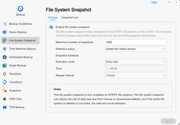
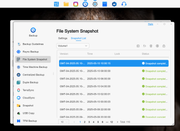
Just to be clear, I am referring to the File System Snapshot section of Backup, not the Snapshot application. The Snapshot application's restore function works, but it only snaps shared folders. File System Snapshot works on the whole volume, but the restore button doesn't seem to do anything.
Thanks
Just to be clear, I am referring to the File System Snapshot section of Backup, not the Snapshot application. The Snapshot application's restore function works, but it only snaps shared folders. File System Snapshot works on the whole volume, but the restore button doesn't seem to do anything.
Thanks

Re: [Help] Snapshot Restore Doesnt Seem to do anything
During the restore process, did you encounter any error messages? If so, please provide us with a screenshot of the error prompt so that we can analyze the issue more accurately.shabzone wrote: ↑10 May 2025, 01:34 I'm using TOS 6.0
Just to be clear, I am referring to the File System Snapshot section of Backup, not the Snapshot application. The Snapshot application's restore function works, but it only snaps shared folders. File System Snapshot works on the whole volume, but the restore button doesn't seem to do anything.
Thanks
Additionally, please note that restoring a file system snapshot requires certain preconditions — all service processes occupying the current volume must be closed beforehand. We recommend restarting your TNAS device first, and then attempting the restore operation again once the system has fully rebooted.
If the issue persists, please visit our official website (https://www.terra-master.com/global/) to contact Live Chat. We will be happy to provide you with remote technical support.
To contact our team, please send email to following addresses, remember to replace (at) with @:
Technical team: support(at)terra-master.com(for technical support)
Service team: service(at)terra-master.com(for purchasing, return, replacement, RMA service)
Technical team: support(at)terra-master.com(for technical support)
Service team: service(at)terra-master.com(for purchasing, return, replacement, RMA service)
Re: [Help] Snapshot Restore Doesnt Seem to do anything
Hi thanks for your reply. I wish I can show you more but there are no error messages when I click restore. It also doesn't take a lot of time, as if it didn't even start the process. My test scenario is I create a text file in my home directory, create a filesystem snapshot, delete the text file, and then restore from snapshot. The text file never gets restored but if I manually go into the saved snapshot I can see the text file and copy it back.
Re: [Help] Snapshot Restore Doesnt Seem to do anything
Hello, we are unable to determine the specific cause of the problem you mentioned.
please generate and download the log report package in TOS > Technical Support > Report Issues, and then send it to our technical support email (support(at)terra-master.com) for inspection.
If you can't send the zip package because it's too big, you can delete the following folders of the zip package to reduce the size.
etc>tos>scripts
etc>udev
etc>init.d
This may allows us to better and faster judge the problem and come up with a solution.
please generate and download the log report package in TOS > Technical Support > Report Issues, and then send it to our technical support email (support(at)terra-master.com) for inspection.
If you can't send the zip package because it's too big, you can delete the following folders of the zip package to reduce the size.
etc>tos>scripts
etc>udev
etc>init.d
This may allows us to better and faster judge the problem and come up with a solution.
To contact our team, please send email to following addresses, remember to replace (at) with @
Technical team: support(at)terra-master.com(for technical support)
Service team: service(at)terra-master.com(for purchasing, return, replacement, RMA service)
Technical team: support(at)terra-master.com(for technical support)
Service team: service(at)terra-master.com(for purchasing, return, replacement, RMA service)
-
wackyflipgame1

- Posts: 1
- Joined: 08 Sep 2025, 15:57

Re: [Help] Snapshot Restore Doesnt Seem to do anything
Thanks for bringing this up — I’ve also noticed it's not restoring as expected. Hoping a fix or update is on the way! Wacky Flip