Re: D6-320 corrupts HDD partitions after several hous of use
Posted: 16 Mar 2025, 16:51
Bad news, Over the last two weeks I have had both drives in the array have the boot record / partition wiped a total of 10 times.
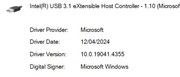
There has been no change in the USB driver since January.
An example of wiped drive.
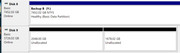
The new partition type is MS Reserved and the first partition is always 2048 in size and the second is the balance depending on the size of the drive.
The Seagate 8tb Ironwolf Pro was corrupted 3 times but boot record & partition table was able to be restored from backup by disk tester
Three times (out of seven) the Seagate 3TB Ironwolf (not Pro) had to be formatted and restored from back up as the as even thou DiskTest restored boot record & partition table successfully it seems to get wiped when the PC shuts down.
The backup partition table is not corrupt as I have used it 3 times to copy the files off the drive using DistkTest
Recovering and restoring the files from the wiped partition 4TB up is a 6-8 hour task and it is extremely frustrating that that I have now done it 3 times.
I have noticed that the Partition wipes may be cached by Windows 10 / 11 because if the drive was working in the previous boot powering down the TDAS and not using safely remove hardware seems to allow it to come back up after a cold boot of windows. The problem is I don’t realise the drives are wiped and shut down.
Note that I have write catching disabled for these drives.
What I have done to try and fix it the last week.
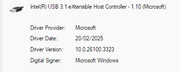
USB driver is has not changed since January when I recorded the version no but I noticed that there was a more recent INF file for win 11.
So upgraded to win 11 on Friday with a new Motherboard driver file and more recent USB driver hoping that would fix the issue
Both drives wiped during the windows upgrade. And many reboots involved with
Only lost the 8TB drive once since the upgrade and once after the upgrade. Repaired Partition from backup successfully each time.
Lost the 4TB drive twice since the upgrade and once after the upgrade. Spent a lot of time Friday/Saturday recovering files and again today as I could not get repair to stick.
The last restoration about finished about an hour ago and on restarting the computer the drive was wiped again.
I was able to restore using TestDisk but on reboot it was still wiped.
However I powered off the TDAS with out shutting down the PC and pulled all the drives and moved them to different trays that they have not been in.
I do not know if changing the USB id made the difference or if the disconnect stopped windows from writing the empty partition data to the drives.
I wonder if the the the Windows Disk Manager may do something when it is closed and overwrite the partition and boot record edits that Testdisk had done when Disk Manager is closed if I left it open in the background? That could explain some of the Behaviour I have noticed.
I am going to make sure disk manager is not running before I use TestDisk in the future.
Update next day
I purchased another USB-C cable and tested it today.
Installed the cable and left the PC running today and lost the 8tb drive between 2-8 hours uptime.
Sleep is disabled and power setting is performance mode with 100% CPU
The Drive was being used for daily backup files by Macrium Reflect and it was completed by 9:30 am (started at 9am) about 2 hours after power on. So the drive was wiped and removed from file explorer after that time
Restored the boot record and partition table from the backup on the disk successfully.
When I restored previously under Windows 10 the drive will retain the Drive Letter previously assigned to it.
However under windows 11 the drive letter will not be remembered as will be assigned the first free letter and will have to be reassigned.
It is also assigned a new Drive GUID
It also breaks every one of my backup definitions as the GUID of the drive has changed. Yesterday after fixing all my backup scripts I thought it was a problem due to changing from windows 10 to windows 11
I now have to edit all 15 backup definition files and disable the use of GUID so it wont happen in the future. Thank god for search & replace in files.
This Christmas gift to myself has been a total lemon. It was supposed to be my JOBD array for bulk storage of rarely needed items. All I am using it for now is overflow for my backup software.
This has been a total waste of time with the all issues in January and the last two weeks. I was intending to just add more SATA ports to my computer but the my video card blocks the PCIe slot for the expansion card. With all the lost time and cost of the unit I would have been half way to paying for a new Mobo, CPU and Ram. I reckon I have spent about 40-70 hours trying to keep this running.
There has been no change in the USB driver since January.
An example of wiped drive.
The new partition type is MS Reserved and the first partition is always 2048 in size and the second is the balance depending on the size of the drive.
The Seagate 8tb Ironwolf Pro was corrupted 3 times but boot record & partition table was able to be restored from backup by disk tester
Three times (out of seven) the Seagate 3TB Ironwolf (not Pro) had to be formatted and restored from back up as the as even thou DiskTest restored boot record & partition table successfully it seems to get wiped when the PC shuts down.
The backup partition table is not corrupt as I have used it 3 times to copy the files off the drive using DistkTest
Recovering and restoring the files from the wiped partition 4TB up is a 6-8 hour task and it is extremely frustrating that that I have now done it 3 times.
I have noticed that the Partition wipes may be cached by Windows 10 / 11 because if the drive was working in the previous boot powering down the TDAS and not using safely remove hardware seems to allow it to come back up after a cold boot of windows. The problem is I don’t realise the drives are wiped and shut down.
Note that I have write catching disabled for these drives.
What I have done to try and fix it the last week.
USB driver is has not changed since January when I recorded the version no but I noticed that there was a more recent INF file for win 11.
So upgraded to win 11 on Friday with a new Motherboard driver file and more recent USB driver hoping that would fix the issue
Both drives wiped during the windows upgrade. And many reboots involved with
Only lost the 8TB drive once since the upgrade and once after the upgrade. Repaired Partition from backup successfully each time.
Lost the 4TB drive twice since the upgrade and once after the upgrade. Spent a lot of time Friday/Saturday recovering files and again today as I could not get repair to stick.
The last restoration about finished about an hour ago and on restarting the computer the drive was wiped again.
I was able to restore using TestDisk but on reboot it was still wiped.
However I powered off the TDAS with out shutting down the PC and pulled all the drives and moved them to different trays that they have not been in.
I do not know if changing the USB id made the difference or if the disconnect stopped windows from writing the empty partition data to the drives.
I wonder if the the the Windows Disk Manager may do something when it is closed and overwrite the partition and boot record edits that Testdisk had done when Disk Manager is closed if I left it open in the background? That could explain some of the Behaviour I have noticed.
I am going to make sure disk manager is not running before I use TestDisk in the future.
Update next day
I purchased another USB-C cable and tested it today.
Installed the cable and left the PC running today and lost the 8tb drive between 2-8 hours uptime.
Sleep is disabled and power setting is performance mode with 100% CPU
The Drive was being used for daily backup files by Macrium Reflect and it was completed by 9:30 am (started at 9am) about 2 hours after power on. So the drive was wiped and removed from file explorer after that time
Restored the boot record and partition table from the backup on the disk successfully.
When I restored previously under Windows 10 the drive will retain the Drive Letter previously assigned to it.
However under windows 11 the drive letter will not be remembered as will be assigned the first free letter and will have to be reassigned.
It is also assigned a new Drive GUID
It also breaks every one of my backup definitions as the GUID of the drive has changed. Yesterday after fixing all my backup scripts I thought it was a problem due to changing from windows 10 to windows 11
I now have to edit all 15 backup definition files and disable the use of GUID so it wont happen in the future. Thank god for search & replace in files.
This Christmas gift to myself has been a total lemon. It was supposed to be my JOBD array for bulk storage of rarely needed items. All I am using it for now is overflow for my backup software.
This has been a total waste of time with the all issues in January and the last two weeks. I was intending to just add more SATA ports to my computer but the my video card blocks the PCIe slot for the expansion card. With all the lost time and cost of the unit I would have been half way to paying for a new Mobo, CPU and Ram. I reckon I have spent about 40-70 hours trying to keep this running.