D6-320 corrupts HDD partitions after several hous of use  [SOLVED]

USB RAID storage for photographers, music producers, movie collectors
User avatar
WonderDog
Posts: 8
Joined: 09 Jan 2025, 19:47
Australia

Re: D6-320 corrupts HDD partitions after several hous of use

Post by WonderDog »

Bad news, Over the last two weeks I have had both drives in the array have the boot record / partition wiped a total of 10 times.

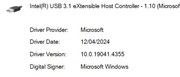
There has been no change in the USB driver since January.
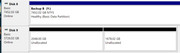
Image

An example of wiped drive.

Image

The new partition type is MS Reserved and the first partition is always 2048 in size and the second is the balance depending on the size of the drive.

The Seagate 8tb Ironwolf Pro was corrupted 3 times but boot record & partition table was able to be restored from backup by disk tester

Three times (out of seven) the Seagate 3TB Ironwolf (not Pro) had to be formatted and restored from back up as the as even thou DiskTest restored boot record & partition table successfully it seems to get wiped when the PC shuts down.

The backup partition table is not corrupt as I have used it 3 times to copy the files off the drive using DistkTest

Recovering and restoring the files from the wiped partition 4TB up is a 6-8 hour task and it is extremely frustrating that that I have now done it 3 times.

I have noticed that the Partition wipes may be cached by Windows 10 / 11 because if the drive was working in the previous boot powering down the TDAS and not using safely remove hardware seems to allow it to come back up after a cold boot of windows. The problem is I don’t realise the drives are wiped and shut down.

Note that I have write catching disabled for these drives.


What I have done to try and fix it the last week.

USB driver is has not changed since January when I recorded the version no but I noticed that there was a more recent INF file for win 11.

So upgraded to win 11 on Friday with a new Motherboard driver file and more recent USB driver hoping that would fix the issue
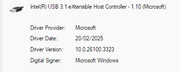
Image

Both drives wiped during the windows upgrade. And many reboots involved with

Only lost the 8TB drive once since the upgrade and once after the upgrade. Repaired Partition from backup successfully each time.

Lost the 4TB drive twice since the upgrade and once after the upgrade. Spent a lot of time Friday/Saturday recovering files and again today as I could not get repair to stick.

The last restoration about finished about an hour ago and on restarting the computer the drive was wiped again.

I was able to restore using TestDisk but on reboot it was still wiped.

However I powered off the TDAS with out shutting down the PC and pulled all the drives and moved them to different trays that they have not been in.


I do not know if changing the USB id made the difference or if the disconnect stopped windows from writing the empty partition data to the drives.

I wonder if the the the Windows Disk Manager may do something when it is closed and overwrite the partition and boot record edits that Testdisk had done when Disk Manager is closed if I left it open in the background? That could explain some of the Behaviour I have noticed.

I am going to make sure disk manager is not running before I use TestDisk in the future.


Update next day

I purchased another USB-C cable and tested it today.

Installed the cable and left the PC running today and lost the 8tb drive between 2-8 hours uptime.

Sleep is disabled and power setting is performance mode with 100% CPU

The Drive was being used for daily backup files by Macrium Reflect and it was completed by 9:30 am (started at 9am) about 2 hours after power on. So the drive was wiped and removed from file explorer after that time

Restored the boot record and partition table from the backup on the disk successfully.

When I restored previously under Windows 10 the drive will retain the Drive Letter previously assigned to it.

However under windows 11 the drive letter will not be remembered as will be assigned the first free letter and will have to be reassigned.

It is also assigned a new Drive GUID

It also breaks every one of my backup definitions as the GUID of the drive has changed. Yesterday after fixing all my backup scripts I thought it was a problem due to changing from windows 10 to windows 11

I now have to edit all 15 backup definition files and disable the use of GUID so it wont happen in the future. Thank god for search & replace in files.

This Christmas gift to myself has been a total lemon. It was supposed to be my JOBD array for bulk storage of rarely needed items. All I am using it for now is overflow for my backup software.

This has been a total waste of time with the all issues in January and the last two weeks. I was intending to just add more SATA ports to my computer but the my video card blocks the PCIe slot for the expansion card. With all the lost time and cost of the unit I would have been half way to paying for a new Mobo, CPU and Ram. I reckon I have spent about 40-70 hours trying to keep this running.
User avatar
TMzethar
TM Support
Posts: 2815
Joined: 27 Oct 2020, 16:43

Re: D6-320 corrupts HDD partitions after several hous of use

Post by TMzethar »

If your hard drive capacity exceeds 2TB, it is recommended to use the GPT format for disk partitioning instead of the MBR format. When creating a new volume, it is advisable to choose the NTFS file system to better ensure data storage and management stability and compatibility. Additionally, it is not recommended to use third-party software to create new volumes; instead, use the system's built-in disk management tool to avoid compatibility issues with the Windows operating system.

For the issue of duplicate device UIDs, it is recommended to try updating the device firmware to resolve it. The specific firmware update guide is as follows:

Preparation
Prepare a spare hard drive.
Ensure that the computer is running the Windows operating system, as the upgrade software is only compatible with the Windows system.
It is strongly recommended to back up the data on the device beforehand to ensure data security.
Before upgrading, disconnect all other devices connected to the USB ports of the Windows computer to avoid potential damage during the upgrade process.

Download the upgrade tool:
Download the MPTool_programme tool from
https://download3.terra-master.com/Docu ... 20Tool.zip

Firmware Update Steps
viewtopic.php?t=7111
To contact our team, please send email to following addresses, remember to replace (at) with @:
Technical team: support(at)terra-master.com (for technical support)
Service team: service(at)terra-master.com (for purchasing, return, replacement, RMA service)
User avatar
WonderDog
Posts: 8
Joined: 09 Jan 2025, 19:47
Australia

Re: D6-320 corrupts HDD partitions after several hous of use

Post by WonderDog »

Not solved but no longer being used.


All drives in my system are GPT.

I am not getting duplicate GUIDs.

Under windows 11 when I restore the broken partition a new GUID is assigned and it is added as new drive.

Under win 10 the restored partition will have the same GUID and windows will remember its drive letter and settings.

I assume this is an interaction of the Disk Repair Tool I am using and windows .


From my research of USB external partitions being changed to RAW and MS Reserved partitions is caused by power loss or disconnection during writes.

Power has not been the issue as the PC has not been powered off as what normally happens when we loose power and I have certainly not lost power over 20 times this year.


My problem only occurs when the the system is up for at least 6-8 hours but it can be weeks between failures as I think it only happens if the drive is doing writes when the TDAS is disconnected.


I this the issue probably the USB port. I have tried multiple USB-c cables.

I only have 1 USB-c port on my motherboard so I cannot try another port.


There are only 2 x USB3.2 gen2 and they are not part of the Z490 chipset. Windows device manager identifies it a Intel 3.1 eXtensible USB.

Code: Select all

1 x USB 3.2 Gen2 Type-A Port (10 Gb/s) (ReDriver) 
1 x USB 3.2 Gen2 Type-C Port (10 Gb/s) (ReDriver)
I am assuming that that there is something causing it to disconcert when it has been in operation for to long. It might be doing this quite often but there is no writes happening at the time.


I went to the DAS as I have run our of SATA ports and the video card is blocking the second PCIE x8/16 slot. My case can support 10 HDD but my motherboard an only support 6 and 2 are used for DVD burner & Blueray

However I just found a PCIE x 4, 4 port card that fits. It is old design but it works.

I will retire the unit until late this year when I will be upgrading my computer CPU/Mobo/RAM. I normally upgrade every 3-5 years.

I might also get USB bluray drive and ditch the burner as I have not burnt a DVD for a few years when I changed backups to use the cloud and hard disk drives.
User avatar
TMeric
TM Product Manager
Posts: 227
Joined: 03 Jul 2023, 11:01

Re: D6-320 corrupts HDD partitions after several hous of use

Post by TMeric »

Perhaps you can try reinitializing the drive after backing up your data and formatting it using the GPT partition style.
It is recommended to use Windows' built-in Disk Management tool to create an NTFS volume.

Additionally, you may try changing the USB cable and USB port, and if possible, test with a different hard drive.
This will help systematically rule out signal issues with the USB cable or problems with the hard drive itself.
To contact our team, please send email to following addresses, remember to replace (at) with @:

Technical team: support(at)terra-master.com(for technical support)
Service team: service(at)terra-master.com(for purchasing, return, replacement, RMA service)
User avatar
WonderDog
Posts: 8
Joined: 09 Jan 2025, 19:47
Australia

Re: D6-320 corrupts HDD partitions after several hous of use

Post by WonderDog »

All my drives are GPT and have been for about decade now. Changed with the previous PC upgrade with UEFI bios and Windows clean install. Was that fun migrating data from disk to disk to be formatted. That was when I got my first 3TB drive WD Black.

2 different HDD's have been reformatted for a total of 4 or 5 times in the past three months. I have lost partitions on 3 of 4 HDDS used in the TDAS

I have used both the Disk Manager and DiskPart command line tool. The Disk Part is better than Disk Manager for troubleshooting as it provides more detailed info.

It has been originally 4 HDD in the TDAS 2 HDD's with live data and 2 HDD's with backup sets.

I moved the data HDDs back into the pc case after retiring my oldest HDD and moving my 800GB music collection. That gave me 2 SATA for the two data drives to be installed in the case. This was back in January after the first week of use.

If I loses my backups I can rebuild them but if I lose both data drives and backups is am SOL

I previously discussed the the USB port I have purchased another other cables to test and it still failed after about 3 or 4 days. I only have 1 USB-c port on this motherboard so I cannot use another port. There is a another 3.2 gen2 port but I do not have a suitable cable.

I suspect that the seperate Intel chip for the 3.2 gen 2 USB is unstable connected long term to the TDAS or the driver is resetting/ reconnecting every few hours of uptime.

Its now been 3 days of all drives in my Case with a PCIe x4 interface card giving me 4 more ports for a total of 10 ports and no issues so far. The

TDAS is now in a box with my rest of my spares, hobby, junk & stuff.
User avatar
Carrot8697
Posts: 7
Joined: 15 May 2024, 00:22
Canada

Re: D6-320 corrupts HDD partitions after several hous of use

Post by Carrot8697 »

I have this problem show up consistently when using Stablebit DrivePool + Scanner. When the automatic scan runs, it corrupts the partition table and kicks the drive off of DrivePool. I have to restart the PC/DAS and then repair the partition table using dmde. No data is ever lost. Definitely something buggy with the UASP implementation (or Windows).

When I disable automatic scanning in Scanner, the problem never occurs again. Very consistent behavior, imo.
Post Reply

Return to “USB Series”