Page 2 of 2

Re: Update Docker Engine

Posted: 04 Dec 2024, 00:04
by fcs001fcs
fcs001fcs wrote: 03 Dec 2024, 23:56
TMeric wrote: 03 Dec 2024, 21:51
When I disable (uncheck) "Enable continuous resource monitoring", I get some data points on the graph.

I checked the storage location listed in the "Resource monitoring" settings and that file "system.db" does not exist. The DB that is listed in that directory is "resource-monitor.db". I think this may be the problem.

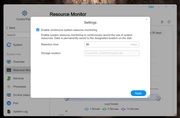
I do not have the ability in the GUI to change the "Storage location" as it is greyed-out for me. See attached screenshot.

TM: How do I set the correct "Storage location" in the "Resource monitoring" settings?


Image
Sorry wrong thread, I will post in correct thread.

Re: Update Docker Engine

Posted: 04 Dec 2024, 02:51
by DCCentR
TM, thanks for updating docker & docker compose. I hope Portainer app also be updated ;)

Meanwhile, I ran into the problem of running two containers after this update - qbittorrent-nox and paperless-ngx-webserver can't start properly anymore.

qbittorrent-nox has in logs:

Code: Select all

doas: /etc/doas.conf is not owned by root
paperless-ngx-webserver:

Code: Select all

                 ^^^^^^^^^^^^^^^^^^^^^^^^^^^^^^^^^^^^
  File "/usr/local/lib/python3.12/site-packages/psycopg/connection.py", line 119, in connect
    raise last_ex.with_traceback(None)
django.db.utils.OperationalError: connection failed: connection to server at "172.22.0.3", port 5432 failed: FATAL:  could not open file "global/pg_filenode.map": Permission denied
Paperless-ngx docker container starting...
Installing languages...
Package tesseract-ocr-rus already installed!
Creating directory scratch directory /tmp/paperless
Adjusting permissions of paperless files. This may take a while.
Waiting for PostgreSQL to start...
Connected to PostgreSQL
Waiting for Redis...
Connected to Redis broker.
Apply database migrations...
Traceback (most recent call last):
  File "/usr/local/lib/python3.12/site-packages/django/db/backends/base/base.py", line 279, in ensure_connection
    self.connect()
  File "/usr/local/lib/python3.12/site-packages/django/utils/asyncio.py", line 26, in inner
    return func(*args, **kwargs)
           ^^^^^^^^^^^^^^^^^^^^^
  File "/usr/local/lib/python3.12/site-packages/django/db/backends/base/base.py", line 256, in connect
    self.connection = self.get_new_connection(conn_params)
                      ^^^^^^^^^^^^^^^^^^^^^^^^^^^^^^^^^^^^
  File "/usr/local/lib/python3.12/site-packages/django/utils/asyncio.py", line 26, in inner
    return func(*args, **kwargs)
           ^^^^^^^^^^^^^^^^^^^^^
  File "/usr/local/lib/python3.12/site-packages/django/db/backends/postgresql/base.py", line 332, in get_new_connection
    connection = self.Database.connect(**conn_params)
                 ^^^^^^^^^^^^^^^^^^^^^^^^^^^^^^^^^^^^
  File "/usr/local/lib/python3.12/site-packages/psycopg/connection.py", line 119, in connect
    raise last_ex.with_traceback(None)
psycopg.OperationalError: connection failed: connection to server at "172.22.0.3", port 5432 failed: FATAL:  could not open file "global/pg_filenode.map": Permission denied
The above exception was the direct cause of the following exception:
Traceback (most recent call last):
  File "/usr/src/paperless/src/manage.py", line 10, in <module>
    execute_from_command_line(sys.argv)
  File "/usr/local/lib/python3.12/site-packages/django/core/management/__init__.py", line 442, in execute_from_command_line
    utility.execute()
  File "/usr/local/lib/python3.12/site-packages/django/core/management/__init__.py", line 436, in execute
    self.fetch_command(subcommand).run_from_argv(self.argv)
  File "/usr/local/lib/python3.12/site-packages/django/core/management/base.py", line 413, in run_from_argv
    self.execute(*args, **cmd_options)
  File "/usr/local/lib/python3.12/site-packages/django/core/management/base.py", line 459, in execute
    output = self.handle(*args, **options)
             ^^^^^^^^^^^^^^^^^^^^^^^^^^^^^
  File "/usr/local/lib/python3.12/site-packages/django/core/management/base.py", line 107, in wrapper
    res = handle_func(*args, **kwargs)
          ^^^^^^^^^^^^^^^^^^^^^^^^^^^^
  File "/usr/local/lib/python3.12/site-packages/django/core/management/commands/migrate.py", line 118, in handle
    executor = MigrationExecutor(connection, self.migration_progress_callback)
               ^^^^^^^^^^^^^^^^^^^^^^^^^^^^^^^^^^^^^^^^^^^^^^^^^^^^^^^^^^^^^^^
  File "/usr/local/lib/python3.12/site-packages/django/db/migrations/executor.py", line 18, in __init__
    self.loader = MigrationLoader(self.connection)
                  ^^^^^^^^^^^^^^^^^^^^^^^^^^^^^^^^
  File "/usr/local/lib/python3.12/site-packages/django/db/migrations/loader.py", line 58, in __init__
    self.build_graph()
  File "/usr/local/lib/python3.12/site-packages/django/db/migrations/loader.py", line 235, in build_graph
    self.applied_migrations = recorder.applied_migrations()
                              ^^^^^^^^^^^^^^^^^^^^^^^^^^^^^
  File "/usr/local/lib/python3.12/site-packages/django/db/migrations/recorder.py", line 89, in applied_migrations
    if self.has_table():
       ^^^^^^^^^^^^^^^^
  File "/usr/local/lib/python3.12/site-packages/django/db/migrations/recorder.py", line 63, in has_table
    with self.connection.cursor() as cursor:
         ^^^^^^^^^^^^^^^^^^^^^^^^
  File "/usr/local/lib/python3.12/site-packages/django/utils/asyncio.py", line 26, in inner
    return func(*args, **kwargs)
           ^^^^^^^^^^^^^^^^^^^^^
  File "/usr/local/lib/python3.12/site-packages/django/db/backends/base/base.py", line 320, in cursor
    return self._cursor()
           ^^^^^^^^^^^^^^
  File "/usr/local/lib/python3.12/site-packages/django/db/backends/base/base.py", line 296, in _cursor
    self.ensure_connection()
  File "/usr/local/lib/python3.12/site-packages/django/utils/asyncio.py", line 26, in inner
    return func(*args, **kwargs)
           ^^^^^^^^^^^^^^^^^^^^^
  File "/usr/local/lib/python3.12/site-packages/django/db/backends/base/base.py", line 278, in ensure_connection
    with self.wrap_database_errors:
         ^^^^^^^^^^^^^^^^^^^^^^^^^
  File "/usr/local/lib/python3.12/site-packages/django/db/utils.py", line 91, in __exit__
    raise dj_exc_value.with_traceback(traceback) from exc_value
  File "/usr/local/lib/python3.12/site-packages/django/db/backends/base/base.py", line 279, in ensure_connection
    self.connect()
  File "/usr/local/lib/python3.12/site-packages/django/utils/asyncio.py", line 26, in inner
    return func(*args, **kwargs)
           ^^^^^^^^^^^^^^^^^^^^^
  File "/usr/local/lib/python3.12/site-packages/django/db/backends/base/base.py", line 256, in connect
    self.connection = self.get_new_connection(conn_params)
                      ^^^^^^^^^^^^^^^^^^^^^^^^^^^^^^^^^^^^
  File "/usr/local/lib/python3.12/site-packages/django/utils/asyncio.py", line 26, in inner
    return func(*args, **kwargs)
           ^^^^^^^^^^^^^^^^^^^^^
  File "/usr/local/lib/python3.12/site-packages/django/db/backends/postgresql/base.py", line 332, in get_new_connection
    connection = self.Database.connect(**conn_params)
                 ^^^^^^^^^^^^^^^^^^^^^^^^^^^^^^^^^^^^
  File "/usr/local/lib/python3.12/site-packages/psycopg/connection.py", line 119, in connect
    raise last_ex.with_traceback(None)
django.db.utils.OperationalError: connection failed: connection to server at "172.22.0.3", port 5432 failed: FATAL:  could not open file "global/pg_filenode.map": Permission denied

Re: Update Docker Engine

Posted: 04 Dec 2024, 03:18
by DCCentR
Other containers of paperless-ngx also throw errors in logs:

paperless-ngx-broker

Code: Select all

1:C 03 Dec 2024 19:01:57.589 # WARNING Memory overcommit must be enabled! Without it, a background save or replication may fail under low memory condition. Being disabled, it can also cause failures without low memory condition, see https://github.com/jemalloc/jemalloc/issues/1328. To fix this issue add 'vm.overcommit_memory = 1' to /etc/sysctl.conf and then reboot or run the command 'sysctl vm.overcommit_memory=1' for this to take effect.
1:C 03 Dec 2024 19:01:57.589 * oO0OoO0OoO0Oo Redis is starting oO0OoO0OoO0Oo
1:C 03 Dec 2024 19:01:57.589 * Redis version=7.4.1, bits=64, commit=00000000, modified=0, pid=1, just started
1:C 03 Dec 2024 19:01:57.589 # Warning: no config file specified, using the default config. In order to specify a config file use redis-server /path/to/redis.conf
1:M 03 Dec 2024 19:01:57.589 * monotonic clock: POSIX clock_gettime
1:M 03 Dec 2024 19:01:57.590 * Running mode=standalone, port=6379.
1:M 03 Dec 2024 19:01:57.590 * Server initialized
1:M 03 Dec 2024 19:01:57.590 * Loading RDB produced by version 7.4.1
1:M 03 Dec 2024 19:01:57.590 * RDB age 34 seconds
1:M 03 Dec 2024 19:01:57.590 * RDB memory usage when created 0.95 Mb
1:M 03 Dec 2024 19:01:57.590 * Done loading RDB, keys loaded: 1, keys expired: 0.
1:M 03 Dec 2024 19:01:57.590 * DB loaded from disk: 0.000 seconds
1:M 03 Dec 2024 19:01:57.590 * Ready to accept connections tcp
1:signal-handler (1733252821) Received SIGTERM scheduling shutdown...
1:M 03 Dec 2024 19:07:02.039 * User requested shutdown...
1:M 03 Dec 2024 19:07:02.039 * Saving the final RDB snapshot before exiting.
1:M 03 Dec 2024 19:07:02.039 # Failed opening the temp RDB file temp-1.rdb (in server root dir /data) for saving: Permission denied
1:M 03 Dec 2024 19:07:02.039 # Error trying to save the DB, can't exit.
1:M 03 Dec 2024 19:07:02.039 # Errors trying to shut down the server. Check the logs for more information.
1:C 03 Dec 2024 19:10:01.300 # WARNING Memory overcommit must be enabled! Without it, a background save or replication may fail under low memory condition. Being disabled, it can also cause failures without low memory condition, see https://github.com/jemalloc/jemalloc/issues/1328. To fix this issue add 'vm.overcommit_memory = 1' to /etc/sysctl.conf and then reboot or run the command 'sysctl vm.overcommit_memory=1' for this to take effect.
1:C 03 Dec 2024 19:10:01.300 * oO0OoO0OoO0Oo Redis is starting oO0OoO0OoO0Oo
1:C 03 Dec 2024 19:10:01.300 * Redis version=7.4.1, bits=64, commit=00000000, modified=0, pid=1, just started
1:C 03 Dec 2024 19:10:01.300 # Warning: no config file specified, using the default config. In order to specify a config file use redis-server /path/to/redis.conf
1:M 03 Dec 2024 19:10:01.300 * monotonic clock: POSIX clock_gettime
1:M 03 Dec 2024 19:10:01.300 * Running mode=standalone, port=6379.
1:M 03 Dec 2024 19:10:01.301 * Server initialized
1:M 03 Dec 2024 19:10:01.301 * Loading RDB produced by version 7.4.1
1:M 03 Dec 2024 19:10:01.301 * RDB age 518 seconds
1:M 03 Dec 2024 19:10:01.301 * RDB memory usage when created 0.95 Mb
1:M 03 Dec 2024 19:10:01.301 * Done loading RDB, keys loaded: 1, keys expired: 0.
1:M 03 Dec 2024 19:10:01.301 * DB loaded from disk: 0.000 seconds
1:M 03 Dec 2024 19:10:01.301 * Ready to accept connections tcp
paperless-ngx-db

Code: Select all

PostgreSQL Database directory appears to contain a database; Skipping initialization
2024-12-03 19:01:57.660 UTC [1] LOG:  starting PostgreSQL 16.6 (Debian 16.6-1.pgdg120+1) on x86_64-pc-linux-gnu, compiled by gcc (Debian 12.2.0-14) 12.2.0, 64-bit
2024-12-03 19:01:57.660 UTC [1] LOG:  listening on IPv4 address "0.0.0.0", port 5432
2024-12-03 19:01:57.660 UTC [1] LOG:  listening on IPv6 address "::", port 5432
2024-12-03 19:01:57.673 UTC [1] LOG:  listening on Unix socket "/var/run/postgresql/.s.PGSQL.5432"
2024-12-03 19:01:57.687 UTC [29] LOG:  database system was shut down at 2024-12-03 19:01:23 UTC
2024-12-03 19:01:57.700 UTC [1] LOG:  database system is ready to accept connections
2024-12-03 19:03:57.766 UTC [1] LOG:  could not open file "postmaster.pid": Permission denied; continuing anyway
2024-12-03 19:03:57.791 UTC [64] FATAL:  could not open file "global/pg_filenode.map": Permission denied
2024-12-03 19:04:57.841 UTC [1] LOG:  could not open file "postmaster.pid": Permission denied; continuing anyway
2024-12-03 19:04:57.842 UTC [65] FATAL:  could not open file "global/pg_filenode.map": Permission denied
2024-12-03 19:05:00.008 UTC [66] FATAL:  could not open file "global/pg_filenode.map": Permission denied
2024-12-03 19:05:00.025 UTC [67] FATAL:  could not open file "global/pg_filenode.map": Permission denied
2024-12-03 19:05:00.027 UTC [68] FATAL:  could not open file "global/pg_filenode.map": Permission denied
2024-12-03 19:05:00.029 UTC [69] FATAL:  could not open file "global/pg_filenode.map": Permission denied
2024-12-03 19:05:00.031 UTC [70] FATAL:  could not open file "global/pg_filenode.map": Permission denied
2024-12-03 19:05:00.045 UTC [71] FATAL:  could not open file "global/pg_filenode.map": Permission denied
2024-12-03 19:05:00.047 UTC [72] FATAL:  could not open file "global/pg_filenode.map": Permission denied
2024-12-03 19:05:00.048 UTC [73] FATAL:  could not open file "global/pg_filenode.map": Permission denied
2024-12-03 19:05:00.059 UTC [74] FATAL:  could not open file "global/pg_filenode.map": Permission denied
2024-12-03 19:05:00.061 UTC [75] FATAL:  could not open file "global/pg_filenode.map": Permission denied
2024-12-03 19:05:00.063 UTC [76] FATAL:  could not open file "global/pg_filenode.map": Permission denied
2024-12-03 19:05:57.900 UTC [1] LOG:  could not open file "postmaster.pid": Permission denied; continuing anyway
2024-12-03 19:05:57.901 UTC [77] FATAL:  could not open file "global/pg_filenode.map": Permission denied
2024-12-03 19:06:57.787 UTC [27] LOG:  checkpoint starting: time
2024-12-03 19:06:57.787 UTC [27] ERROR:  could not open directory "pg_logical/snapshots": Permission denied
2024-12-03 19:06:57.931 UTC [1] LOG:  could not open file "postmaster.pid": Permission denied; continuing anyway
2024-12-03 19:06:57.932 UTC [78] FATAL:  could not open file "global/pg_filenode.map": Permission denied
2024-12-03 19:06:58.787 UTC [27] LOG:  checkpoint starting: time
2024-12-03 19:06:58.787 UTC [27] ERROR:  could not open directory "pg_logical/snapshots": Permission denied
2024-12-03 19:06:59.788 UTC [27] LOG:  checkpoint starting: time
2024-12-03 19:06:59.788 UTC [27] ERROR:  could not open directory "pg_logical/snapshots": Permission denied
2024-12-03 19:07:00.788 UTC [27] LOG:  checkpoint starting: time
2024-12-03 19:07:00.788 UTC [27] ERROR:  could not open directory "pg_logical/snapshots": Permission denied
2024-12-03 19:07:01.414 UTC [1] LOG:  received fast shutdown request
2024-12-03 19:07:01.414 UTC [1] LOG:  could not open file "postmaster.pid": Permission denied
2024-12-03 19:07:01.414 UTC [1] LOG:  aborting any active transactions
2024-12-03 19:07:01.416 UTC [1] LOG:  background worker "logical replication launcher" (PID 32) exited with exit code 1
2024-12-03 19:07:01.788 UTC [27] LOG:  shutting down
2024-12-03 19:07:01.788 UTC [27] PANIC:  could not open file "/var/lib/postgresql/data/global/pg_control": Permission denied
2024-12-03 19:07:01.788 UTC [1] LOG:  checkpointer process (PID 27) was terminated by signal 6: Aborted
2024-12-03 19:07:01.788 UTC [1] LOG:  terminating any other active server processes
2024-12-03 19:07:01.788 UTC [1] LOG:  abnormal database system shutdown
2024-12-03 19:07:01.790 UTC [1] LOG:  database system is shut down
PostgreSQL Database directory appears to contain a database; Skipping initialization
2024-12-03 19:10:00.921 UTC [1] LOG:  starting PostgreSQL 16.6 (Debian 16.6-1.pgdg120+1) on x86_64-pc-linux-gnu, compiled by gcc (Debian 12.2.0-14) 12.2.0, 64-bit
2024-12-03 19:10:00.921 UTC [1] LOG:  listening on IPv4 address "0.0.0.0", port 5432
2024-12-03 19:10:00.921 UTC [1] LOG:  listening on IPv6 address "::", port 5432
2024-12-03 19:10:00.941 UTC [1] LOG:  listening on Unix socket "/var/run/postgresql/.s.PGSQL.5432"
2024-12-03 19:10:00.966 UTC [30] LOG:  database system was interrupted; last known up at 2024-12-03 19:01:57 UTC
2024-12-03 19:10:01.138 UTC [31] FATAL:  the database system is starting up
2024-12-03 19:10:03.262 UTC [32] FATAL:  the database system is starting up
2024-12-03 19:10:04.219 UTC [33] FATAL:  the database system is starting up
2024-12-03 19:10:04.873 UTC [30] LOG:  could not open directory "./base/5": Permission denied
2024-12-03 19:10:04.874 UTC [30] LOG:  could not open directory "./pg_replslot": Permission denied
2024-12-03 19:10:04.874 UTC [30] LOG:  could not open directory "./pg_tblspc": Permission denied
2024-12-03 19:10:04.874 UTC [30] LOG:  could not open directory "./pg_stat": Permission denied
2024-12-03 19:10:04.874 UTC [30] LOG:  could not open directory "./pg_stat_tmp": Permission denied
2024-12-03 19:10:04.874 UTC [30] LOG:  could not open directory "./pg_xact": Permission denied
2024-12-03 19:10:04.874 UTC [30] LOG:  could not open directory "./pg_logical": Permission denied
2024-12-03 19:10:04.874 UTC [30] LOG:  could not open directory "pg_tblspc": Permission denied
2024-12-03 19:10:04.874 UTC [30] FATAL:  could not read file "backup_label": Permission denied
2024-12-03 19:10:04.875 UTC [1] LOG:  startup process (PID 30) exited with exit code 1
2024-12-03 19:10:04.875 UTC [1] LOG:  aborting startup due to startup process failure
2024-12-03 19:10:04.876 UTC [1] LOG:  database system is shut down
PostgreSQL Database directory appears to contain a database; Skipping initialization
2024-12-03 19:10:05.502 UTC [1] LOG:  starting PostgreSQL 16.6 (Debian 16.6-1.pgdg120+1) on x86_64-pc-linux-gnu, compiled by gcc (Debian 12.2.0-14) 12.2.0, 64-bit
2024-12-03 19:10:05.502 UTC [1] LOG:  listening on IPv4 address "0.0.0.0", port 5432
2024-12-03 19:10:05.502 UTC [1] LOG:  listening on IPv6 address "::", port 5432
2024-12-03 19:10:05.515 UTC [1] LOG:  listening on Unix socket "/var/run/postgresql/.s.PGSQL.5432"
2024-12-03 19:10:05.529 UTC [30] LOG:  database system was interrupted; last known up at 2024-12-03 19:01:57 UTC
2024-12-03 19:10:06.447 UTC [31] FATAL:  the database system is starting up
2024-12-03 19:10:07.381 UTC [32] FATAL:  the database system is starting up
2024-12-03 19:10:09.492 UTC [33] FATAL:  the database system is starting up
2024-12-03 19:10:10.574 UTC [34] FATAL:  the database system is starting up
2024-12-03 19:10:12.666 UTC [35] FATAL:  the database system is starting up
2024-12-03 19:10:14.149 UTC [36] FATAL:  the database system is starting up
2024-12-03 19:10:15.537 UTC [30] LOG:  syncing data directory (fsync), elapsed time: 10.00 s, current path: ./base/16384/16854
2024-12-03 19:10:16.250 UTC [37] FATAL:  the database system is starting up
2024-12-03 19:10:17.683 UTC [30] LOG:  database system was not properly shut down; automatic recovery in progress
2024-12-03 19:10:17.690 UTC [30] LOG:  redo starts at 0/4FADCC0
2024-12-03 19:10:17.690 UTC [30] LOG:  invalid record length at 0/4FB91D8: expected at least 24, got 0
2024-12-03 19:10:17.690 UTC [30] LOG:  redo done at 0/4FB91A0 system usage: CPU: user: 0.00 s, system: 0.00 s, elapsed: 0.00 s
2024-12-03 19:10:17.703 UTC [28] LOG:  checkpoint starting: end-of-recovery immediate wait
2024-12-03 19:10:17.816 UTC [28] LOG:  checkpoint complete: wrote 14 buffers (0.1%); 0 WAL file(s) added, 0 removed, 0 recycled; write=0.001 s, sync=0.081 s, total=0.120 s; sync files=13, longest=0.007 s, average=0.007 s; distance=45 kB, estimate=45 kB; lsn=0/4FB91D8, redo lsn=0/4FB91D8
2024-12-03 19:10:17.825 UTC [1] LOG:  database system is ready to accept connections
2024-12-03 19:11:17.832 UTC [1] LOG:  could not open file "postmaster.pid": Permission denied; continuing anyway
2024-12-03 19:11:17.833 UTC [51] FATAL:  could not open file "global/pg_filenode.map": Permission denied
The Stack's of my containers with these problems:

paperless-ngx

Code: Select all

services:
  broker:
    image: docker.io/library/redis:7
    restart: always
    volumes:
      - /Volume1/Data_1/docker/redis:/data

  db:
    image: docker.io/library/postgres:16
    restart: always
    volumes:
      - /Volume1/Data_1/docker/postgres:/var/lib/postgresql/data
    environment:
      POSTGRES_DB: paperless
      POSTGRES_USER: paperless
      POSTGRES_PASSWORD: paperless

  webserver:
    image: ghcr.io/paperless-ngx/paperless-ngx:latest
    restart: always
    depends_on:
      - db
      - broker
    ports:
      - "8010:8000"
    volumes:
      - /Volume1/Data_1/docker/paperless-ngx/data:/usr/src/paperless/data
      - /Volume1/Data_1/docker/paperless-ngx/media:/usr/src/paperless/media
      - /Volume1/Data_1/docker/paperless-ngx/export:/usr/src/paperless/export
      - /Volume1/Data_1/docker/paperless-ngx/consume:/usr/src/paperless/consume
    environment:
      PAPERLESS_REDIS: redis://broker:6379
      PAPERLESS_DBHOST: db
      PAPERLESS_ADMIN_USER: admin
      PAPERLESS_ADMIN_PASSWORD: 1991
      PAPERLESS_SECRET_KEY: aM.i(8xTMc*<sZbyGsNO,^Mcr~d`LC
      PAPERLESS_OCR_LANGUAGES: rus
      PAPERLESS_TIME_ZONE: Europe/Moscow
      USERMAP_UID: 0
      USERMAP_GID: 0

volumes:
  data:
  media:
  pgdata:
  redisdata:
qbittorrent-nox

Code: Select all

services:
  qbittorrent-nox:
    # for debugging
    #cap_add:
      #- SYS_PTRACE
    container_name: qbittorrent-nox
    restart: always
    environment:
      #- PAGID=10000
      - PGID=0
      - PUID=0
      - QBT_LEGAL_NOTICE=confirm
      - QBT_VERSION=latest
      - QBT_WEBUI_PORT=8080
      - TZ=Europe/Moscow
      #- UMASK=022
    image: qbittorrentofficial/qbittorrent-nox:latest
    ports:
      # for bittorrent traffic
      - 6881:6881/tcp
      - 6881:6881/udp
      # for WebUI
      - 8080:8080/tcp
    read_only: false
    stop_grace_period: 30m
    tmpfs:
      - /tmp
    tty: true
    volumes:
      - /Volume1/Data_1/docker:/config
      - /Volume2/Data_2/downloads:/downloads
Re-pull image and redeploy thru stack's didn't help.

Re: Update Docker Engine

Posted: 04 Dec 2024, 03:41
by bugacha
DCCentR wrote: 04 Dec 2024, 02:51 TM, thanks for updating docker & docker compose. I hope Portainer app also be updated ;)

Meanwhile, I ran into the problem of running two containers after this update - qbittorrent-nox and paperless-ngx-webserver can't start properly anymore.

qbittorrent-nox has in logs:
I use this qbitorrent image

Code: Select all

services:
  qbittorrent:
    image: lscr.io/linuxserver/qbittorrent:latest
and it works perfectly fine

Re: Update Docker Engine

Posted: 04 Dec 2024, 17:35
by DCCentR
DCCentR wrote: 04 Dec 2024, 02:51 TM, thanks for updating docker & docker compose. I hope Portainer app also be updated ;)

Meanwhile, I ran into the problem of running two containers after this update - qbittorrent-nox and paperless-ngx-webserver can't start properly anymore.

qbittorrent-nox has in logs:

Code: Select all

doas: /etc/doas.conf is not owned by root
paperless-ngx-webserver:

Code: Select all

                 ^^^^^^^^^^^^^^^^^^^^^^^^^^^^^^^^^^^^
  File "/usr/local/lib/python3.12/site-packages/psycopg/connection.py", line 119, in connect
    raise last_ex.with_traceback(None)
django.db.utils.OperationalError: connection failed: connection to server at "172.22.0.3", port 5432 failed: FATAL:  could not open file "global/pg_filenode.map": Permission denied
Paperless-ngx docker container starting...
Installing languages...
Package tesseract-ocr-rus already installed!
Creating directory scratch directory /tmp/paperless
Adjusting permissions of paperless files. This may take a while.
Waiting for PostgreSQL to start...
Connected to PostgreSQL
Waiting for Redis...
Connected to Redis broker.
Apply database migrations...
Traceback (most recent call last):
  File "/usr/local/lib/python3.12/site-packages/django/db/backends/base/base.py", line 279, in ensure_connection
    self.connect()
  File "/usr/local/lib/python3.12/site-packages/django/utils/asyncio.py", line 26, in inner
    return func(*args, **kwargs)
           ^^^^^^^^^^^^^^^^^^^^^
  File "/usr/local/lib/python3.12/site-packages/django/db/backends/base/base.py", line 256, in connect
    self.connection = self.get_new_connection(conn_params)
                      ^^^^^^^^^^^^^^^^^^^^^^^^^^^^^^^^^^^^
  File "/usr/local/lib/python3.12/site-packages/django/utils/asyncio.py", line 26, in inner
    return func(*args, **kwargs)
           ^^^^^^^^^^^^^^^^^^^^^
  File "/usr/local/lib/python3.12/site-packages/django/db/backends/postgresql/base.py", line 332, in get_new_connection
    connection = self.Database.connect(**conn_params)
                 ^^^^^^^^^^^^^^^^^^^^^^^^^^^^^^^^^^^^
  File "/usr/local/lib/python3.12/site-packages/psycopg/connection.py", line 119, in connect
    raise last_ex.with_traceback(None)
psycopg.OperationalError: connection failed: connection to server at "172.22.0.3", port 5432 failed: FATAL:  could not open file "global/pg_filenode.map": Permission denied
The above exception was the direct cause of the following exception:
Traceback (most recent call last):
  File "/usr/src/paperless/src/manage.py", line 10, in <module>
    execute_from_command_line(sys.argv)
  File "/usr/local/lib/python3.12/site-packages/django/core/management/__init__.py", line 442, in execute_from_command_line
    utility.execute()
  File "/usr/local/lib/python3.12/site-packages/django/core/management/__init__.py", line 436, in execute
    self.fetch_command(subcommand).run_from_argv(self.argv)
  File "/usr/local/lib/python3.12/site-packages/django/core/management/base.py", line 413, in run_from_argv
    self.execute(*args, **cmd_options)
  File "/usr/local/lib/python3.12/site-packages/django/core/management/base.py", line 459, in execute
    output = self.handle(*args, **options)
             ^^^^^^^^^^^^^^^^^^^^^^^^^^^^^
  File "/usr/local/lib/python3.12/site-packages/django/core/management/base.py", line 107, in wrapper
    res = handle_func(*args, **kwargs)
          ^^^^^^^^^^^^^^^^^^^^^^^^^^^^
  File "/usr/local/lib/python3.12/site-packages/django/core/management/commands/migrate.py", line 118, in handle
    executor = MigrationExecutor(connection, self.migration_progress_callback)
               ^^^^^^^^^^^^^^^^^^^^^^^^^^^^^^^^^^^^^^^^^^^^^^^^^^^^^^^^^^^^^^^
  File "/usr/local/lib/python3.12/site-packages/django/db/migrations/executor.py", line 18, in __init__
    self.loader = MigrationLoader(self.connection)
                  ^^^^^^^^^^^^^^^^^^^^^^^^^^^^^^^^
  File "/usr/local/lib/python3.12/site-packages/django/db/migrations/loader.py", line 58, in __init__
    self.build_graph()
  File "/usr/local/lib/python3.12/site-packages/django/db/migrations/loader.py", line 235, in build_graph
    self.applied_migrations = recorder.applied_migrations()
                              ^^^^^^^^^^^^^^^^^^^^^^^^^^^^^
  File "/usr/local/lib/python3.12/site-packages/django/db/migrations/recorder.py", line 89, in applied_migrations
    if self.has_table():
       ^^^^^^^^^^^^^^^^
  File "/usr/local/lib/python3.12/site-packages/django/db/migrations/recorder.py", line 63, in has_table
    with self.connection.cursor() as cursor:
         ^^^^^^^^^^^^^^^^^^^^^^^^
  File "/usr/local/lib/python3.12/site-packages/django/utils/asyncio.py", line 26, in inner
    return func(*args, **kwargs)
           ^^^^^^^^^^^^^^^^^^^^^
  File "/usr/local/lib/python3.12/site-packages/django/db/backends/base/base.py", line 320, in cursor
    return self._cursor()
           ^^^^^^^^^^^^^^
  File "/usr/local/lib/python3.12/site-packages/django/db/backends/base/base.py", line 296, in _cursor
    self.ensure_connection()
  File "/usr/local/lib/python3.12/site-packages/django/utils/asyncio.py", line 26, in inner
    return func(*args, **kwargs)
           ^^^^^^^^^^^^^^^^^^^^^
  File "/usr/local/lib/python3.12/site-packages/django/db/backends/base/base.py", line 278, in ensure_connection
    with self.wrap_database_errors:
         ^^^^^^^^^^^^^^^^^^^^^^^^^
  File "/usr/local/lib/python3.12/site-packages/django/db/utils.py", line 91, in __exit__
    raise dj_exc_value.with_traceback(traceback) from exc_value
  File "/usr/local/lib/python3.12/site-packages/django/db/backends/base/base.py", line 279, in ensure_connection
    self.connect()
  File "/usr/local/lib/python3.12/site-packages/django/utils/asyncio.py", line 26, in inner
    return func(*args, **kwargs)
           ^^^^^^^^^^^^^^^^^^^^^
  File "/usr/local/lib/python3.12/site-packages/django/db/backends/base/base.py", line 256, in connect
    self.connection = self.get_new_connection(conn_params)
                      ^^^^^^^^^^^^^^^^^^^^^^^^^^^^^^^^^^^^
  File "/usr/local/lib/python3.12/site-packages/django/utils/asyncio.py", line 26, in inner
    return func(*args, **kwargs)
           ^^^^^^^^^^^^^^^^^^^^^
  File "/usr/local/lib/python3.12/site-packages/django/db/backends/postgresql/base.py", line 332, in get_new_connection
    connection = self.Database.connect(**conn_params)
                 ^^^^^^^^^^^^^^^^^^^^^^^^^^^^^^^^^^^^
  File "/usr/local/lib/python3.12/site-packages/psycopg/connection.py", line 119, in connect
    raise last_ex.with_traceback(None)
django.db.utils.OperationalError: connection failed: connection to server at "172.22.0.3", port 5432 failed: FATAL:  could not open file "global/pg_filenode.map": Permission denied
Solved this problem by deleting the containers and their images. After re-deploying from Stacks, they all started working without any errors

bugacha wrote: 04 Dec 2024, 03:41
DCCentR wrote: 04 Dec 2024, 02:51 TM, thanks for updating docker & docker compose. I hope Portainer app also be updated ;)

Meanwhile, I ran into the problem of running two containers after this update - qbittorrent-nox and paperless-ngx-webserver can't start properly anymore.

qbittorrent-nox has in logs:
I use this qbitorrent image

Code: Select all

services:
  qbittorrent:
    image: lscr.io/linuxserver/qbittorrent:latest
and it works perfectly fine
Thanks, but I prefer to use official containers where possible

Re: Update Docker Engine

Posted: 28 Dec 2024, 19:11
by hindsight
Hi TM team, is it possible to get an updated version of Docker Engine on TOS 5.1?
TOS 5.1.145, Docker Engine version in the App Center = 20.10.17.

Re: Update Docker Engine

Posted: 06 Feb 2025, 17:04
by Alby87
hindsight wrote: 28 Dec 2024, 19:11 Hi TM team, is it possible to get an updated version of Docker Engine on TOS 5.1?
TOS 5.1.145, Docker Engine version in the App Center = 20.10.17.
Yes please, we are stuck with TOS 5.1 because F4-421, can't update images anymore!

Re: Update Docker Engine

Posted: 06 Feb 2025, 17:07
by Nullbrawl
hindsight wrote: 28 Dec 2024, 19:11 Hi TM team, is it possible to get an updated version of Docker Engine on TOS 5.1?
TOS 5.1.145, Docker Engine version in the App Center = 20.10.17.
It would be great to have an updated docker engine version on TOS 5.1! It is expected that the TM team may soon provide an upgradation.