How to install NextCloud  [SOLVED]

Discussion about Docker
User avatar
makhai
Posts: 23
Joined: 18 Jul 2024, 23:08
France

Re: How to install NextCloud

Post by makhai »

If I can help anyone, here's my working configuration file
(It's deprecated with recent version of docker compose, but you may need to add version on top of the file)

Code: Select all

services:
  db:
    image: mariadb:11
    restart: always
    command: --transaction-isolation=READ-COMMITTED --log-bin=binlog --binlog-format=ROW
    volumes:
      - db:/var/lib/mysql
    environment:
      - MYSQL_ROOT_PASSWORD=GIGA_SECRET_HAHA
      - MYSQL_DATABASE=RANDOM_BASE
      - MYSQL_USER=RANDOM_USER
      - MYSQL_PASSWORD=BIG_SECRET
  app:
    image: nextcloud:29
    depends_on:
      - db
    restart: always
    ports:
      - 8082:80
    links:
      - db
    volumes:
      - nextcloud:/var/www/html
    environment:
      - MYSQL_HOST=db
      - MYSQL_DATABASE=RANDOM_BASE
      - MYSQL_USER=RANDOM_USER
      - MYSQL_PASSWORD=BIG_SECRET
      - OVERWRITECLIURL=https://my-amesome-domain-name.com
      - OVERWRITEPROTOCOL=https

volumes:
  nextcloud:
  db:
User avatar
SquarePeg
Posts: 70
Joined: 11 Jun 2021, 19:28
Wales

Re: How to install NextCloud

Post by SquarePeg »

makhai wrote: 24 Aug 2024, 00:02 If I can help anyone, here's my working configuration file
(It's deprecated with recent version of docker compose, but you may need to add version on top of the file)

Code: Select all

services:
  db:
    image: mariadb:11
    restart: always
    command: --transaction-isolation=READ-COMMITTED --log-bin=binlog --binlog-format=ROW
    volumes:
      - db:/var/lib/mysql
    environment:
      - MYSQL_ROOT_PASSWORD=GIGA_SECRET_HAHA
      - MYSQL_DATABASE=RANDOM_BASE
      - MYSQL_USER=RANDOM_USER
      - MYSQL_PASSWORD=BIG_SECRET
  app:
    image: nextcloud:29
    depends_on:
      - db
    restart: always
    ports:
      - 8082:80
    links:
      - db
    volumes:
      - nextcloud:/var/www/html
    environment:
      - MYSQL_HOST=db
      - MYSQL_DATABASE=RANDOM_BASE
      - MYSQL_USER=RANDOM_USER
      - MYSQL_PASSWORD=BIG_SECRET
      - OVERWRITECLIURL=https://my-amesome-domain-name.com
      - OVERWRITEPROTOCOL=https

volumes:
  nextcloud:
  db:
Thanks, I don't actually know how to use this file though - I've installed docker from the app store and that's about it
User avatar
makhai
Posts: 23
Joined: 18 Jul 2024, 23:08
France

Re: How to install NextCloud

Post by makhai »

First you need docker engine and docker manager.
You can also install portainer, it may help later.

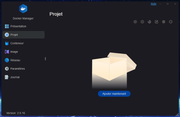
In docker manager you can create a project
Image

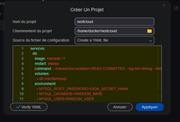
Then fill the fields like this.
You can locale it where you want.
Image

And copy/paste le conf file
WARNING :
- Use this version, the one I post before will require reverse proxy.
- Modify MYSQL parameters for better security, I give examples.
- Use your NAS IP with "OVERWRITECLIURL"

Code: Select all

services:  # List of software to be parameterized
  db:  # Database to store users and datas
    image: mariadb:10.6  # Version without bug. V11 don't work well
    restart: always  # will start with docker engine... if docker engine starts lol (TOS bug)
    command: --transaction-isolation=READ-COMMITTED --log-bin=binlog --binlog-format=ROW # IDK
    volumes:	# links between NAS files and container files
      - db:/var/lib/mysql
    environment:	# variables for database access
      - MYSQL_ROOT_PASSWORD=GIGA_SECRET_HAHA
      - MYSQL_DATABASE=RANDOM_BASE
      - MYSQL_USER=RANDOM_USER
      - MYSQL_PASSWORD=BIG_SECRET
  app:	# nextcloud app that will use the database
    image: nextcloud:29
    depends_on:	# will wait database before build
      - db
    restart: always
    ports:	# will be available on http://x.x.x.x:8082
      - 8082:80
    links:	# connected to database
      - db
    volumes:
      - nextcloud:/var/www/html
    environment:
      - MYSQL_HOST=localhost:3306
      - MYSQL_DATABASE=RANDOM_BASE
      - MYSQL_USER=RANDOM_USER
      - MYSQL_PASSWORD=BIG_SECRET
      - OVERWRITECLIURL=http://192.168.x.xx 	# IP TO COMPLETE
#      - OVERWRITEPROTOCOL=https	# ONLY IF YOU HAVE HTTPS

volumes:
  nextcloud:
  db:
  
Use "Verify YAML" for check syntax. If you don't, you can't create project.
And apply.

Wait a minute, then try to reach your ip and the port (8082 in my example)
Like "http://192.168.1.15:8082"

Create your admin user and enjoy
User avatar
pirata1906
Posts: 1
Joined: 04 Aug 2024, 23:21
Portugal

Re: How to install NextCloud

Post by pirata1906 »

hello
I'm also lost on how to install nextcloud using mariadb and how to acess nextcloud over the internet. total newbie here with a terramaster F4-424
User avatar
makhai
Posts: 23
Joined: 18 Jul 2024, 23:08
France

Re: How to install NextCloud

Post by makhai »

pirata1906 wrote: 29 Aug 2024, 01:13
Hi !
Did you follow my previous post step by step ?

Please tell me if something is unclear so I can improve it.
User avatar
makhai
Posts: 23
Joined: 18 Jul 2024, 23:08
France

Re: How to install NextCloud

Post by makhai »

However, unless you have specific needs, I suggest using the Nextcloud app provided by TOS store
User avatar
SquarePeg
Posts: 70
Joined: 11 Jun 2021, 19:28
Wales

Re: How to install NextCloud

Post by SquarePeg »

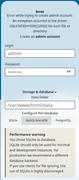
Hi, I'm sorry I haven't had much time to experiment. I have tried altering a few settings but it keeps failing. I have attached my current yaml config - I basically kept most of your settings to make sure it works but I keep getting the following error
Image

I've attached the YAML file I'm using, I'm not sure where I'm going wrong

Code: Select all

services:  # List of software to be parameterized
  db:  # Database to store users and datas
    image: mariadb:10.6  # Version without bug. V11 don't work well
    restart: always  # will start with docker engine... if docker engine starts lol (TOS bug)
    command: --transaction-isolation=READ-COMMITTED --log-bin=binlog --binlog-format=ROW # IDK
    volumes:	# links between NAS files and container files
      - db:/Volume1/public/docker/mariadb
    environment:	# variables for database access
      - MYSQL_ROOT_PASSWORD=GIGA_SECRET_HAHA
      - MYSQL_DATABASE=RANDOM_BASE
      - MYSQL_USER=RANDOM_USER
      - MYSQL_PASSWORD=BIG_SECRET
  app:	# nextcloud app that will use the database
    image: nextcloud:29
    depends_on:	# will wait database before build
      - db
    restart: always
    ports:	# will be available on http://x.x.x.x:8082
      - 8082:80
    links:	# connected to database
      - db
    volumes:
      - nextcloud:/Volume1/public/docker/nextcloud
    environment:
      - MYSQL_HOST=localhost:3306
      - MYSQL_DATABASE=RANDOM_BASE
      - MYSQL_USER=RANDOM_USER
      - MYSQL_PASSWORD=BIG_SECRET
      - OVERWRITECLIURL=http://192.168.1.68 	# IP TO COMPLETE
#      - OVERWRITEPROTOCOL=https	# ONLY IF YOU HAVE HTTPS

volumes:
  nextcloud:
  db:
User avatar
makhai
Posts: 23
Joined: 18 Jul 2024, 23:08
France

Re: How to install NextCloud

Post by makhai »

SquarePeg wrote: 29 Aug 2024, 03:05
There is a problem with your volumes, you inverted host and container.
The syntax is :

Code: Select all

volumes:
  - path/on/host:path/in/container
The end of the yml file create volumes db and nextcloud, who who are managed by docker.

So you have 2 options :
1) Stay with the volumes managed by docker

Code: Select all

volumes:
  - nextcloud:/var/www/html
2) Link folders in /Volume1/public/docker/ and delete the volumes declaration at the end of the yml

Code: Select all

volumes:
  - /Volume1/public/docker/nextcloud:/var/www/html
Know the second option will allow anyone to access your data because it's stored in public folder.
User avatar
makhai
Posts: 23
Joined: 18 Jul 2024, 23:08
France

Re: How to install NextCloud

Post by makhai »

Of course I give an example with nextcloud but it's the same with db
User avatar
SquarePeg
Posts: 70
Joined: 11 Jun 2021, 19:28
Wales

Re: How to install NextCloud

Post by SquarePeg »

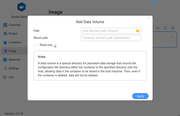
I still keep getting the same error, I have also tried installing the latest all-in-one image from docker hub but I get presenting with a screen asking for a source and destination directory and have no idea what to enter

Image
Locked

Return to “Docker”