User-defined System Disk

More about TOS 6 new features and improvements, and its key features.
User avatar
DanielB
Posts: 14
Joined: 21 Jul 2024, 02:02
Canada

Re: User-defined System Disk

Post by DanielB »

When I got my F2-424 this past July, I inserted a NVMe and did not insert my HDDs until after I had installed TOS to the NVMe and upgraded it to TOS 6 Beta. This did exactly what I wanted it to, meaning OS on the NVMe and nothing except my storage data on HDD1.

I upgraded TOS6 Beta a few times and nothing that I noticed with my setup changed. But after the upgrade to TOS 6.0.500, I noticed that if I SSH into my TNAS and type cd /Volume2 in order to switch to my HDD1, it now contains @apps, as well as @cache, @collect, @desktop, @system, @thumbnail, @videoframe and @zlog.

/Volume2 (my NVMe) has those same folders - as well as @disk and @usb.

So, I am wondering:
  • As I do not want any system files on mystorage drive, HDD1, - can I just delete them from it, ie from /Volume2? Or is there a specific procedure I should follow to achieve the same thing, in case any of the files to be delete are in use/would be expected after a TNAS reboot?
  • Why did this happen? An explanation of TOS6's system files at the top of this very thread suggests that as of TOS6, TNAS would not put system files on all installed drives. A 6.0.x update, the last one I believe, did this.
  • Why did the @drive and @usb not appear on Volume2? Are they no longer needed?
F2-424 w 1x 250GB WD SN580 Blue NVMe (TOS6.0.519) + 2x 4TB WD Red Plus 3.5"HDDs
User avatar
DanielB
Posts: 14
Joined: 21 Jul 2024, 02:02
Canada

Re: User-defined System Disk

Post by DanielB »

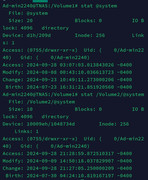
Clarification of my last point: @drive & @usb are on /Volume1 but not /Volume2. My assumption was that the /Volume2 versions were newer but checking dates via the stat directoryname command in SSH, it looks like system directories on both Volumes are being accessed still.

Here's a screenshot of the command for the @system directory on both Volume1 (NVMe) and Volume2(HDD1) :

Image
F2-424 w 1x 250GB WD SN580 Blue NVMe (TOS6.0.519) + 2x 4TB WD Red Plus 3.5"HDDs
User avatar
TMzethar
TM Support
Posts: 2815
Joined: 27 Oct 2020, 16:43

Re: User-defined System Disk

Post by TMzethar »

We can see that the primary Volume has changed .
This can happen if Volume 1, which is the primary volume, is not mounted successfully or is mounted too slowly or if there are file system errors when the system boots.
You can go to Control Panel - Shared Folders - Advanced Settings and revert to “Volume 1”.
Regarding your Volume 1, it is recommended that you try to check and fix any possible errors:viewtopic.php?t=2575
To contact our team, please send email to following addresses, remember to replace (at) with @:
Technical team: support(at)terra-master.com (for technical support)
Service team: service(at)terra-master.com (for purchasing, return, replacement, RMA service)
User avatar
robertodantoni
Posts: 1
Joined: 09 Apr 2025, 16:33
Italy

create/recreate a distributed system disk and recovering a data pool

Post by robertodantoni »

Hello,

I recently purchased a F8 SSD TM nas, and equipped it with a data pool of 4x NVME 4TB drives (16TB total / 12TB available) to be used as archive, backup and PLEX media player.

I was not aware of the need for a system disk or the user-defined subtleties, so I initially configured a salvaged 0.5 TB NVME drive as system disk; at a later stage I added a 1TB drive to its pool, hoping to make the system disk redundant, but now I know it's not the case (I have to assign it to all disks of the pool during the initial configuration, if i'm not mistaken).

I have two questions:

1) I believe it's too late to make my system disk redundant, and I have to reinitialize the NAS and repeat the initial configuration in order to assign system disk to more than one drive (e.g. to the two salvaged 0.5+1TB drives) - correct?

2) what happens if I remove the data pool drives (in my case, the 4x 4TB NVME drives), reinitialize the NAS wiping the two salvaged drives clean (installing a redundant system disk), and then I reinstall the 16TB data pool? Will the system recognize it? or do I have to recreating it from scratch, losing all data?

Thanks!
Terramaster F8 SSD, 4x NVME 4TB Lexar NM790
User avatar
TMzethar
TM Support
Posts: 2815
Joined: 27 Oct 2020, 16:43

Re: create/recreate a distributed system disk and recovering a data pool

Post by TMzethar »

robertodantoni wrote: 09 Apr 2025, 16:48
Hi. Sorry to inform you that you are currently occupying the main topic post. You should create a new topic in the forum section.

Regarding your questions:

1. Generally, you can increase the number of system partitions by reinstalling TOS.
If you know how to use Linux commands and the mdadm tool, you don't need to reinstall TOS. You can add the second partition (8GB) of another SSD to the system array md9 and change the RAID member count from 1 to 2.

2. TOS can automatically recognize existing TOS storage pools and volumes.
To contact our team, please send email to following addresses, remember to replace (at) with @:
Technical team: support(at)terra-master.com (for technical support)
Service team: service(at)terra-master.com (for purchasing, return, replacement, RMA service)
Post Reply

Return to “New and Key Features in TOS 6”