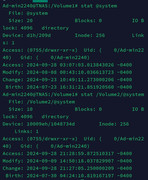
I upgraded TOS6 Beta a few times and nothing that I noticed with my setup changed. But after the upgrade to TOS 6.0.500, I noticed that if I SSH into my TNAS and type cd /Volume2 in order to switch to my HDD1, it now contains @apps, as well as @cache, @collect, @desktop, @system, @thumbnail, @videoframe and @zlog.
/Volume2 (my NVMe) has those same folders - as well as @disk and @usb.
So, I am wondering:
- As I do not want any system files on mystorage drive, HDD1, - can I just delete them from it, ie from /Volume2? Or is there a specific procedure I should follow to achieve the same thing, in case any of the files to be delete are in use/would be expected after a TNAS reboot?
- Why did this happen? An explanation of TOS6's system files at the top of this very thread suggests that as of TOS6, TNAS would not put system files on all installed drives. A 6.0.x update, the last one I believe, did this.
- Why did the @drive and @usb not appear on Volume2? Are they no longer needed?