Page 2 of 2
Re: All New Snapshot
Posted: 08 Jul 2024, 22:49
by baf28
TMeric wrote: ↑08 Jul 2024, 22:07
Do you mean that the Duplicate function to duplicate to the remote TNAS function is not available? Please make sure your snapshot version is consistent.
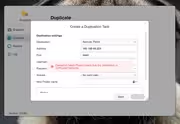
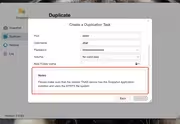
Of course, I have the same versions of OS 5.1.131 installed on both devices and a snapshot is installed on both devices, but I can't transfer the picture, it doesn't work. What else do you need? SSH or something else that would it work?
Re: All New Snapshot
Posted: 09 Jul 2024, 14:52
by IrisLi
1. First confirm whether your two TNAS is under the same LAN.
2. Check whether the port of the HTTPS of the server is changed, please go to the control panel-network to view. The default port is 5443.
If this problem still exists, please contact the online customer service appointment engineer on the official website to check for you remotely.
Re: All New Snapshot
Posted: 09 Jul 2024, 16:15
by Gremlin
I have checked and can confirm I also see the "No Valid Data" message in the Create Dialogue and cannot find a way in which to modify it. (This is both from TOS5 to TOS6 and vice-versa)
Re: All New Snapshot
Posted: 09 Jul 2024, 18:44
by baf28
TMqiky wrote: ↑09 Jul 2024, 14:52
1. First confirm whether your two TNAS is under the same LAN.
2. Check whether the port of the HTTPS of the server is changed, please go to the control panel-network to view. The default port is 5443.
If this problem still exists, please contact the online customer service appointment engineer on the official website to check for you remotely.
1 - yes, the devices are on the same network
2 - the port did not change on the server and by default 5443, and the port changed on the client. I tried to install the same 5443 from both sides and it didn't help.
Okay, I've never contacted the service yet, I'll try to do as you advise.
Re: All New Snapshot
Posted: 10 Jul 2024, 14:03
by baf28
TMqiky wrote: ↑09 Jul 2024, 14:52
1. First confirm whether your two TNAS is under the same LAN.
2. Check whether the port of the HTTPS of the server is changed, please go to the control panel-network to view. The default port is 5443.
If this problem still exists, please contact the online customer service appointment engineer on the official website to check for you remotely.
I sent an email to support and attached the file. How do I know if my letter has been delivered? No one will send me confirmation or anything else.
Re: All New Snapshot
Posted: 10 Jul 2024, 18:51
by TMzethar
baf28 wrote: ↑10 Jul 2024, 14:03
Please make an appointment for remote troubleshooting with the technical support mailbox.