Re: owncloud Login
Posted: 22 Jun 2021, 10:50
1. Turn off the device and turn it on without any hard disks
and TNAS PC found the device.
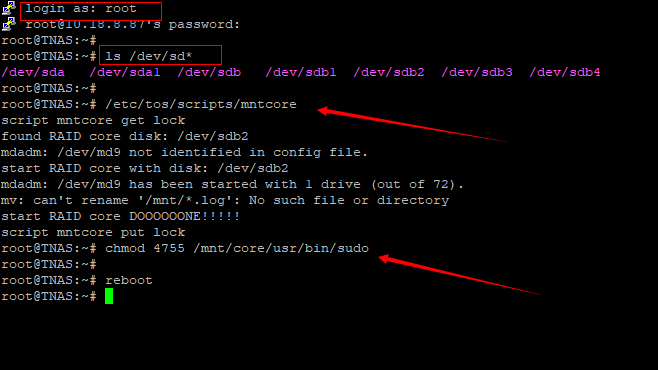
2. Log in as root, password admin(IP+9222)
3. After logging in to the background, insert all hard disks and enter the following command
ls /dev/sd*
4. After seeing the hard disk information, execute the command
/etc/tos/scripts/mntcore
chmod 4755 /mnt/core/usr/bin/sudo
5. Then enter reboot.
and TNAS PC found the device.
2. Log in as root, password admin(IP+9222)
3. After logging in to the background, insert all hard disks and enter the following command
ls /dev/sd*
4. After seeing the hard disk information, execute the command
/etc/tos/scripts/mntcore
chmod 4755 /mnt/core/usr/bin/sudo
5. Then enter reboot.