Page 2 of 14
Re: TOS 7.0.0804 Official Release (x86) is Released for Update
Posted: 28 Jul 2026, 20:32
by sianderson
i don’t know if i should get upset or not that Ive been taken off the thank you's

have i upset people?
Re: TOS 7.0.0804 Official Release (x86) is Released for Update
Posted: 28 Jul 2026, 21:09
by Silversnake
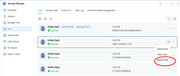
I have a problem. Since the last update, neither the file manager nor any other application detects the NVMe drives in the slots. I have a total of 1+3 drives installed.
The Storage Manager sees all four drives, but I can only use the main one (which holds the system). No application detects the other drives.
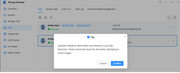
If I try to mount a drive, I receive the following message:
"Operation failed! An abnormality was detected in your disk filesystem. Please check and repair the disk before attempting to mount it again."
The solution?
Remove the drives, test them for integrity in an external enclosure, and put them back?
Does anyone else have the same problem?
Re: TOS 7.0.0804 Official Release (x86) is Released for Update
Posted: 28 Jul 2026, 22:06
by snapsh0t
Silversnake wrote: ↑28 Jul 2026, 21:09
I have a problem. Since the last update, neither the file manager nor any other application detects the NVMe drives in the slots. I have a total of 1+3 drives installed.
The Storage Manager sees all four drives, but I can only use the main one (which holds the system). No application detects the other drives.
If I try to mount a drive, I receive the following message:
"Operation failed! An abnormality was detected in your disk filesystem. Please check and repair the disk before attempting to mount it again."
The solution?
Remove the drives, test them for integrity in an external enclosure, and put them back?
Does anyone else have the same problem?
Do you have a volume(s) and shared folders configured on the M.2 drives?
Re: TOS 7.0.0804 Official Release (x86) is Released for Update
Posted: 28 Jul 2026, 23:54
by crisisacting
Updated testbed devices; didn't experience any of the previous issues which are fixed by this update.
Starting client units updates in coming days.
Re: TOS 7.0.0804 Official Release (x86) is Released for Update
Posted: 29 Jul 2026, 04:14
by Silversnake
I have been using the F4-SSD for over six months. All updates went smoothly until the last one; now, the drives no longer appear in the file manager. While the Storage Manager detects the drives, I cannot mount them, and the system displays the error I mentioned earlier. I removed the drives, checked them externally, and reinstalled them, but the error persists.
I will likely remove the drives, perform a factory reset, run the update, and then reinstall the drives.
Re: TOS 7.0.0804 Official Release (x86) is Released for Update
Posted: 29 Jul 2026, 05:14
by BFG
After updating TOS 7 to version 7.0.0804, the system no longer mounts USB drives
Re: TOS 7.0.0804 Official Release (x86) is Released for Update
Posted: 29 Jul 2026, 07:46
by OlRedRooster
Update worked great, fixed my Jellyfin monitoring after running a manual scan immediately after updating.
Copied in new media and it was detected just like the good old days of TOS6.
Re: TOS 7.0.0804 Official Release (x86) is Released for Update
Posted: 29 Jul 2026, 12:10
by Silversnake
Please provide a link to download version TOS 7.0.0791. As I mentioned earlier in this thread, I am unable to mount internal NVMe drives on version 7.0.0804. I plan to perform a factory reset and install the last version where everything worked correctly. Thank you.
Edit:
1) System shutdown (F4-SSD)
2) Physical removal of 3 NVMe drives
3) Factory reset = the latest version (7.0.0804) remained (I had assumed it would revert to an earlier version).
4) System booted up
5) System shutdown
6) Insertion of one of the NVMe drives
7) System startup and login to Disk Manager
8) Still not working (see image)
9) Solution: wipe the main drive, install the base version from a USB drive, and manually update to the last working version?
Edit 2:
I inserted a new NVMe drive (NTFS formatted) into the slot and mounted it. Once again, it failed.
Will this be fixed soon?
Or am I forced to take the steps I mentioned earlier — wiping the main drive and performing a clean install of an older system and the last version that actually worked (7.0.0791)?
Re: TOS 7.0.0804 Official Release (x86) is Released for Update
Posted: 29 Jul 2026, 13:22
by nitzer71
OlRedRooster wrote: ↑29 Jul 2026, 07:46
Update worked great, fixed my Jellyfin monitoring after running a manual scan immediately after updating.
Copied in new media and it was detected just like the good old days of TOS6.
Great to hear the update fixed your Jellyfin monitoring issue. Could you share a few details about your setup so we can compare?
- Is your Jellyfin installed from the TerraMaster App Center or running in Docker?
- Which TerraMaster NAS model are you using?
- Did you upgrade directly from TOS 6 to TOS 7.0.0804, or did you go through earlier TOS 7 versions first?
- After the update, did you only run the manual "Scan Media Files" once and then real-time monitoring immediately started working?
Re: TOS 7.0.0804 Official Release (x86) is Released for Update
Posted: 29 Jul 2026, 13:52
by nitzer71
RyanYang wrote: ↑28 Jul 2026, 14:39
You can manually perform a "Scan Media Library" once from the console to reset the monitoring trigger mechanism. This action will override any lingering monitoring status judgments left from before the update and remove the "do not monitor" configuration lock.
App updates are already in the pipeline; certain features currently shown as "disabled" are also being progressively optimized.
I have already performed the recommended "Scan Media Files" reset, but the monitoring lock appears to remain. Could you please advise where this "do not monitor" configuration lock is stored or how it can be verified/cleared manually?