Page 2 of 7

Re: TOS 7.0.0780 (X86) is Released for Update

Posted: 14 Jul 2026, 21:48
by snapsh0t
My F2-425 Plus updated successfully. Still have to stop the monitor task to get the HDDs to sleep.

Re: TOS 7.0.0780 (X86) is Released for Update

Posted: 14 Jul 2026, 22:21
by k.wechselberger
The installation on my F2.422 went smoothly.

However, I have to note (this was also the case in versionTOS 7.0.0777) that Docker isn't working.
When I activate (start) Docker from the AppCenter, it runs briefly and then deactivates itself after a few seconds.

Here is the output of `journalctl -u DockerEngine.service -f`:

Code: Select all

Jul 14 16:09:33 TNAS systemd[1]: Stopped DockerEngine.service.
Jul 14 16:12:53 TNAS systemd[1]: Starting DockerEngine.service...
Jul 14 16:13:09 TNAS DockerEngine[225169]: Docker service started successfully.
Jul 14 16:13:09 TNAS DockerEngine[225169]: 0
Jul 14 16:13:09 TNAS systemd[1]: Started DockerEngine.service.
Jul 14 16:13:31 TNAS systemd[1]: Stopping DockerEngine.service...
Jul 14 16:13:31 TNAS DockerEngine[225718]: start-stop-daemon: warning: failed to kill 225432: No such process
Jul 14 16:13:31 TNAS DockerEngine[225718]: No process in pidfile '/var/run/DockerEngine-ssd.pid' found running; none killed.
Jul 14 16:13:33 TNAS DockerEngine[225690]: 0
Jul 14 16:13:33 TNAS systemd[1]: DockerEngine.service: Deactivated successfully.
Jul 14 16:13:33 TNAS systemd[1]: Stopped DockerEngine.service.

Re: TOS 7.0.0780 (X86) is Released for Update

Posted: 14 Jul 2026, 22:23
by Zymphad
Any plans to update portainer? It is 2.24 from november 2024

Re: TOS 7.0.0780 (X86) is Released for Update

Posted: 15 Jul 2026, 00:32
by crisisacting
Only noticed SMB remote folder issue Friday on .777 build & this update has resolved that, in test bed units.

All eligible deployed units will be updated in the coming weeks.

Re: TOS 7.0.0780 (X86) is Released for Update

Posted: 15 Jul 2026, 01:50
by EgorA
Zymphad wrote: 14 Jul 2026, 22:23 Any plans to update portainer? It is 2.24 from november 2024
Try to run dockhand in docker. It's much better.

docker project:

Code: Select all

services:
  dockhand:
    image: fnsys/dockhand:latest
    container_name: dockhand
    network_mode: bridge
    ports:
      - 8000:3000
    volumes:
      - /Volume1/docker/dockhand:/app/data:rw
      - /var/run/docker.sock:/var/run/docker.sock
    restart: always

Re: TOS 7.0.0780 (X86) is Released for Update

Posted: 15 Jul 2026, 07:15
by apvm
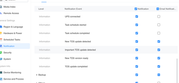
sianderson wrote: 14 Jul 2026, 21:13 how often does TOS check for new updates? i have mine set to email me but so far i haven’t received an email to tell me a new version is available

after the installation i do get the email from both my NAS's to tell me its installed / rebooted etc so i know its set up correctly to email me
Image
I have the F4-424 and Terramaster did send me an email about the update. BTW, I see you have the D4-320, is the fan loud on yours, mine is pretty loud and wondering why, it was not loud at all until three days ago and I only bought it in early June.

Re: TOS 7.0.0780 (X86) is Released for Update

Posted: 15 Jul 2026, 15:57
by DCCentR
I looked a little deeper into the problem I had earlier with launching Docker containers. Below is my conclusion, in collaboration with llm :D

***

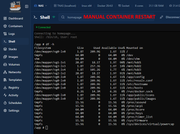
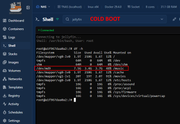
Subject: Critical Bug Report: Docker bind-mounts fall back to rootfs (/dev/md9) during boot, risking system partition exhaustion.

Dear TerraMaster Support Team,
I am reporting a critical boot sequence race condition in TOS that affects Docker containers after a system reboot. This issue appeared after a recent TOS update.

1. Hardware & Environment:
Device: F4-424 Pro
OS: TOS 7
Storage: Multiple internal BTRFS volumes across different LVM volume groups (vg0 to vg4).

2. Symptoms:
After a cold boot, multiple Docker containers (Homepage and Jellyfin) start in a severely degraded state due to incorrect path resolution:

A) Homepage Container:
Incorrect Disk Space Reporting: Paths that should point to large BTRFS volumes incorrectly fall back to the system root partition.
Expected: Mounts pointing to /dev/mapper/vgX-lvX (1.8T - 20T volumes)
Actual after cold boot: Paths like /mnt/hdd2, /mnt/hdd3, /mnt/hdd4 point to /dev/md9 (7.4G system partition)
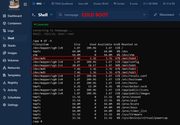
Screenshots with "df -h" output:
Image Image

B) Jellyfin Container:
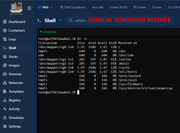
Critical Mount Fallback: Similar behavior where media paths fall back to rootfs.
Expected: /dev/mapper/vg2-lv2 20T 19T 1.9T 91% /music
Actual after cold boot: /dev/md9 7.5G 3.4G 3.7G 48% /music
Playback Failure: Jellyfin throws FFmpeg exited with code 254 errors because actual media files are inaccessible.
Screenshots with "df -h" output:
Image Image

C) System Stability Risk:
Since these containers actively write data (caches, logs, metadata, transcodes) to these paths, this fallback behavior poses an immediate risk of filling up the 7.5GB system partition (/dev/md9), which can cause the entire TOS to crash or become read-only.

Note: Manually restarting the containers 1–2 minutes after boot fully resolves the issue, confirming this is strictly a timing/mounting sequence problem.

3. Root Cause Analysis (Evidence from "dmesg -T" and Docker behavior):
The Docker service is not configured to wait for all user volumes to finish their mount sequence. Volumes 3, 4, and 5 experience significant mounting delays relative to the base system initialization.

Here is the exact timeline from a fresh boot log:
09:30:47 – Volume 1 (vg0-lv0) mounted.
09:30:49 – Volume 2 (vg1-lv1) mounted.
(~48-second system stall occurs here, during which TOS scripts repeatedly overwrite smartmontools.service symlinks).
09:31:37 – Volume 3 (vg2-lv2) mounted.
09:31:57 – Docker network interfaces (docker0, br-*) initialize, and containers (including Homepage and Jellyfin) begin starting.
09:32:22 – Volume 4 (vg3-lv3) finally mounts.
09:32:23 – Volume 5 (vg4-lv4) finally mounts.

The full dmesg output - https://dropmefiles.com/Fy6R8

Conclusion: Because containers start before the target volumes are fully mounted, the host paths do not yet exist as mount points. Docker's default behavior is to create a fallback directory on the host's current filesystem, which is the root partition (/dev/md9).

4. Steps to Reproduce:
Configure multiple internal storage volumes (e.g., Volume 1 through Volume 5).
Set up Homepage and/or Jellyfin Docker containers with bind-mounts pointing to directories on Volume 3, 4, or 5.
Enable "Start on boot" for these containers.
Reboot the NAS.
Execute "df -h" inside the running containers shortly after boot. Mounts will point to /dev/md9 (rootfs) instead of the correct /dev/mapper/vgX-lvX volumes.

***

I hope this is the right approach and that it will help solve the problem.

Re: TOS 7.0.0780 (X86) is Released for Update

Posted: 15 Jul 2026, 21:12
by joka388
snapsh0t wrote: 14 Jul 2026, 21:48 My F2-425 Plus updated successfully. Still have to stop the monitor task to get the HDDs to sleep.
same here :(

Re: TOS 7.0.0780 (X86) is Released for Update

Posted: 15 Jul 2026, 22:22
by sianderson
apvm wrote: 15 Jul 2026, 07:15
sianderson wrote: 14 Jul 2026, 21:13 how often does TOS check for new updates? i have mine set to email me but so far i haven’t received an email to tell me a new version is available

after the installation i do get the email from both my NAS's to tell me its installed / rebooted etc so i know its set up correctly to email me
Image
I have the F4-424 and Terramaster did send me an email about the update. BTW, I see you have the D4-320, is the fan loud on yours, mine is pretty loud and wondering why, it was not loud at all until three days ago and I only bought it in early June.
hmm im still waiting for any kind of emails about 780 update a bit strange, i will try turning off the notifications and on again :) i havent updated to 780 to give a chance for an email to come through

i must say i dont notice any kind of noise from the D4-320, but it is in a comms cabinet with the other 3 NAS's so plenty of fans working, i use it as a backup so i would imagine the drives are in hibernation mode until just gone midnight when it does the back up and then drop off again so it shouldnt really be generating much heat to kick in the fans but definitely nothing i would say ooh thats a fan working overtime etc

i guess it could be a vibration from the drives? or the overall ambient temperature causing them to work a bit harder i guess

Re: TOS 7.0.0780 (X86) is Released for Update

Posted: 16 Jul 2026, 01:29
by Nitrokalel
felicidades por los avances cada vez mas se siente mas solido y estable el sistema,, recuerden dejar ambas opciones de virtualizacion (Virtualbox y VMs) y tendran una plataforma completa, donde los usuarios empezarana preferirlos sobre marcas mas grandes... yo las he manejado y terramaster es mejor que todas ellas

F8 SSD Plus (8x4TB NVMe, TRaid, 48GB, prod) update ok
F8 SSD Plus (6x1TB+2x2TB, TRaid, 48GB, beta) update ok
F4-424 Pro (2x22TB+2x10TB HDD +1TB+500GB NVMe, TRaid, 32GB, beta) update ok
F2-423 (2x18TB, TRaid, 32GB, beta) update ok
F2-221 (6TB+10TB, TRaid, 10GB, beta) update ok
D1 SSD (2TB, prod) is recognized