TOS 7.0.1652 (x86) Official Release Update

Official news about TOS, mobile app, PC app updates or beta releases.
User avatar
Vanekjin
Posts: 5
Joined: 14 May 2026, 11:53
Russia

Re: TOS 7.0.1652 (x86) Official Release Update

Post by Vanekjin »

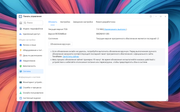
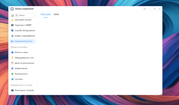
Everything would be fine, but I decided to reset the NAS after two rollbacks to zero and deleting everything that was on the system. Honestly, it’s a complete mess!

Image

Image
User avatar
Alak
Posts: 28
Joined: 27 Aug 2026, 19:09
France

Re: TOS 7.0.1652 (x86) Official Release Update

Post by Alak »

Hi,
Following up on my previous report regarding the Firefox password manager dropdown not appearing on the TOS 7 login screen:
Here is the exact technical reason why this happens in Firefox (unlike Chrome/Edge, which are more permissive with standalone text inputs):
1. Missing autocomplete="username" on the step-1 input: Because TOS 7 uses a two-step login flow (username first, password loaded dynamically in step 2), there is no <input type="password"> present in the DOM during step 1. Without a password field in the DOM, Firefox's autofill engine (Fathom) strictly requires the username <input> element to include the autocomplete="username" attribute (and ideally name="username" or id="username"). Currently, the step-1 text input lacks this attribute, so Firefox treats it as a generic text box rather than a login field.
2. Why it works right after a TOS update reboot: Immediately after a firmware update reboot, the initial redirect renders a state where both the username and password inputs exist in the DOM at the same time (even if the password field is visually hidden). Once the first login completes, subsequent sessions switch to the standard two-step dynamic rendering where the password <input> is absent from the DOM on step 1, breaking Firefox's autofill detection.
Suggested fix:
Simply adding autocomplete="username" to the username <input> element on the step-1 login form (or keeping the <input type="password"> hidden in the DOM during step 1, as Synology DSM and QNAP QTS do) will immediately restore native Firefox autofill support.
Thanks!
:ugeek: F4-424 :ugeek:
:ugeek: D6-320 :ugeek:
User avatar
EriChan
TM Support
Posts: 476
Joined: 06 Jan 2026, 12:27
China

Re: TOS 7.0.1652 (x86) Official Release Update

Post by EriChan »

Vanekjin wrote: ↑Today, 03:08
Sorry to hear about the trouble after resetting your NAS.

Could you briefly share the exact steps you took (e.g., how you performed the rollback/reset, your NAS model, and what other issues you're seeing)? This will help our team reproduce and pinpoint the problem.Thanks.
To contact our team, please send email to following addresses, remember to replace (at) with @

Technical team: support(at)terra-master.com(for technical support)
Service team: service(at)terra-master.com(for purchasing, return, replacement, RMA service)
User avatar
EriChan
TM Support
Posts: 476
Joined: 06 Jan 2026, 12:27
China

Re: TOS 7.0.1652 (x86) Official Release Update

Post by EriChan »

Alak wrote: ↑Today, 03:29
Thank you for the detailed follow-up and technical analysis.
The issue you previously reported has already been fixed for a future release—please stay tuned for the update.
To contact our team, please send email to following addresses, remember to replace (at) with @

Technical team: support(at)terra-master.com(for technical support)
Service team: service(at)terra-master.com(for purchasing, return, replacement, RMA service)
User avatar
RyanYang
TM Support
Posts: 1185
Joined: 01 Dec 2020, 11:50
China

Re: TOS 7.0.1652 (x86) Official Release Update

Post by RyanYang »

apvm wrote: ↑Today, 00:40
You can go to Support & Help on the TOS desktop, enable Debug Mode, and then try restarting or waiting for the next update. If the issue occurs again, you can send us the logs for analysis.
To contact our team, please send email to following addresses, remember to replace (at) with @
Technical team: support(at)terra-master.com (for technical support)
Service team: service(at)terra-master.com (for purchasing, return, replacement)
User avatar
nitzer71
Posts: 48
Joined: 08 Jul 2026, 08:12
Australia

Re: TOS 7.0.1652 (x86) Official Release Update

Post by nitzer71 »

I successfully updated my F4-425 Plus to TOS 7.0.1652.

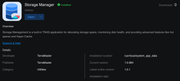
After the update, I noticed that App Center displays a “New” label for Storage Manager.

When I open its details, I see the following:
Image

- Current version: 1.0.084
- Latest online version: 1.0.1

However, there is no Update button. Only Open and Uninstall are available.

Could TerraMaster support please clarify whether version 1.0.084 is already newer than 1.0.1, or whether this is a version-numbering or App Center display issue?

Should I simply leave Storage Manager as it is?

Thanks! :D
F4-425 Plus | 16GB RAM | Intel(R) N150 | 3× 12TB HDD (TRAID) | 1× 1TB NVMe | 1× 500GB NVMe
User avatar
TMzethar
TM Support
Posts: 3135
Joined: 27 Oct 2020, 16:43

Re: TOS 7.0.1652 (x86) Official Release Update

Post by TMzethar »

nitzer71 wrote: ↑Today, 11:31
Thank you for reporting this. We have logged this display error and are currently investigating it.
- Current version: 1.0.084
- Latest online version: 1.0.1
To contact our team, please send email to following addresses, remember to replace (at) with @:
Technical team: support(at)terra-master.com (for technical support)
Service team: service(at)terra-master.com (for purchasing, return, replacement, RMA service)
User avatar
Vanekjin
Posts: 5
Joined: 14 May 2026, 11:53
Russia

Re: TOS 7.0.1652 (x86) Official Release Update

Post by Vanekjin »

I didn’t have much information there; I removed the disc with the photos and the disc with the centralized backup backups (the most interesting thing is that the data didn’t get picked up either — after reinstalling this program, it crashed for the second time, which is very disappointing). After that, I went to the settings and used the option to reset the configuration and return to the original state, which I did twice. The result was the picture shown above. The most interesting thing is that I connected via the mobile app, and the remote access option suggested I enter my account details.

Sorry to hear about the trouble after resetting your NAS.

Could you briefly share the exact steps you took (e.g., how you performed the rollback/reset, your NAS model, and what other issues you're seeing)? This will help our team reproduce and pinpoint the problem.Thanks.
[/quote]
User avatar
Gremlin
Gold Member
Posts: 1790
Joined: 02 Dec 2022, 22:31
Great Britain

Re: TOS 7.0.1652 (x86) Official Release Update

Post by Gremlin »

RyanYang wrote: ↑Yesterday, 19:11
Thank you.
British By Birth, Canadian By Choice, Residence By Circumstance :)
F5-221 TOS7.0.1422 - 4x4TB (Ironwolf) Traid
F2-424 TOS7.0.1422 - 2x500GB nvme (P3) Traid, 2x6TB HDD (HGST) Traid
Frustrated Beta Tester!!!
F2-221, F2-425+ == Tos7.1 in progress (broken)!
User avatar
Gremlin
Gold Member
Posts: 1790
Joined: 02 Dec 2022, 22:31
Great Britain

Re: TOS 7.0.1652 (x86) Official Release Update

Post by Gremlin »

TMzethar wrote: ↑Today, 12:00
Re Storage Manager: Just updated F2-221 to this version (from 7.0.1533) - Confirm In the App Centre I see the "new" tag for the app(top r.h. corner), but there is no update button as noted. (In my schema the tag is orange) The tag/button opens the specific app panel.

At the same time, all the other installed apps have a tag/button top right (in blue) that will also open the app panel. EXCEPT:
ClamAV does not have a anything at all! But clicking in the place the tag/button should be opens the app panel.

Which brings us right back to the question: "Why is this basic stuff not checked properly BEFORE you release a version update :?: :?:
{It isn't like this is the test version - or is it? Really?}
British By Birth, Canadian By Choice, Residence By Circumstance :)
F5-221 TOS7.0.1422 - 4x4TB (Ironwolf) Traid
F2-424 TOS7.0.1422 - 2x500GB nvme (P3) Traid, 2x6TB HDD (HGST) Traid
Frustrated Beta Tester!!!
F2-221, F2-425+ == Tos7.1 in progress (broken)!
Post Reply

Return to “Update Notice”