

Hi everyone,
I have the following setup:
- NAS: TerraMaster F8 SSD Plus, running TOS 7.0.1422.
- TerraSync: version 2.1.560.
- DAS: TerraMaster D4-320, connected directly to the NAS via USB.
- DAS storage: two independent 3 TB HDDs, formatted as ext4. Both are mounted in TOS and have passed read/write tests.
- Computer: a Mac with an external drive containing approximately 644 GB of working files.
I want automatic two-way synchronization, similar to Dropbox or Qsync, between the external drive on my Mac and a folder on one of the DAS HDDs.
Mac external drive ⇄ NAS-connected D4-320 HDD
I want the synchronized files stored directly on the DAS, without keeping an intermediate copy on the NAS’s internal SSD.
However, when adding a Team Folder in TerraSync, the USB storage does not appear. When creating a shared folder in TOS Control Panel, only the internal SSD volume is available as a location.
Is this setup supported by TerraSync/TNAS PC? Is there an official way to make a folder on the USB DAS available as a TerraSync Team Folder?
If it is not supported, has anyone successfully implemented this exact setup using another application? I need changes made on either side to synchronize automatically, rather than a one-way backup.
I have seen the documentation about USB source restrictions on Windows clients, but my question concerns USB storage connected to the NAS, with a Mac client.
Any guidance or firsthand experience would be appreciated. Thanks!
[Help] wo-way sync between a Mac and a D4-320 connected to an F8 SSD Plus — can TerraSync do this?

Re: [Help] wo-way sync between a Mac and a D4-320 connected to an F8 SSD Plus — can TerraSync do this?
TerraSync does not support USB storage directories.
If you do not plan to use your D4-320 with other devices, you may consider backing up the data on the D4-320’s drives, connecting it to a computer, and deleting all drive partitions.
Then, connect the D4-320 to the F8 SSD Plus, create a storage pool and volumes for the drives inside the D4-320 just as you would for the internal drives of the F8 SSD Plus, so that they can be selected by TerraSync.
However, this approach means that the file system on the D4-320’s drive will not be recognized by other computer devices.
To contact our team, please send email to following addresses, remember to replace (at) with @:
Technical team: support(at)terra-master.com (for technical support)
Service team: service(at)terra-master.com (for purchasing, return, replacement, RMA service)
Technical team: support(at)terra-master.com (for technical support)
Service team: service(at)terra-master.com (for purchasing, return, replacement, RMA service)
Re: [Help] wo-way sync between a Mac and a D4-320 connected to an F8 SSD Plus — can TerraSync do this?
Thank you, this sounds like exactly what I need. Can I create a separate single-disk storage pool and volume for each HDD in the D4-320, without RAID, and then use a shared folder on one of those volumes as a TerraSync team folder for two-way synchronization with my Mac? Will this configuration remain available automatically after restarting the NAS?
Re: [Help] wo-way sync between a Mac and a D4-320 connected to an F8 SSD Plus — can TerraSync do this?
Your plan is feasible. The structure and information for the storage pool and volumes will be written to the D4-320 drive, and the corresponding configuration will be stored within the system; it will not be lost upon reboot.
It is generally recommended to keep the D4-320 enabled before starting F8 SSD Plus. If you start and connect the D4-320 after F8 SSD Plus has already started, you will need to manually mount them in Storage Management.
It is generally recommended to keep the D4-320 enabled before starting F8 SSD Plus. If you start and connect the D4-320 after F8 SSD Plus has already started, you will need to manually mount them in Storage Management.
To contact our team, please send email to following addresses, remember to replace (at) with @:
Technical team: support(at)terra-master.com (for technical support)
Service team: service(at)terra-master.com (for purchasing, return, replacement, RMA service)
Technical team: support(at)terra-master.com (for technical support)
Service team: service(at)terra-master.com (for purchasing, return, replacement, RMA service)
Re: [Help] wo-way sync between a Mac and a D4-320 connected to an F8 SSD Plus — can TerraSync do this?
Hi, I’m using TNAS PC 5.2.564 on macOS with TerraSync 2.1.560 on TOS 7.
Two-way synchronization between my Mac’s external drive (/Volumes/SSD) and a team folder on my NAS works correctly. However, Finder does not show any sync-status badges on the files or folders. On-demand sync is currently disabled.
Could you clarify:
1. Are Finder sync-status badges supported for standard two-way synchronization with on-demand sync disabled?
2. If badges require on-demand sync, can I enable it while keeping the local folder on my external drive?
3. Can I then select “Always keep on this device” for the entire folder, so all files remain fully available offline?
4. Would enabling this on my existing task change the local folder’s location or require downloading the files again?
My goal is to keep all files on the external drive, synchronize them in both directions, and see their individual sync status in Finder, similar to Dropbox.
Thank you!
Re: [Help] wo-way sync between a Mac and a D4-320 connected to an F8 SSD Plus — can TerraSync do this?
1. When on-demand syncing is turned off, Finder does not display a sync status badge.
2. You can enable on-demand syncing while keeping the local folder on your external drive. Enabling on-demand syncing does not replace or move your local sync directory; it simply changes the policy for “when files are downloaded to your device.”
3. You can select “Always keep on this device” for an entire folder. Right-click any file or folder to choose a policy.
4. This action only switches the sync mode and filter rules; it does not change the location of the local sync directory. To prevent individual files from being marked as “Available Online Only,” we recommend applying “Always Keep on This Device” to the entire local sync directory immediately after enabling on-demand sync. Files that have been pinned or are already on your device will remain available locally, and you won’t need to redownload the entire task.
To contact our team, please send email to following addresses, remember to replace (at) with @:
Technical team: support(at)terra-master.com (for technical support)
Service team: service(at)terra-master.com (for purchasing, return, replacement, RMA service)
Technical team: support(at)terra-master.com (for technical support)
Service team: service(at)terra-master.com (for purchasing, return, replacement, RMA service)
Re: [Help] wo-way sync between a Mac and a D4-320 connected to an F8 SSD Plus — can TerraSync do this?
In TNAS PC 5.2.564 for macOS, editing my existing task only offers sync direction and filters. There is no “Enable on-demand sync” checkbox, and the summary shows “On-demand sync: Not available.” The local directory is /Volumes/IM_QNAP, the root of an external drive. How can I enable it for this existing task?
My local sync directory is the root of the external drive (/Volumes/IM_QNAP). Could this explain why on-demand sync is unavailable? Does macOS require a subfolder instead?
I tested a new on-demand task in TNAS PC 5.2.564 for macOS. When on-demand sync is enabled, the local directory selector disappears. The task automatically creates /Users/djego/Library/CloudStorage/TNASPC-Prueba_BajoDemanda. How can I select a folder on my external drive instead, as you indicated was supported?
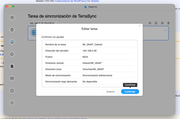
My local sync directory is the root of the external drive (/Volumes/IM_QNAP). Could this explain why on-demand sync is unavailable? Does macOS require a subfolder instead?
I tested a new on-demand task in TNAS PC 5.2.564 for macOS. When on-demand sync is enabled, the local directory selector disappears. The task automatically creates /Users/djego/Library/CloudStorage/TNASPC-Prueba_BajoDemanda. How can I select a folder on my external drive instead, as you indicated was supported?
Re: [Help] wo-way sync between a Mac and a D4-320 connected to an F8 SSD Plus — can TerraSync do this?
TerraSync does not support using directories as local directory on a USB drive connected to your computer.
To contact our team, please send email to following addresses, remember to replace (at) with @:
Technical team: support(at)terra-master.com (for technical support)
Service team: service(at)terra-master.com (for purchasing, return, replacement, RMA service)
Technical team: support(at)terra-master.com (for technical support)
Service team: service(at)terra-master.com (for purchasing, return, replacement, RMA service)