

TOS 6 to TOS 7 on F6-424 MAX: a week later, still not fully operational
I wanted to share my experience and express my disappointment with what should have been a straightforward, supported TOS upgrade.
I own two TerraMaster NAS devices: an F4-424 Pro and an F6-424 MAX. Both were running TOS 6.0.794. I deliberately chose to upgrade F6-424 Max first, leaving F4-424 Pro untouched until I could assess reliability.
On Monday 9 November, I installed TOS 7.0.0747 through the update offered within TOS Control Panel. This was not a beta installation or an attempt to bypass the supported upgrade route. TOS was installed on SATA HDDs, not NVMe.
After the update countdown and reboot, F6-424 Max returned to a TNAS Initialisation screen, rather than its existing login. TNAS PC reported it as uninitialised, the shares were inaccessible, and my existing SSH credentials were rejected.
What followed has involved:
• Contacting support and supplying screenshots and diagnostic information.
• Purchasing a replacement nano USB drive to fit the internal motherboard connection.
• Flashing the official TOS 7 UEFI boot image.
• Opening the NAS, replacing its boot USB and disconnecting the storage drives to test it.
• Reconnecting the drives in their original bays, only to find the NAS still requesting initialisation.
• Seeking clarification about how to proceed without destroying the existing data.
• Reinstalling TOS, explicitly retaining the existing 8 GB system partition, as support instructed.
• Recreating the administrator account and checking storage, shares and applications.
The recovery installed TOS 7.0.1536. After reseating the drive carriers, all HDDs were detected, and the existing RAID pool and Btrfs volume reported Normal. My files are accessible, and media plays through Windows. There is no confirmed data loss, and I have not needed to restore the full dataset.
However, Plex is still unusable for playback.
Its data survived, but its recreated service account had different numerical IDs from the old account. Correcting ownership of its application-data folder allowed Plex to start and display the existing libraries. It still cannot access the media files.
Support directed me to:
Shared Folder → Edit → Permissions → Application User
Unfortunately, the Application User tab is missing entirely on my installation. Only User and User Group appear. I have repeated the check in a completely fresh Incognito session, logged in as administrator, and sent support screenshots confirming this.
Plex is now disabled to prevent my family trying to use a server that cannot play anything. The nightly media mirror from F4-424 Pro has been restored after resolving the changed SSH host key, but application access remains unresolved. My latest support email was sent on Friday 13 November; I am awaiting a response.
I appreciate the assistance support has provided. Nevertheless, it is now Monday 16 November, and a routine upgrade has left this NAS without its intended Plex functionality for over a week.
I have full backups and a second functioning NAS that is a complete mirror of the other NAS, so the disruption has been manageable. Without those, this would have been considerably more difficult.
Is this a known recovery or application-registration issue, and can an engineer provide a definite resolution?
To be clear – I do have an ongoing open support ticket placed with [email protected] but am still waiting for an answer re. no option for Application User under Shared Folder → Edit → Permissions on my installation.
I would also like TerraMaster to explain what checks or improvements will prevent other users following the official upgrade route from encountering this experience. It has understandably left me extremely reluctant to upgrade F4-424 Pro.
[Help] TOS 6 to TOS 7 on F6-424 MAX: a week later, still not fully operational


Re: [Help] TOS 6 to TOS 7 on F6-424 MAX: a week later, still not fully operational
Thank you for sharing your detailed feedback with us, and please accept our sincere apologies for the inconvenience and frustration this upgrade experience has caused.
To help resolve the issues you reported as quickly as possible, we recommend connecting with our technical support team for a quick remote assistance session via our online support portal:
https://salesiq.zohopublic.com/signatur ... 97d0be8892
When connecting, please include your existing email ticket details along with this forum thread URL and your forum ID so our engineers can pick up right where things left off. We have also passed your experience and feedback along to our product and engineering teams for further review as we continue working to improve the upgrade process. Thank you again for your patience.
To contact our team, please send email to following addresses, remember to replace (at) with @
Technical team: support(at)terra-master.com(for technical support)
Service team: service(at)terra-master.com(for purchasing, return, replacement, RMA service)
Technical team: support(at)terra-master.com(for technical support)
Service team: service(at)terra-master.com(for purchasing, return, replacement, RMA service)


Re: [Help] TOS 6 to TOS 7 on F6-424 MAX: a week later, still not fully operational
Here is how I solved my problem with Plex Server not working ...
1. Click on Control Panel --> Under Privileges click on "Shared Folder" --> Click on the folder containing your Plex Server Media (in my case, it was named "HDD-Public") --> right click to get "Edit" --> under top menus click on "Permissions" --> Click "Application User" tab on top --> check "read/write" or "read" whichever permission you want to grant next to "plex"
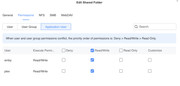
1. Click on Control Panel --> Under Privileges click on "Shared Folder" --> Click on the folder containing your Plex Server Media (in my case, it was named "HDD-Public") --> right click to get "Edit" --> under top menus click on "Permissions" --> Click "Application User" tab on top --> check "read/write" or "read" whichever permission you want to grant next to "plex"