Sometimes I just need to retore a file from a backed-up desktop computer via Centralized Backup.
3 questions:
1. How do I do that in the latest TOS 7?
2. Is Centralized Backup the best app to use for selectively restoring desktop user files or OS files?
3. Can I restore the backup image of the desktop (e.g. C: drive) to some kind of virtual C: drive on the NAS? So that I can from there copy only the files I need to recover, to the desktop computer.
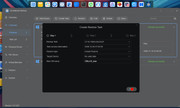
I see that there is some option to do that when it asks you where you want to restore to, but would I have to set up some sort of temporary partition (shared folder, etc.) to do that? See attached image. I am confused.
It throws an error code when I try to restore to the virtual partition that it suggests restoring to (New VM Name). Does that partition exist as a hidden or virtual partition somewhere that I can not see? Because the box above that "Target Device" shows no valid data. I can not change the name on the target device. This is really confusing.
Your help is much appreciated. Thanks.