

Need your help please.
I have @snapshot folder set to be visible in my shared folders. I remember that it worked well in previous versions of TOS 7.x on out T12 when I first set up the new NAS month ago. I could open up the folder, view or copy the contents. If I recall correctly, it was done this way?
I just upgraded to TOS 7.0.1536.
I see the @snapshot folder in each shared folder. But I can NOT ACCESS it (open up that folder to see what is inside). I get a red X on the screen that says "You need permission to perform this action".
What permission? I have not made any changes to the new version, nor changed any permissions.
I did take another look at the superuser, user, and guest permissions under "user" and "user groups" in the control panel. All are set to full read/write, so that is not the problem.
TOS 7.0.1536 - did it break something?
I even tried toggeling the "view snapshot folder" on/off, in the snapshot app under each respective folder, and it made no difference.
I really need to be able to access individual files and restore them from the snapshot folder. Today I need to restore a file. The only workaround was for me to retore the whole share (the entire shared folder) via the restore command in snapshot app.
Can someone please let me know what is wrong, and how to fix that in this latest TOS? Thanks.
[Help] Did TOS 7.0.1536 kill access to my snapshots?
[Help] Did TOS 7.0.1536 kill access to my snapshots?
This user appreciates any help. Thanks!


Re: [Help] Did TOS 7.0.1536 kill access to my snapshots?
Starting with Snapshot 2.1.032, we introduced the Immutable Snapshot feature:
Please open the Snapshot app and refer to the screenshot below to verify the protection status and unlock/adjust it accordingly:
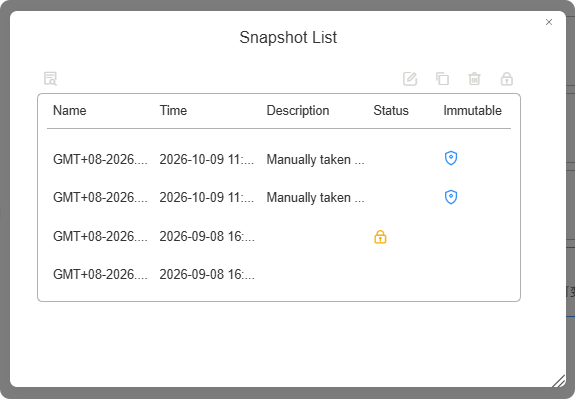
Please check this on your end and let us know if you can browse the @snapshot folder afterward!
- Users can configure a protection period for snapshots of shared folders or iSCSI LUNs.
- During the protection period, no users—including administrators—can delete, modify, or tamper with the protected snapshots, further enhancing the security of critical data. Once the protection period expires, the system automatically lifts the protection.
Please open the Snapshot app and refer to the screenshot below to verify the protection status and unlock/adjust it accordingly:
Please check this on your end and let us know if you can browse the @snapshot folder afterward!
To contact our team, please send email to following addresses, remember to replace (at) with @
Technical team: support(at)terra-master.com(for technical support)
Service team: service(at)terra-master.com(for purchasing, return, replacement, RMA service)
Technical team: support(at)terra-master.com(for technical support)
Service team: service(at)terra-master.com(for purchasing, return, replacement, RMA service)
Re: [Help] Did TOS 7.0.1536 kill access to my snapshots?
I take snapshots hourly. There are currently about 1150 snapshots. None of them have the "Immutable" blue shield. One had the orange lock icon, and I unlocked it after multiple attempts. Flaky.
Then when I go into my shared folder, click on the @snapshot folder to see what is inside, I still get a red box and X sign. See attached images.
Am I trying to access the snapshot files correctly, or am I doing this wrong? Thank you so much for your help with this.
I have multiple shared folders, and I can no longer access any of the @snapshot folders in them. It worked flawlesly before the latest update. I was back then able to open the folder, browse to whichever date I wanted, and copy individual files from there that I needed to "restore" back to my shared folder. At least that is the way I think I used to do that when I first set up this NAS 2 months ago.
The new update also crashed Centralized Backup. I posted separately on that one. (Update, I deleted Centralized Backup, and downloaded and reinstalled. Now that works again).
I did the same uninstall, download, and reinstall of the Snapshot APP. Made no difference. Still do not have access to the snapshot folders.
Is there a way to roll back to the previous TOS 7.x version that was stable?
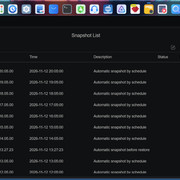
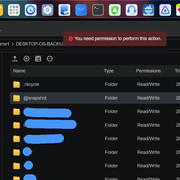
Then when I go into my shared folder, click on the @snapshot folder to see what is inside, I still get a red box and X sign. See attached images.
Am I trying to access the snapshot files correctly, or am I doing this wrong? Thank you so much for your help with this.
I have multiple shared folders, and I can no longer access any of the @snapshot folders in them. It worked flawlesly before the latest update. I was back then able to open the folder, browse to whichever date I wanted, and copy individual files from there that I needed to "restore" back to my shared folder. At least that is the way I think I used to do that when I first set up this NAS 2 months ago.
The new update also crashed Centralized Backup. I posted separately on that one. (Update, I deleted Centralized Backup, and downloaded and reinstalled. Now that works again).
I did the same uninstall, download, and reinstall of the Snapshot APP. Made no difference. Still do not have access to the snapshot folders.
Is there a way to roll back to the previous TOS 7.x version that was stable?
This user appreciates any help. Thanks!


Re: [Help] Did TOS 7.0.1536 kill access to my snapshots?
I think this goes back further than .1536.
I am on .1422 and get a permissions error if I try to browse the snapshot folder.
{I just made the snapshots visible to test this function and have not rebooted/reset anything else.}
I am on .1422 and get a permissions error if I try to browse the snapshot folder.
{I just made the snapshots visible to test this function and have not rebooted/reset anything else.}
British By Birth, Canadian By Choice, Residence By Circumstance 
F5-221 TOS7.0.1422 - 4x4TB (Ironwolf) Traid
F2-424 TOS7.0.1422 - 2x500GB nvme (P3) Traid, 2x6TB HDD (HGST) Traid
Frustrated Beta Tester!!!
F2-221, F2-425+ == Tos7.1 in progress (broken)!
F5-221 TOS7.0.1422 - 4x4TB (Ironwolf) Traid
F2-424 TOS7.0.1422 - 2x500GB nvme (P3) Traid, 2x6TB HDD (HGST) Traid
Frustrated Beta Tester!!!
F2-221, F2-425+ == Tos7.1 in progress (broken)!
Re: [Help] Did TOS 7.0.1536 kill access to my snapshots?
we sincerely apologize for the inconvenience caused after the update.
We have confirmed that this issue does exist and have already submitted it to our product team to evaluate an optimization and fix plan for an upcoming release. Since TOS does not support direct firmware downgrades to earlier versions, please stay tuned for future updates.
Thank you very much for your patience and understanding!
To contact our team, please send email to following addresses, remember to replace (at) with @
Technical team: support(at)terra-master.com(for technical support)
Service team: service(at)terra-master.com(for purchasing, return, replacement, RMA service)
Technical team: support(at)terra-master.com(for technical support)
Service team: service(at)terra-master.com(for purchasing, return, replacement, RMA service)