[Discussion] F4-423, Tos7 and managing Plex repo across different NAS devices

SMB, NFS, FTP, web file manager and Rsync server.
Post Reply
User avatar
Schnorra
Posts: 7
Joined: 10 Dec 2024, 08:36
Australia

[Discussion] F4-423, Tos7 and managing Plex repo across different NAS devices

Post by Schnorra »

Device: TM f4-423
o/s: TOS 7.0.1422

Remote NAS: Buffalo LS-QVL/R5 Series
os: Buffalo firmware 1.75
share protofol: windows, i.p

Hi there,

I currently run a PLEX server and QBittorent on my TOS7 nas. Basically what I to is have a local SHARED folder which has all my purchased music files (flac, mp3, iso) and another 'virtual folder than point to a folder on my Bauffalo NAS which holds my video files that are used less often.

I then 'map' these paths to my PLEX server.

FUTHERMORe, I run a QBittorrent server, which downloads torrents directly the remote server path mapped within the TOS7.0 server so my sharing ratios remain consistent

The MAIN PROBLEM is the remote paths on the TOS server are very unstable either to traffic from streaming off the PLEX/TM/TOS server from the remote storgae space(Buffalo NAS), TOS updates.

My questions is, what it the most stable way to map a stable virtual drive/folder on a TM/TOS7 that can be access via Plex?

Is it becuase I am linking the Buffallo share as subfolder within the 'local' TOS Shared Folders tree?

Is it better if I create a separate TOS 'Shared Folder' and link the Buffalo share as subfolder, or created dedicated Shared FOlder for EACH Buffalo mapped folder?

And are there better services that the SPC/NFS services within TOS7 to facilitate these connections?
Image

Image
User avatar
EriChan
TM Support
Posts: 473
Joined: 06 Jan 2026, 12:27
China

Re: [Discussion] F4-423, Tos7 and managing Plex repo across different NAS devices

Post by EriChan »

Schnorra wrote: ↑08 Nov 2026, 10:52
The instability and dropped mounts you are experiencing under heavy traffic are primarily caused by combining high-concurrency network I/O (qBittorrent writes + Plex streaming reads) over a remote SMB mount to a legacy NAS (Buffalo LS-QVL series). When the remote SMB server struggles with concurrent locks and I/O wait, the Linux CIFS client times out and drops the mount.

Here are the recommended practices to achieve a stable setup on TOS 7:

1. Folder Structure & Mount Points

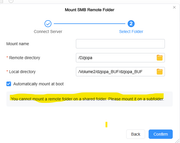
1. Why the error appears: As shown in your screenshot, TOS does not allow mounting directly to the root of a Shared Folder. It must be mounted into an empty subfolder.

2.Best practice: Create a single dedicated TOS Shared Folder (e.g., RemoteMounts), and create dedicated empty subfolders inside it for each remote share (e.g., /Volume2/RemoteMounts/Buffalo_Video and /Volume2/RemoteMounts/Buffalo_Dzjopa).

Benefit: This cleanly separates remote file systems from your local storage tree, preventing TOS file indexing and ACL permission scans from stalling when the remote NAS is slow or offline.

2. Fix the qBittorrent I/O Bottleneck
  • Do not download directly to a remote network mount. Writing hundreds of concurrent torrent chunks over SMB will quickly overwhelm the CPU and network stack of older Buffalo NAS units, triggering CIFS connection timeouts.
Solution: In qBittorrent (Options > Downloads):
  • Set Keep incomplete torrents in: to a local folder on your F4-423 (preferably an SSD or local RAID volume).
  • Set Move completed torrents to: to your mounted Buffalo folder.This changes torrent writes from heavy random I/O into a single sequential transfer upon completion, eliminating mount drops during active downloads.
3. Protocol Choice: NFS vs. SMB
  • If your Buffalo firmware supports NFS, it typically offers lower protocol overhead, better throughput, and less sensitivity to connection timeouts on low-power devices compared to SMB.
  • If staying with SMB, verify in the Buffalo settings whether SMB2 is supported and enabled, as legacy SMB1 is notoriously prone to session disconnections under load.
To contact our team, please send email to following addresses, remember to replace (at) with @

Technical team: support(at)terra-master.com(for technical support)
Service team: service(at)terra-master.com(for purchasing, return, replacement, RMA service)
User avatar
HarounHaroun
Posts: 4
Joined: 02 Jan 2025, 09:36
Australia

Re: [Discussion] F4-423, Tos7 and managing Plex repo across different NAS devices

Post by HarounHaroun »

OK.. I am trying to mount the root folder and a subfolder on the same remote share as two different share within the TOS shared folder.. it is not allowing me.. Do I need to create another shared folder and link to that?

eg:

TOS>VOL1>SHARED FOLDER>BUFFALO 1
TOS>VOL1>SHARED FOLDER1>BUFFALO1>BUFSUFOLDER
User avatar
EriChan
TM Support
Posts: 473
Joined: 06 Jan 2026, 12:27
China

Re: [Discussion] F4-423, Tos7 and managing Plex repo across different NAS devices

Post by EriChan »

HarounHaroun wrote: ↑11 Nov 2026, 14:37
TOS does not currently support mounting remote subdirectories directly—it only supports mounting the root of a remote share.

Since mounting the root share already gives you full access to all of its subfolders, you only need to mount it once:
  • Mount the Buffalo root share to a local subfolder (e.g., /Volume1/SharedFolder/Buffalo1).
  • In Plex or qBittorrent, simply navigate into that path and point directly to the target subfolder (/Volume1/SharedFolder/Buffalo1/BUFSUFOLDER).
(If you strictly require two distinct mount points in TOS, you will need to configure that subfolder as a separate, independent share on the Buffalo NAS first).
To contact our team, please send email to following addresses, remember to replace (at) with @

Technical team: support(at)terra-master.com(for technical support)
Service team: service(at)terra-master.com(for purchasing, return, replacement, RMA service)
Post Reply

Return to “File Services”