

I've recently updated to TOS 7 and installed latest CloudSync app, and where before (on TOS 5) I could sync my cloud data into an encrypted shared folder, now it won't let me select any. The only folders I see in the list when creating new task (and choosing local destination) are unencrypted ones.
Of course all encrypted folder are mounted and accessible. I even can see them in Dupl Backup on the same step, but not in CloudSync for some reason.
I tried tinkering with folders' permissions, creating new ones, rebooting, reinstalling etc, and nothing worked.
Am I missing something? Is this intended change? Or perhaps it can be fixed somehow?
[Help] Latest version of CloudSync won't allow syncing into encrypted folder [SOLVED]


Re: [Help] Latest version of CloudSync won't allow syncing into encrypted folder
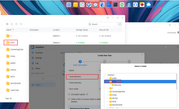
Thank you for the detailed description. No changes have been made to the system, and the option to select encrypted folders remains available. You need to mount the encrypted folder within the shared folder interface first, and then try creating the task again. If it still does not work, please contact us online via this link: https://salesiq.zohopublic.com/signatur ... 97d0be8892
Re: [Help] Latest version of CloudSync won't allow syncing into encrypted folder
Yeah, I get it about mounting first, but still none of 4 my encrypted folders show up.
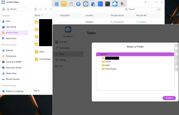
I'm on ARM (F4-212) if it is of any help, CloudSync version is 3.2.037 and UI is a bit different from yours.
I'm on ARM (F4-212) if it is of any help, CloudSync version is 3.2.037 and UI is a bit different from yours.

Re: [Help] Latest version of CloudSync won't allow syncing into encrypted folder [SOLVED]
Thank you for your feedback!
We have confirmed that this issue indeed exists in the ARM version of CloudSync, and it will be fixed in a future release. Please stay tuned.
Thank you for your patience and support.
To contact our team, please send email to following addresses, remember to replace (at) with @
Technical team: support(at)terra-master.com(for technical support)
Service team: service(at)terra-master.com(for purchasing, return, replacement, RMA service)
Technical team: support(at)terra-master.com(for technical support)
Service team: service(at)terra-master.com(for purchasing, return, replacement, RMA service)