
[Help] Compatibility of the NOCTUA NF‑A12x25 PWM fan connector and the F4‑425 connector [SOLVED]
-
passkeeper

- Posts: 1
- Joined: 18 Sep 2026, 18:54

[Help] Compatibility of the NOCTUA NF‑A12x25 PWM fan connector and the F4‑425 connector
The stock fan started making noise after a year of use. I want to install the NOCTUA NF‑A12x25 PWM, but I’ve seen in various sources that people say you need to change the pinout using an adapter. Is that true?


Re: [Help] Compatibility of the NOCTUA NF‑A12x25 PWM fan connector and the F4‑425 connector
Best take a look. My F2-425Plus appears to have a standard 4 pin-out connector. (I have not actually checked the wiring). Motherboards tend to change during production runs I suspect. I have one older Tnas with BOTH types of connectors.
F5-221 TOS7.0.1278 - 4x4TB (Ironwolf) Traid
F2-424 TOS7.0.1278 - 2x500GB nvme (P3) Traid, 2x6TB HDD (HGST) Traid
F2-221 TOS7.0.1278 - 1x3TB Ext4, 1x4TB Btrfs
F2-425+ TOS7.0.1278 - 2x500GB nvme (P3) Traid, 2x6TB HDD (EXOS) Traid
F2-424 TOS7.0.1278 - 2x500GB nvme (P3) Traid, 2x6TB HDD (HGST) Traid
F2-221 TOS7.0.1278 - 1x3TB Ext4, 1x4TB Btrfs
F2-425+ TOS7.0.1278 - 2x500GB nvme (P3) Traid, 2x6TB HDD (EXOS) Traid


Re: [Help] Compatibility of the NOCTUA NF‑A12x25 PWM fan connector and the F4‑425 connector [SOLVED]
The pinout for the F4-425 fan connector is:
Pin 1 → Pin 4: PWM → FG → VCC → GND
This differs from the standard Intel pinout used by standard PC PWM fans (including the Noctua NF-A12x25), so an adapter cable is required.
To account for variations between production batches, we recommend performing the following two checks after opening the unit:
Step 1: Check for silkscreen markings next to the fan header on the motherboard.
After disconnecting the power and removing the side panel, locate the 4-pin fan header on the motherboard (labeled SYS_FAN, FAN1, etc.) and check for small labels indicating the pin assignments or function abbreviations (e.g., GND, VCC, FG, PWM) next to the header.
Step 2: Check the wire color sequence on the original fan's connector.
Unplug the original fan and observe the color arrangement of the four wires (from left to right):
If the sequence is Black → Yellow → Green → Blue (standard Intel definition), the pinout matches Noctua's, and the fan can be plugged in directly.
If the sequence differs from the standard, you will need to reconfigure the wiring order or pin assignments on the adapter cable.
Pin 1 → Pin 4: PWM → FG → VCC → GND
This differs from the standard Intel pinout used by standard PC PWM fans (including the Noctua NF-A12x25), so an adapter cable is required.
To account for variations between production batches, we recommend performing the following two checks after opening the unit:
Step 1: Check for silkscreen markings next to the fan header on the motherboard.
After disconnecting the power and removing the side panel, locate the 4-pin fan header on the motherboard (labeled SYS_FAN, FAN1, etc.) and check for small labels indicating the pin assignments or function abbreviations (e.g., GND, VCC, FG, PWM) next to the header.
Step 2: Check the wire color sequence on the original fan's connector.
Unplug the original fan and observe the color arrangement of the four wires (from left to right):
If the sequence is Black → Yellow → Green → Blue (standard Intel definition), the pinout matches Noctua's, and the fan can be plugged in directly.
If the sequence differs from the standard, you will need to reconfigure the wiring order or pin assignments on the adapter cable.
Re: [Help] Compatibility of the NOCTUA NF‑A12x25 PWM fan connector and the F4‑425 connector
WHY would you do that? (And not sell replacement fans - as I was advised a long time ago)
My experience of @TM supplied fans is the colour coding is:Step 2: Check the wire color sequence on the original fan's connector.
Unplug the original fan and observe the color arrangement of the four wires (from left to right):
If the sequence is Black → Yellow → Green → Blue (standard Intel definition), the pinout matches Noctua's, and the fan can be plugged in directly.
If the sequence differs from the standard, you will need to reconfigure the wiring order or pin assignments on the adapter cable.
BLACK --> BLACK --> BLACK -- BLACK

F2-425Plus
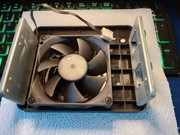
I guess Production doesn't quite carry through from Design!
F5-221 TOS7.0.1278 - 4x4TB (Ironwolf) Traid
F2-424 TOS7.0.1278 - 2x500GB nvme (P3) Traid, 2x6TB HDD (HGST) Traid
F2-221 TOS7.0.1278 - 1x3TB Ext4, 1x4TB Btrfs
F2-425+ TOS7.0.1278 - 2x500GB nvme (P3) Traid, 2x6TB HDD (EXOS) Traid
F2-424 TOS7.0.1278 - 2x500GB nvme (P3) Traid, 2x6TB HDD (HGST) Traid
F2-221 TOS7.0.1278 - 1x3TB Ext4, 1x4TB Btrfs
F2-425+ TOS7.0.1278 - 2x500GB nvme (P3) Traid, 2x6TB HDD (EXOS) Traid