[Help] NVMe Drive Question

RAID, Volume, storage pool, hard drive, USB, SSD cache and iSCSI LUN
LordP
Posts: 57
Joined: 24 Jul 2025, 01:16
United States of America

[Help] NVMe Drive Question

Post by LordP »

I wanted to update my F4-423 to TOS-7 and I was going to use ONE of my two 512GB NVMe in my F6-424, but it turns out I can't remove one of the NVMes in the F6 ???

The F4-423 currently has 2x 4TB NVMes
The F6-424 currently has 2x 512GB NVMes

After exhaustive testing, I determined that Hypercache is not for me, it completely destroys my network speed:

viewtopic.php?t=7419

So, the idea was to remove one of the two 512GB NVMe from the F6-424 and use it as the TOS drive in the F4-423.

What I found is that even though I disabled Hypercache on NVMe-2, in the F6-424, the device would not boot unless I had BOTH 512GB units installed. My TOS-7 is installed in NVMe-2 - I checked and double checked four times. I even tried booting with only one NVMe installed, and then with only the other one installed (in case the TOS was misreporting the drive) - no way Jose.

The only way to have the F6-424 boot is with BOTH NVMes installed.

The question is very simple: Why?

Why can't I remove an unused drive from the F6-424?

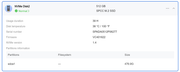
Yes, I disabled it in TOS:

Image
F4-423
TOS version is 6.0.694
BIOS is 5.19
Hard drives 4x ST24000NT002-3N1101 24TB Iron Wolf Pro
TOS - Crucial P310 4TB PCIe Gen4 2280 NVMe M.2
Hypercache - Crucial P310 4TB PCIe Gen4 2280 NVMe M.2
OWC 32GB (2x16GB) DDR4 3200 PC4-25600 CL22
User avatar
CursaYang
TM Support
Posts: 953
Joined: 06 Jan 2025, 16:34
China

Re: [Help] NVMe Drive Question

Post by CursaYang »

Based on the screenshot you provided, this NVMe drive is not part of the array. May I ask: what is the boot behavior when only one NVMe drive is installed? If you have a monitor, you can connect it to view the output during startup.
To contact our team, please send email to following addresses, remember to replace (at) with @

Technical team: support(at)terra-master.com(for technical support)
Service team: service(at)terra-master.com(for purchasing, return, replacement, RMA service)
LordP
Posts: 57
Joined: 24 Jul 2025, 01:16
United States of America

Re: [Help] NVMe Drive Question

Post by LordP »

It simply does not boot at all.

I connect it to my network and use TNAS PC.

If I can find a spare monitor, I'll try to see what is going on. But I sort of gave up and put both SSDs back in so I can use the NAS.

If someone can tell me why it won't boot, I'll try it again, but otherwise I don't see the point of doing the same thing over and over.
F4-423
TOS version is 6.0.694
BIOS is 5.19
Hard drives 4x ST24000NT002-3N1101 24TB Iron Wolf Pro
TOS - Crucial P310 4TB PCIe Gen4 2280 NVMe M.2
Hypercache - Crucial P310 4TB PCIe Gen4 2280 NVMe M.2
OWC 32GB (2x16GB) DDR4 3200 PC4-25600 CL22
User avatar
CursaYang
TM Support
Posts: 953
Joined: 06 Jan 2025, 16:34
China

Re: [Help] NVMe Drive Question

Post by CursaYang »

Have you noticed the status of the NAS during startup? Under normal conditions, there will be a single beep indicating that the hardware self-test has passed, followed by three beeps about one minute later. This indicates that the boot system is normal, and the issue lies with the TOS system. At this point, you can locate the NAS via TNAS PC and check its status there. After you boot into the system using the two SSDs, you can collect a system report and send it to us for analysis.
To contact our team, please send email to following addresses, remember to replace (at) with @

Technical team: support(at)terra-master.com(for technical support)
Service team: service(at)terra-master.com(for purchasing, return, replacement, RMA service)
LordP
Posts: 57
Joined: 24 Jul 2025, 01:16
United States of America

Re: [Help] NVMe Drive Question

Post by LordP »

CursaYang wrote: ↑31 Aug 2026, 18:10 Have you noticed the status of the NAS during startup? Under normal conditions, there will be a single beep indicating that the hardware self-test has passed, followed by three beeps about one minute later. This indicates that the boot system is normal, and the issue lies with the TOS system. At this point, you can locate the NAS via TNAS PC and check its status there. After you boot into the system using the two SSDs, you can collect a system report and send it to us for analysis.
I am not sure what you are asking me to do.

Do you want me to remove the extra NVMe and then try to boot? And then add that NVMe back and look for a system report?

BTW, where do I find the system report?

What I did was order a new 512TB NVMe so I can free up the two very valuable 4TB SSDs, so I might just let that one useless SSD stay in the NAS.
F4-423
TOS version is 6.0.694
BIOS is 5.19
Hard drives 4x ST24000NT002-3N1101 24TB Iron Wolf Pro
TOS - Crucial P310 4TB PCIe Gen4 2280 NVMe M.2
Hypercache - Crucial P310 4TB PCIe Gen4 2280 NVMe M.2
OWC 32GB (2x16GB) DDR4 3200 PC4-25600 CL22
User avatar
Gremlin
Gold Member
Posts: 1768
Joined: 02 Dec 2022, 22:31
Great Britain

Re: [Help] NVMe Drive Question

Post by Gremlin »

LordP wrote: ↑31 Aug 2026, 19:19
I'm sure you are right to replace the 4TB nvme. Any 4th Gen device is surely wasted on the -423 nas which only runs PCIE 3rd Gen x 1 lane for the nvme slots. I've never been convinced that Hyper-cache would be of any benefit on these (effectively) low level devices. As for the "Useless" nvme; remove it and secure erase/wipe it on something other than a TM nas and get rid of any traces of what might be on it. At the very least you may get an indication of any failings in the drive. (or send it to me. I might even pay the postage. :lol: )
F5-221 TOS7.0.1278 - 4x4TB (Ironwolf) Traid
F2-424 TOS7.0.1278 - 2x500GB nvme (P3) Traid, 2x6TB HDD (HGST) Traid
F2-221 TOS7.0.1278 - 1x3TB Ext4, 1x4TB Btrfs
F2-425+ TOS7.0.1278 - 2x500GB nvme (P3) Traid, 2x6TB HDD (EXOS) Traid
LordP
Posts: 57
Joined: 24 Jul 2025, 01:16
United States of America

Re: [Help] NVMe Drive Question

Post by LordP »

Gremlin wrote: ↑31 Aug 2026, 20:00
LordP wrote: ↑31 Aug 2026, 19:19
I'm sure you are right to replace the 4TB nvme. Any 4th Gen device is surely wasted on the -423 nas which only runs PCIE 3rd Gen x 1 lane for the nvme slots. I've never been convinced that Hyper-cache would be of any benefit on these (effectively) low level devices. As for the "Useless" nvme; remove it and secure erase/wipe it on something other than a TM nas and get rid of any traces of what might be on it. At the very least you may get an indication of any failings in the drive. (or send it to me. I might even pay the postage. :lol: )
That is the entire problem right there.

I can't seem to get the NAS to boot without the 'useless' NVMe.

It is not being used, but the empty slot is preventing boot up.
F4-423
TOS version is 6.0.694
BIOS is 5.19
Hard drives 4x ST24000NT002-3N1101 24TB Iron Wolf Pro
TOS - Crucial P310 4TB PCIe Gen4 2280 NVMe M.2
Hypercache - Crucial P310 4TB PCIe Gen4 2280 NVMe M.2
OWC 32GB (2x16GB) DDR4 3200 PC4-25600 CL22
LordP
Posts: 57
Joined: 24 Jul 2025, 01:16
United States of America

Re: [Help] NVMe Drive Question

Post by LordP »

Gremlin wrote: ↑31 Aug 2026, 20:00
LordP wrote: ↑31 Aug 2026, 19:19
I'm sure you are right to replace the 4TB nvme. Any 4th Gen device is surely wasted on the -423 nas which only runs PCIE 3rd Gen x 1 lane for the nvme slots. I've never been convinced that Hyper-cache would be of any benefit on these (effectively) low level devices. As for the "Useless" nvme; remove it and secure erase/wipe it on something other than a TM nas and get rid of any traces of what might be on it. At the very least you may get an indication of any failings in the drive. (or send it to me. I might even pay the postage. :lol: )
I am actually thinking about selling the two 4TB NVMes.

https://www.amazon.com/dp/B0F3WLFCPL?th=1

Not sure what I should ask for them tho.
F4-423
TOS version is 6.0.694
BIOS is 5.19
Hard drives 4x ST24000NT002-3N1101 24TB Iron Wolf Pro
TOS - Crucial P310 4TB PCIe Gen4 2280 NVMe M.2
Hypercache - Crucial P310 4TB PCIe Gen4 2280 NVMe M.2
OWC 32GB (2x16GB) DDR4 3200 PC4-25600 CL22
User avatar
MikeZhang
TM Support
Posts: 443
Joined: 05 Sep 2023, 22:21

Re: [Help] NVMe Drive Question

Post by MikeZhang »

LordP wrote: ↑31 Aug 2026, 20:37
It's suggested that you try temporarily installing two disks in the F6-424. After entering TOS, use the "System Disk" function under "Storage Management" > "Disk" to migrate the system disk to the “useless” NVMe disk. Then shut down F6 and remove the other NVME disk.
To contact our team, please send email to following addresses, remember to replace (at) with @

Technical team: support(at)terra-master.com(for technical support)
Service team: service(at)terra-master.com(for purchasing, return, replacement, RMA service)
LordP
Posts: 57
Joined: 24 Jul 2025, 01:16
United States of America

Re: [Help] NVMe Drive Question

Post by LordP »

MikeZhang wrote: ↑01 Sep 2026, 07:24
LordP wrote: ↑31 Aug 2026, 20:37
It's suggested that you try temporarily installing two disks in the F6-424. After entering TOS, use the "System Disk" function under "Storage Management" > "Disk" to migrate the system disk to the “useless” NVMe disk. Then shut down F6 and remove the other NVME disk.
I'm sorry, but I am still very confused.

Currently, the TOS is installed on ONE of the NVMe SSDs. You want me to migrate it to the OTHER NVMe?

BTW, I also currently have BOTH 512GB SSDs installed because I couldn't boot with the TOS installed on ONE SSD.

Please refer to the image above for the status of the 'useless' SSD.
F4-423
TOS version is 6.0.694
BIOS is 5.19
Hard drives 4x ST24000NT002-3N1101 24TB Iron Wolf Pro
TOS - Crucial P310 4TB PCIe Gen4 2280 NVMe M.2
Hypercache - Crucial P310 4TB PCIe Gen4 2280 NVMe M.2
OWC 32GB (2x16GB) DDR4 3200 PC4-25600 CL22
Post Reply

Return to “Storage”