[Help] Double Backup Issue with Rsync over ssh

SMB, NFS, FTP, web file manager and Rsync server.
Post Reply
User avatar
yxyx999
Posts: 11
Joined: 11 Nov 2025, 00:09
Germany

[Help] Double Backup Issue with Rsync over ssh

Post by yxyx999 »

Hi all,

i am using a Terramaster F8 with TOS7 as the primary device, and an Unifi NAS for Backups. While I would like to stick with the Terramaster BBS Tools, I am running into the issue, that I cannot use the Double Backup App for Backups to the Unifi NAS.

Unifi provides an RSync service with rsync over SSH. When I run

Code: Select all

rsync -e ssh [User Name]@[IP]::
in the Terminal on the Terramaster, I can view every folder on the Unifi NAS; however, when I configure credentials in the Double Backup App, no destination folder appears.

Also, I noticed it reports a successful connection no matter which IP, port, or username I enter; however, when I use the standard Backup App with the Rsync Server via SSH on port 22—as noted in the Unifi Settings—it indicates a connection failure.

Maybe someone here uses a similar setup, but I would like to avoid using over tools through docker for this.
User avatar
CursaYang
TM Support
Posts: 953
Joined: 06 Jan 2025, 16:34
China

Re: [Help] Double Backup Issue with Rsync over ssh

Post by CursaYang »

Image

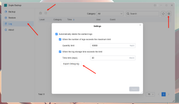
Please refer to the image to export the Duple Backup logs and debug logs. Then send them to our technical support email at support(at)terra-master.com. We will analyze the logs.
To contact our team, please send email to following addresses, remember to replace (at) with @

Technical team: support(at)terra-master.com(for technical support)
Service team: service(at)terra-master.com(for purchasing, return, replacement, RMA service)
User avatar
yxyx999
Posts: 11
Joined: 11 Nov 2025, 00:09
Germany

Re: [Help] Double Backup Issue with Rsync over ssh

Post by yxyx999 »

CursaYang wrote: ↑24 Aug 2026, 11:00 Image

Please refer to the image to export the Duple Backup logs and debug logs. Then send them to our technical support email at support(at)terra-master.com. We will analyze the logs.
Hi CursaYang, thanks for getting back to me! I’ve sent the log over and I’ll be sure to let you know if anything else comes up.
User avatar
TMjack
TM Support
Posts: 201
Joined: 27 Oct 2020, 08:41

Re: [Help] Double Backup Issue with Rsync over ssh

Post by TMjack »

Once our engineers receive your logs, they will analyze them as soon as possible. We will notify you of the results by email immediately once the analysis is complete.
To contact our team, please send email to following addresses, remember to replace (at) with @
Technical team: support(at)terra-master.com (for technical support)
Service team: service(at)terra-master.com (for purchasing, return, replacement, RMA service)
User avatar
TMroy
TM Support
Posts: 3135
Joined: 10 Mar 2020, 14:04
China

Re: [Help] Double Backup Issue with Rsync over ssh

Post by TMroy »

Currently Douple Backup does not support rsync backup over ssh. You need use rsync module mode.
To contact our team, please send email to following addresses, remember to replace (at) with @:
Support team: support(at)terra-master.com (for technical support only)
Service team: service(at)terra-master.com (for purchasing, return, replacement, RMA service)
User avatar
yxyx999
Posts: 11
Joined: 11 Nov 2025, 00:09
Germany

Re: [Help] Double Backup Issue with Rsync over ssh

Post by yxyx999 »

TMroy wrote: ↑29 Aug 2026, 09:55 Currently Douple Backup does not support rsync backup over ssh. You need use rsync module mode.
Hi Roy, if I understand you correct, you mean the rsync Backup Tab in the normal Backup Application? I tried it here with the ssh Transmission encryption in Port 22, but this gives me just a generic "Failed to connect to backup destination" pop up window
User avatar
CursaYang
TM Support
Posts: 953
Joined: 06 Jan 2025, 16:34
China

Re: [Help] Double Backup Issue with Rsync over ssh

Post by CursaYang »

We need to examine this issue remotely. Please visit the link below and contact our online support team to schedule a remote session:
https://salesiq.zohopublic.com/signatur ... 97d0be8892
To contact our team, please send email to following addresses, remember to replace (at) with @

Technical team: support(at)terra-master.com(for technical support)
Service team: service(at)terra-master.com(for purchasing, return, replacement, RMA service)
Post Reply

Return to “File Services”