

Currently, the Left/Right Arrow keys can be used to switch between images, while the Up/Down Arrow keys can be used to zoom in and out. The PgUp/PgDown keys are currently not supported for switching between images.
Terramaster Photos
Re: Terramaster Photos
To contact our team, please send email to following addresses, remember to replace (at) with @
Technical team: support(at)terra-master.com(for technical support)
Service team: service(at)terra-master.com(for purchasing, return, replacement, RMA service)
Technical team: support(at)terra-master.com(for technical support)
Service team: service(at)terra-master.com(for purchasing, return, replacement, RMA service)


Re: Terramaster Photos
Currently, on the timeline page, you can only scroll the page using the mouse wheel or by dragging the scrollbar on the right.
To contact our team, please send email to following addresses, remember to replace (at) with @
Technical team: support(at)terra-master.com(for technical support)
Service team: service(at)terra-master.com(for purchasing, return, replacement, RMA service)
Technical team: support(at)terra-master.com(for technical support)
Service team: service(at)terra-master.com(for purchasing, return, replacement, RMA service)


Re: Terramaster Photos
Hi,
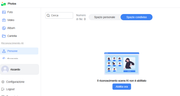
I didn't test the indexing but I need to tell that every time there is an OS update (recently to 1140 and 1163), App Photos AI went disabled and it's necessary to re-enable wasting lot of time and CPU to redo all the analysis.
I didn't test the indexing but I need to tell that every time there is an OS update (recently to 1140 and 1163), App Photos AI went disabled and it's necessary to re-enable wasting lot of time and CPU to redo all the analysis.

Re: Terramaster Photos
We tested this in our internal testing environment but were unable to reproduce the issue.
Could you please keep an eye on this behavior during your next system update to see if it recurs? In the meantime, we will continue to monitor this situation.
Thank you for your feedback!
To contact our team, please send email to following addresses, remember to replace (at) with @
Technical team: support(at)terra-master.com(for technical support)
Service team: service(at)terra-master.com(for purchasing, return, replacement, RMA service)
Technical team: support(at)terra-master.com(for technical support)
Service team: service(at)terra-master.com(for purchasing, return, replacement, RMA service)


Re: Terramaster Photos
I haven't found this request anywhere, so excuse me if it is a duplicate.
On the TNAS mobile app (and I'm using it on an iPhone), please add the option to separately view photos and videos, which is functionality available on the desktop version.
On the TNAS mobile app (and I'm using it on an iPhone), please add the option to separately view photos and videos, which is functionality available on the desktop version.
Re: Terramaster Photos
What version of TNAS Mobile are you currently using? In TNAS Mobile 3.5.081, you can view photos and videos through the built-in Photos app.
To contact our team, please send email to following addresses, remember to replace (at) with @
Technical team: support(at)terra-master.com(for technical support)
Service team: service(at)terra-master.com(for purchasing, return, replacement, RMA service)
Technical team: support(at)terra-master.com(for technical support)
Service team: service(at)terra-master.com(for purchasing, return, replacement, RMA service)
Re: Terramaster Photos
I’m on 3.5.081. I have the photos option but photos and videos are combined. I’m looking for a way to filter them separately. In the desktop app, there are two separate icons to select either photos or videos.
Re: Terramaster Photos
We apologize — we did not fully understand your requirements before. Currently, TNAS Mobile does not support viewing photos and videos separately. I will forward this request to our product team, and thank you very much for your suggestion.
To contact our team, please send email to following addresses, remember to replace (at) with @
Technical team: support(at)terra-master.com(for technical support)
Service team: service(at)terra-master.com(for purchasing, return, replacement, RMA service)
Technical team: support(at)terra-master.com(for technical support)
Service team: service(at)terra-master.com(for purchasing, return, replacement, RMA service)
Re: Terramaster Photos
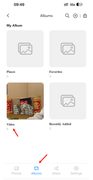
Hello. After evaluation by our product team, we have decided to keep the current design as is in order to maintain a consistent overall page layout. If you need to access videos separately, you can select video in the Albums app to view it.
To contact our team, please send email to following addresses, remember to replace (at) with @
Technical team: support(at)terra-master.com(for technical support)
Service team: service(at)terra-master.com(for purchasing, return, replacement, RMA service)
Technical team: support(at)terra-master.com(for technical support)
Service team: service(at)terra-master.com(for purchasing, return, replacement, RMA service)