

Hi all ,
i have TM F4-424 Pro , TOS6.0.794
got this problem after upgrade to TOS6.0.794
----
Internal Server Error
The server encountered an internal error and was unable to complete your request.
Please contact the server administrator if this error reappears multiple times, please include the technical details below in your report.
More details can be found in the server log.
----
I try to install NextCloud from app Center in TOS6.0 but hardly got it work form database then next issues is after setup i got php is missed alot of modules and dont know how to install it or update the php from 7 to last version as its use the TOS php and cant be edited so any help ?
here the problem i go when check status form nextcloud admin and i cant even reconfig memorey in php.conf :
The PHP memory limit is below the recommended value of 512MB.
Your data directory and files are probably accessible from the internet. The .htaccess file is not working. It is strongly recommended that you configure your web server so that the data directory is no longer accessible, or move the data directory outside the web server document root.
The "X-Content-Type-Options" HTTP header is not set to "nosniff". This is a potential security or privacy risk, as it is recommended to adjust this setting accordingly.
The "X-Frame-Options" HTTP header is not set to "SAMEORIGIN". This is a potential security or privacy risk, as it is recommended to adjust this setting accordingly.
Accessing site insecurely via HTTP. You are strongly advised to set up your server to require HTTPS instead, as described in the security tips ↗.
Your web server is not properly set up to resolve "/.well-known/webfinger". Further information can be found in the documentation ↗.
Your web server is not properly set up to resolve "/.well-known/nodeinfo". Further information can be found in the documentation ↗.
Your web server is not properly set up to resolve "/.well-known/caldav". Further information can be found in the documentation ↗.
Your web server is not properly set up to resolve "/.well-known/carddav". Further information can be found in the documentation ↗.
Your installation has no default phone region set. This is required to validate phone numbers in the profile settings without a country code. To allow numbers without a country code, please add "default_phone_region" with the respective ISO 3166-1 code ↗ of the region to your config file.
No memory cache has been configured. To enhance performance, please configure a memcache, if available. Further information can be found in the documentation ↗.
This instance is missing some recommended PHP modules. For improved performance and better compatibility it is highly recommended to install them.
intl
gmp
imagick
[help] NextCloud installation and configurations issues
[help] NextCloud installation and configurations issues
F4-424 Pro 32GB


Re: [help] NextCloud installation and configurations issues
Update PHP to latest version, install required modules (intl, gmp, imagick), set memory_limit ≥512MB, fix .htaccess, enable HTTPS, configure well-known URLs, move data خارج webroot, enable OPcache/memcache, and set security headers properly.


Re: [help] NextCloud installation and configurations issues
Thank you for your feedback. The Nextcloud version currently included in the App Center is an early version. We recommend that you go to the TOS system interface > App Center > Community Apps to install the latest version of the community application.
To contact our team, please send email to following addresses, remember to replace (at) with @
Technical team: support(at)terra-master.com(for technical support)
Service team: service(at)terra-master.com(for purchasing, return, replacement, RMA service)
Technical team: support(at)terra-master.com(for technical support)
Service team: service(at)terra-master.com(for purchasing, return, replacement, RMA service)


Re: [help] NextCloud installation and configurations issues
Hi, I am on the latest TOS 7. The Nextcloud App through the "App Center" (also installed MariaDB) returns an error like "Error while trying to create admin user: Failed to connect to the database: An exception occurred in the driver: SQLSTATE[HY000] [2006] MySQL server has gone away".
Can you please give me detailed steps how to install / configure Nextcloud?
I tried to change the "Database host" for localhost and several ports, etc and only now with the NAS IP and port I use to access it via Web browser, it did something, but I always get some kind of error...
Thank you
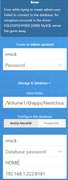
Can you please give me detailed steps how to install / configure Nextcloud?
I tried to change the "Database host" for localhost and several ports, etc and only now with the NAS IP and port I use to access it via Web browser, it did something, but I always get some kind of error...
Thank you

Re: [help] NextCloud installation and configurations issues
The Nextcloud version currently available on the App Center is an earlier release. We recommend navigating to TOS System Interface > App Center > Community Apps to install the latest community version:
https://tmnascommunity.eu/download/nextcloud_okm/
You can also refer to the configuration instructions on the relevant page for setup guidance.
https://tmnascommunity.eu/download/nextcloud_okm/
You can also refer to the configuration instructions on the relevant page for setup guidance.
To contact our team, please send email to following addresses, remember to replace (at) with @
Technical team: support(at)terra-master.com(for technical support)
Service team: service(at)terra-master.com(for purchasing, return, replacement, RMA service)
Technical team: support(at)terra-master.com(for technical support)
Service team: service(at)terra-master.com(for purchasing, return, replacement, RMA service)
Re: [help] NextCloud installation and configurations issues
Hi, I do not see my previous message, but basically: TOS 7 (the latest) + App Center Nextcloud & MariaDb. I am trying to set it up but I always get some different error like Data base or Access Timeout etc.
Could you tell me how to config? Step-by-step? Thank you
Could you tell me how to config? Step-by-step? Thank you
Re: [help] NextCloud installation and configurations issues
https://tmnascommunity.eu/download/nextcloud_okm/
You can refer this.
You can refer this.
To contact our team, please send email to following addresses, remember to replace (at) with @
Technical team: support(at)terra-master.com(for technical support)
Service team: service(at)terra-master.com(for purchasing, return, replacement, RMA service)
Technical team: support(at)terra-master.com(for technical support)
Service team: service(at)terra-master.com(for purchasing, return, replacement, RMA service)