[Help] After update 7.0.1105 TOS shows bios warning

The discussion here is limited to topics related to the system update itself. Please post the functional issues after the system update to the corresponding other forums.
Post Reply
User avatar
ajsango
Posts: 2
Joined: 17 Aug 2026, 08:13
United States of America

[Help] After update 7.0.1105 TOS shows bios warning

Post by ajsango »

:x
BIOS Version MADNO102.V05

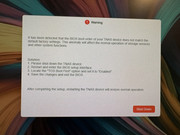
Error message after login to TOS 7.0 as follows:

"It has been detected that the bios boot order of your TNAS device does not match the default factory settings. This anomaly will affect the normal operation of storage services and other system functions.

Solution:
1) Shut down the TNAS device
2) Restart and enter bios setup interface
3) Locate the "TOS BOOT FIRST" option and set it to enabled
4) Save the changes and exit the bios.

After completing the setup, restarting the TNAS device will restore normal operation."


I can verify that the TOS BOOT FIRST option is enabled. Message still persists. This update has essentially bricked my TNAS device making it unusable. I am grateful for any suggestion that can overcome this problem Thank you in advance.

The TOS appears to boot normally, because I can login to the web interface.. however this warning doesn't not allow me to pass with only the option to shutdown the device.

Image
User avatar
ajsango
Posts: 2
Joined: 17 Aug 2026, 08:13
United States of America

Re: [Help] After update 7.0.1105 TOS shows bios warning

Post by ajsango »

I forgot to mention that my device is TNAS F6-424.
User avatar
EriChan
TM Support
Posts: 316
Joined: 06 Jan 2026, 12:27
China

Re: [Help] After update 7.0.1105 TOS shows bios warning

Post by EriChan »

ajsango wrote: 17 Aug 2026, 08:24
Thank you for the detailed description. As this issue is uncommon and involves multiple potential factors, please contact our support team via the link below to schedule a remote technical support session. Our engineers will connect directly to diagnose and help fix the problem:

https://salesiq.zohopublic.com/signatur ... 97d0be8892

(Please remember to include this forum thread link and your forum ID when reaching out.)
To contact our team, please send email to following addresses, remember to replace (at) with @

Technical team: support(at)terra-master.com(for technical support)
Service team: service(at)terra-master.com(for purchasing, return, replacement, RMA service)
Post Reply

Return to “System Update”