

My F4-425 Pro (i3-N305) chip has the same problems as the N350 Chip in the other topic, maxing out at around 98 °C under a load of 20-25%.
The N305 chip has a TDP of 15W and a TDP Down of 9W. Depending on the cooling. In the BIOS it's 13500 so that's not bad when it's put in a desktop with good cooling. I think in this case it should be 9W standard. Also: The max draw is not limited so my Chip will take in the max of 35W according to the Intel ARK site. This will bring it to 98 °C in my F4-425 Pro. 35W max is only for Desktops with proper Cooling according to the Intel ARK site. it wil run at 3.8 GHz. on all cores.
So, all F4-425 models have the same bios and settings but different chips?
I guess a BIOS firmware update is needed for this with a differentiation of the 350 and 305 chips.
Especially capping the max Watt limit of the CPU to ensure the chip is not frequently overheating and dying after several months of use.
I used the Intel Rapl to test the wattage after BIOS tweaks; PL1: 9000 and PL2: 15000.
Test results:
Situation: Duration: Package power: Temperature:
Idle 120s 4,27 W 50 °C
Load, 12% 10 s 8,96 W 82 °C
Load, 18% 120 s 8,99 W 89 °C
Editing the settings work but the temperature still is quite high here.
Looks like I also have a unit with the thermal paste applied wrong....
I will bring all setting back to stock and do the test again later and post it here with pictures.
[Help] My F4-425 Pro (N305) is reaching 98°C under load (25%) [SOLVED]


Re: [Help] My F4-425 Pro (N305) is reaching 98°C under load (25%)
Start with the simple stuff, seriously do you feel the fan blowing air? Is the fan setting set to auto?
F6-424 & F4-425 Plus at 7.0.1298
F4-424 Pro (x2) at 7.0.1298
D4-320 (Offline until I can afford more HDDs)
F4-424 Pro (x2) at 7.0.1298
D4-320 (Offline until I can afford more HDDs)
Re: [Help] My F4-425 Pro (N305) is reaching 98°C under load (25%)
Fan blows air, Fan is going to 1400 RPM under load. No problem there. all the simple stuff is already checked. 


Re: [Help] My F4-425 Pro (N305) is reaching 98°C under load (25%)
I know it's apples and oranges, but on every Tnas I have the fan(s) run at over 2000rpm at full speed and probably about 1800 on auto. The ambient today is about 35C. (See sig for models)
F5-221 TOS7.0.1278 - 4x4TB (Ironwolf) Traid
F2-424 TOS7.0.1278 - 2x500GB nvme (P3) Traid, 2x6TB HDD (HGST) Traid
F2-221 TOS7.0.1278 - 1x3TB Ext4, 1x4TB Btrfs
F2-425+ TOS7.0.1278 - 2x500GB nvme (P3) Traid, 2x6TB HDD (EXOS) Traid
F2-424 TOS7.0.1278 - 2x500GB nvme (P3) Traid, 2x6TB HDD (HGST) Traid
F2-221 TOS7.0.1278 - 1x3TB Ext4, 1x4TB Btrfs
F2-425+ TOS7.0.1278 - 2x500GB nvme (P3) Traid, 2x6TB HDD (EXOS) Traid


Re: [Help] My F4-425 Pro (N305) is reaching 98°C under load (25%)
Thank you for your feedback and detailed analysis!
We look forward to seeing your follow-up test results and pictures with the stock settings.
To contact our team, please send email to following addresses, remember to replace (at) with @
Technical team: support(at)terra-master.com(for technical support)
Service team: service(at)terra-master.com(for purchasing, return, replacement, RMA service)
Technical team: support(at)terra-master.com(for technical support)
Service team: service(at)terra-master.com(for purchasing, return, replacement, RMA service)
Re: [Help] My F4-425 Pro (N305) is reaching 98°C under load (25%)
Thanks, Ambient on my system is around 33C. So, not so different from yours. What are your CPU's doing idle and under load?
Re: [Help] My F4-425 Pro (N305) is reaching 98°C under load (25%)
Idle round 44C. Load - I don't load them that much, so not comparable.
F5-221 TOS7.0.1278 - 4x4TB (Ironwolf) Traid
F2-424 TOS7.0.1278 - 2x500GB nvme (P3) Traid, 2x6TB HDD (HGST) Traid
F2-221 TOS7.0.1278 - 1x3TB Ext4, 1x4TB Btrfs
F2-425+ TOS7.0.1278 - 2x500GB nvme (P3) Traid, 2x6TB HDD (EXOS) Traid
F2-424 TOS7.0.1278 - 2x500GB nvme (P3) Traid, 2x6TB HDD (HGST) Traid
F2-221 TOS7.0.1278 - 1x3TB Ext4, 1x4TB Btrfs
F2-425+ TOS7.0.1278 - 2x500GB nvme (P3) Traid, 2x6TB HDD (EXOS) Traid
Re: [Help] My F4-425 Pro (N305) is reaching 98°C under load (25%)
CPU temperature / power behaviour – TerraMaster NAS
I've been investigating unusually high CPU temperatures on my unit.
The NAS is currently completely back to stock configuration, including the original BIOS defaults. I measured the CPU package power using the Intel RAPL energy_uj counter over 120-second intervals.
For comparison, I also tested a PL1 = 9 W / PL2 = 15 W configuration.
Configuration Avg. package power CPU temperature / behaviour
Stock – idle 4.35–4.38 W 54–56 °C
PL1 9 W / PL2 15 W – idle ~4.27 W ~50–53 °C
Stock – 4 Transmission torrents ~10.03 W ~94 °C, thermal throttling
PL1 9 W / PL2 15 W – Transmission ~8.99 W Peaks around ~89 °C
Stock behaviour
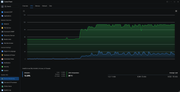
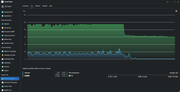
With the NAS completely stock, the CPU reaches approximately 88 °C within 20 seconds after starting four Transmission torrents. It subsequently reaches around 94 °C, at which point the CPU starts throttling. The temperature then drops to around 86 °C before rising again.
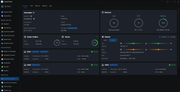
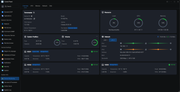
The fan was reporting approximately 84% / 1450 RPM during this behaviour and did not appear to increase significantly beyond that.
After stopping Transmission, the CPU temperature dropped from approximately 94 °C to 64 °C within about 10 seconds.
Power-limit test
As a comparison, I temporarily configured:
PL1: 9 W
PL2: 15 W
A 120-second RAPL measurement under sustained Transmission load showed approximately 8.99 W average package power.
This reduced the maximum observed temperature somewhat, but the CPU could still reach approximately 89 °C.
Interestingly, idle package power was essentially unchanged between the configurations (~4.27 W vs. ~4.35–4.38 W).
Question
Could TerraMaster please clarify whether these temperatures are considered normal for this CPU/cooling solution?
In particular, I'm interested in whether the combination of:
~54–56 °C at only ~4.35 W idle package power;
~94 °C under approximately 10 W sustained package power;
thermal throttling under sustained Transmission load;
and the fan apparently topping out around ~1450 RPM;
is expected behaviour, or whether this unit may have a thermal interface, heatsink/contact, fan-control or other hardware issue.
I've attached screenshots of the temperatures, fan speed and measurements.
Thanks!
I've been investigating unusually high CPU temperatures on my unit.
The NAS is currently completely back to stock configuration, including the original BIOS defaults. I measured the CPU package power using the Intel RAPL energy_uj counter over 120-second intervals.
For comparison, I also tested a PL1 = 9 W / PL2 = 15 W configuration.
Configuration Avg. package power CPU temperature / behaviour
Stock – idle 4.35–4.38 W 54–56 °C
PL1 9 W / PL2 15 W – idle ~4.27 W ~50–53 °C
Stock – 4 Transmission torrents ~10.03 W ~94 °C, thermal throttling
PL1 9 W / PL2 15 W – Transmission ~8.99 W Peaks around ~89 °C
Stock behaviour
With the NAS completely stock, the CPU reaches approximately 88 °C within 20 seconds after starting four Transmission torrents. It subsequently reaches around 94 °C, at which point the CPU starts throttling. The temperature then drops to around 86 °C before rising again.
The fan was reporting approximately 84% / 1450 RPM during this behaviour and did not appear to increase significantly beyond that.
After stopping Transmission, the CPU temperature dropped from approximately 94 °C to 64 °C within about 10 seconds.
Power-limit test
As a comparison, I temporarily configured:
PL1: 9 W
PL2: 15 W
A 120-second RAPL measurement under sustained Transmission load showed approximately 8.99 W average package power.
This reduced the maximum observed temperature somewhat, but the CPU could still reach approximately 89 °C.
Interestingly, idle package power was essentially unchanged between the configurations (~4.27 W vs. ~4.35–4.38 W).
Question
Could TerraMaster please clarify whether these temperatures are considered normal for this CPU/cooling solution?
In particular, I'm interested in whether the combination of:
~54–56 °C at only ~4.35 W idle package power;
~94 °C under approximately 10 W sustained package power;
thermal throttling under sustained Transmission load;
and the fan apparently topping out around ~1450 RPM;
is expected behaviour, or whether this unit may have a thermal interface, heatsink/contact, fan-control or other hardware issue.
I've attached screenshots of the temperatures, fan speed and measurements.
Thanks!
Re: [Help] My F4-425 Pro (N305) is reaching 98°C under load (25%)
I uploaded the results. I have not reached the 98 I got earlier but 94 in sustained tests.
Thanks!

Re: [Help] My F4-425 Pro (N305) is reaching 98°C under load (25%)
High CPU temperature under low load usually indicates degraded thermal paste. Please reach out to our support team for warranty service.
To contact our team, please send email to following addresses, remember to replace (at) with @:
Support team: support(at)terra-master.com (for technical support only)
Service team: service(at)terra-master.com (for purchasing, return, replacement, RMA service)
Support team: support(at)terra-master.com (for technical support only)
Service team: service(at)terra-master.com (for purchasing, return, replacement, RMA service)