These connections stem from the network connectivity detection mechanism in TOS 7.
The system implements a CheckNetworkBy204 service that checks internet connectivity approximately every 15 seconds. As part of this process, it performs DNS queries and connectivity checks against multiple well-known domains (such as baidu.com, google.com, cloudflare.com, etc.) to determine whether the NAS has an active internet connection.
This is expected background behavior used purely for network status monitoring. Hope this clarifies your concern!
To contact our team, please send email to following addresses, remember to replace (at) with @
These connections stem from the network connectivity detection mechanism in TOS 7.
The system implements a CheckNetworkBy204 service that checks internet connectivity approximately every 15 seconds. As part of this process, it performs DNS queries and connectivity checks against multiple well-known domains (such as baidu.com, google.com, cloudflare.com, etc.) to determine whether the NAS has an active internet connection.
This is expected background behavior used purely for network status monitoring. Hope this clarifies your concern!
To better assist you in confirming whether there are any abnormalities in the TOS system, please navigate to TOS > Technical Support > Issue Reports to generate and download the system report, then send the it to our technical support email at [email protected] via email, and attach the forum link and your forum ID as well.
To contact our team, please send email to following addresses, remember to replace (at) with @
First issue (display error):
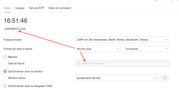
I set the date format to dd-mm-yyyy, but in the same dialog, the date is still displayed in the French format and in the US format, despite manually changing the setting.
Second issue (link error!?):
When I search for “NTP” and jump to the corresponding menu, the dialog suddenly appears completely empty.
Model: F2-424 with TOS 7.0.1105 - currently changing every month - Bios V08
you can discuss with me in French, German and English
The upgrade to 7.0.0804 appeared to be ok having upgraded from TOS 6 on a F2-223 which was stable and running for typically 60-70days with zero issue before an update, but with no TOS 6 updates coming out anymore, it was time to move up.
Well it appeared to be ok for the first half hour after the upgrade completed and then things one by one began stopping and services crashing, and then I could not longer ssh in, or login, and can now not even log in to the local monitor and keyboard plugged in TTY screen. Not sure how something can be working fine than have this occur unless some process after the upgrade continues to change things in the back ground.
So as of right now, the machine is useless. It cannot be reached on the network, I can not ssh in, no TOS web UI is reachable, and on the TTY local monitor, not one of the many accounts I had setup and working, allow any login.
I guess it's start completely over and confirm it "works" before deciding further course of actions and moving past. Where can I get a USB/restore image to get this back to a functioning state?
These connections stem from the network connectivity detection mechanism in TOS 7.
The system implements a CheckNetworkBy204 service that checks internet connectivity approximately every 15 seconds. As part of this process, it performs DNS queries and connectivity checks against multiple well-known domains (such as baidu.com, google.com, cloudflare.com, etc.) to determine whether the NAS has an active internet connection.
This is expected background behavior used purely for network status monitoring. Hope this clarifies your concern!
I've had the same experience: heavy network activity after updating to DOS 7—not just to Baidu, Google, and Cloudflare, but also to myexternalip.com, ifconfig.me, and api.seeip.org—and all of this even though my system is running in “Security Isolation Mode.”
If the “Security Isolation Mode” is apparently intended to block external access requests, why does the system still broadcast its external IP address to the open Internet every 15 seconds?
Wouldn't it be better if network connectivity detection were active only when external network services are actually being used?
After upgrading to TOS 7, you may be unable to access the system due to a full root directory or excessively high system resource consumption. Since the system is currently inaccessible, we cannot confirm the exact root cause.
You can first refer to this post to create a bootable TOS 7 system: viewtopic.php?t=6433
Thanks for the extra details. We'll monitor this and keep testing to see if we can replicate it.
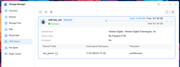
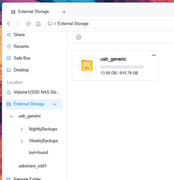
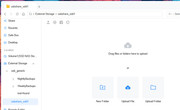
I have an additional observation after the TOS 7 update that hopefully someone can explain. While under TOS 6, I used USB Copy to make backups of Volume1 to an attached USB storage device. USB Copy as part of its functionality created the backup scheduled tasks for me. I then created custom scheduled tasks to clean up old backups. All worked perfectly under TOS 6. Now under TOS 7 the USB Copy backup tasks still work properly but my custom backup clean up tasks did not. In troubleshooting this issue I found that under TOS 6 the attached USB storage device was mounted solely as usbshare_sdc1 but now under TOS 7 it was mounted as both usbshare_sdd1 and usb_generic folders. See attached screenshots. USB Copy backup tasks were automatically modified to point to the new usb_generic folder. However, my custom backup clean up tasks were not automatically modified. I had to manually modify the scripts that those clean up tasks ran. Also, the new usbshare_sdd1 seems to be empty and available as storage for any other files I may have. Basically, it looks like my external USB storage has 2 partitions but as you can see from the last picture it only has 1 partition occupying the entire disk. Thank you for any enlightenment you can shed on this.
TOS7 uses new path names. However, some old path names from TOS6 may still remain. This is a display issue that is currently being fixed; please wait for a future TOS update.
Sorry, due to changes in USB path names after upgrading to TOS7, you will need to modify your original custom tasks.
Regarding the “additional partition” you mentioned, it does not appear to be mentioned in the screenshot you provided.
To contact our team, please send email to following addresses, remember to replace (at) with @:
Technical team: support(at)terra-master.com (for technical support)
Service team: service(at)terra-master.com (for purchasing, return, replacement, RMA service)
TMzethar wrote: ↑01 Sep 2026, 15:01
Sorry, due to changes in USB path names after upgrading to TOS7, you will need to modify your original custom tasks.
Was this ever mentioned in the release notes? If not, maybe it should have been. Does the change of path names affect anything else?



 - Bios V08