If your current system version is 6.0.794, please first refer to the instructions on the first page of this post to check your current BIOS version. Once you’ve confirmed your device meets the upgrade requirements, you can manually upgrade it to version 7.0.0747, after which you will receive push notifications for higher version updates.
Please remove the D4-320 before starting the upgrade, and reconnect it once the upgrade is fully complete.
To contact our team, please send email to following addresses, remember to replace (at) with @
Just want to make sure procedure, this is what I am planning (1) turn off F4-424 (2) then turn off D4-320 (3) turn F4-424 on but leave D4-320 off (4) do the upgrade since my current version is 6.0.794 and bios is 1.06 (5) wait for the upgrade finished (6) update it to the lastest update version (7) turn the F4-424 off (8) turn the D4-320 back on (9) turn the F4-424 on.
One question is remove D4-320 also mean I have to remove its volume before the upgrade? Please also note that my system disk is a nvme. m2 ssd (volume 1) the drives inside F4-424 is traid (volume 2), the drives inside D4-320 is Traid (volume 3).
I hope the above 1-9 procedure are what I suppose to do, please let me know if something is wrong with my procedure. Thanks.
Seems I did something wrong because after the upgrade to TOS 7, did the auto shared folder convertion permission before I add the D4-320 back to F4-424 but after it is completed (which was around 3 hours), I added the d4-320 back, TOS can see the volume, did not ask to do shared folder convertion permission and no problem with Jellyfin, the only problem is when I click the shortcut icon on TOS 7 dashboard a webpage with bad connection 501 error will pop up but if i use my ipaddress:8096 there is no problem, is there anyway to fix this and do I need to do a shared folder convertion permission on the d4-320 traid volume? Looking forward to your kind assistance.
apvm wrote: ↑30 Jul 2026, 00:21
Seems I did something wrong because after the upgrade to TOS 7, did the auto shared folder convertion permission before I add the D4-320 back to F4-424 but after it is completed (which was around 3 hours), I added the d4-320 back, TOS can see the volume, did not ask to do shared folder convertion permission and no problem with Jellyfin, the only problem is when I click the shortcut icon on TOS 7 dashboard a webpage with bad connection 501 error will pop up but if i use my ipaddress:8096 there is no problem, is there anyway to fix this and do I need to do a shared folder convertion permission on the d4-320 traid volume? Looking forward to your kind assistance.
Jellyfin app has changed its access address in newer releases. If you're using a shortcut from an older version, delete it and send it to desktop again from "All Applications." Also, make sure your Jellyfin app is updated to the latest version.
To contact our team, please send email to following addresses, remember to replace (at) with @:
Technical team: support(at)terra-master.com (for technical support)
Service team: service(at)terra-master.com (for purchasing, return, replacement, RMA service)
"Jellyfin app has changed its access address in newer releases. If you're using a shortcut from an older version, delete it and send it to desktop again"
How to do it? By the way, Jellyfin app said 10.11.15 installed but Jellyfish report it is version 10.11.0 and web version is 10.11.0 (c8eed9a89-dirty)
Version 10.11.15 is an adaptation derived from the native server version 10.11.0.
That's why the app still shows the original version number (10.11.0) internally.
To contact our team, please send email to following addresses, remember to replace (at) with @:
Technical team: support(at)terra-master.com (for technical support)
Service team: service(at)terra-master.com (for purchasing, return, replacement, RMA service)
TMzethar wrote: ↑30 Jul 2026, 18:51
Version 10.11.15 is an adaptation derived from the native server version 10.11.0.
That's why the app still shows the original version number (10.11.0) internally.
Thanks, if that is the case, everything seems to work now, the D4-320 will sleep in 30 minutes (all led lights will be off only the power Led is on).
My upgrade to TOS 7 seems a little bit more complicated since I have the D4-320 as Traid volume 3, not just the F4-424 or other NAS alone without any attached D4-320.
I performed the update on an F4-424 with Bios MADN0101.V05.
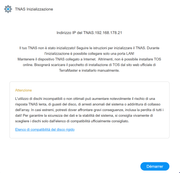
After completing the update which lasted about 5 minutes, when I rebooted I received a message that the system needs to be reinitialized
But will I lose everything I have on the HDDs? How can I solve this?
Thanks
SOLVED! Sorry, I didn't read the solution on the first page carefully. All I had to do was remove the USB stick.
brigius wrote: ↑31 Jul 2026, 14:10
I performed the update on an F4-424 with Bios MADN0101.V05.
After completing the update which lasted about 5 minutes, when I rebooted I received a message that the system needs to be reinitialized
But will I lose everything I have on the HDDs? How can I solve this?
Thanks