[ Kavita ] Self-hosted digital book library

Discussion on apps, protocols, APIs, specifications, and more. You are welcome to join us as a TOS app developer!
User avatar
scottish
Posts: 3
Joined: 30 Jan 2021, 20:21
Great Britain

Re: [ Kavita ] Self-hosted digital book library

Post by scottish »

i have managed to install but it won't enable, is there anything i should try to get it to enable
When i go into the gui and try starting nothing happens
Image

Image


the Start .log is
26/05/25 20:51:58 Will use /Volume1 to store config files
26/05/25 20:51:59 The main volume is /Volume1
26/05/25 20:51:59 Config folder exist at /usr/local/@APP_CONFIG/Kavita
26/05/25 20:51:59 config symlink doesn't exist, will be created
MODCONFIGPATHHOME=/home/Scottish21/MOD_CONFIG/Kavita
MODCONFIGPATH=/usr/local/@APP_CONFIG/Kavita
MAIN_VOLUME=/Volume1
HOME_VOLUME=/Volume1
[Kavita] [2025-05-26 20:52:01.172 +01:00 1] [Fatal] Host terminated unexpectedly
System.TypeInitializationException: The type initializer for 'Microsoft.Data.Sqlite.SqliteConnection' threw an exception.
---> System.Reflection.TargetInvocationException: Exception has been thrown by the target of an invocation.
---> System.DllNotFoundException: Unable to load shared library 'e_sqlite3' or one of its dependencies. In order to help diagnose loading problems, consider using a tool like strace. If you're using glibc, consider setting the LD_DEBUG environment variable:
/Volume1/@apps/Kavita/bin/program/e_sqlite3.so: cannot open shared object file: No such file or directory
/lib/libc.so.6: version `GLIBC_2.28' not found (required by /Volume1/@apps/Kavita/bin/program/libe_sqlite3.so)
libe_sqlite3.so: cannot open shared object file: No such file or directory
/Volume1/@apps/Kavita/bin/program/e_sqlite3: cannot open shared object file: No such file or directory
/Volume1/@apps/Kavita/bin/program/libe_sqlite3: cannot open shared object file: No such file or directory


I can send your the whole log if that would help
User avatar
outkastm
Gold Member
Posts: 1461
Joined: 29 Dec 2020, 23:52

Re: [ Kavita ] Self-hosted digital book library

Post by outkastm »

No need to send the complete log. Unfortunately, the GLIBC version available on TOS5 is too old for the latest versions of Kavita. Maybe is time for you to update to TOS6 if possible ? Also i dont have anymore a NAS running TOS5 to test the TOS5 apps...
User avatar
outkastm
Gold Member
Posts: 1461
Joined: 29 Dec 2020, 23:52

Re: [ Kavita ] Self-hosted digital book library

Post by outkastm »

probably i will come with a solution for TOS5 x86
User avatar
outkastm
Gold Member
Posts: 1461
Joined: 29 Dec 2020, 23:52

Re: [ Kavita ] Self-hosted digital book library

Post by outkastm »

Download and install ModBaseMusl + MUSL. Then download again latest Kavita for TOS5 and install it. Let me know if it will work.
User avatar
Metaladict
Posts: 2
Joined: 24 Jul 2026, 04:01
Peru

Re: [ Kavita ] Self-hosted digital book library

Post by Metaladict »

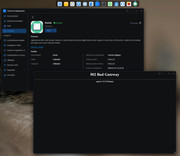
I recently upgraded from TOS 6 to TOS 7, and the KAVITA launcher isn't working for me, even though the app itself is working fine. Do you know how to fix the launcher issue?

Image
User avatar
Metaladict
Posts: 2
Joined: 24 Jul 2026, 04:01
Peru

Re: [ Kavita ] Self-hosted digital book library

Post by Metaladict »

Metaladict wrote: 24 Jul 2026, 04:15 I recently upgraded from TOS 6 to TOS 7, and the KAVITA launcher isn't working for me, even though the app itself is working fine. Do you know how to fix the launcher issue?

Image
I found the solution in the forums themselves; apparently, TOS 7 isn't included with PHP 7.4, so you have to install it from the App Center.

https://tmnascommunity.eu/2026/07/12/to ... -for-apps/
User avatar
petrose
Posts: 21
Joined: 26 Dec 2025, 19:08
Denmark

Re: [ Kavita ] Self-hosted digital book library

Post by petrose »

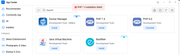
It seems that TOS 7 install of PHP 7.4 is no longer working !
It stops around 20% of install process:

Image

I reported it to TOS7 Forum prior to Final Version, and after I upgraded to Final version, problem still persist.
BR PetRose
My TNAS: F8 SSD Plus, now with TOS7 Final version along with 1+3x2 TB SSD sticks, formatted as BTRFS and using TRAID
User avatar
petrose
Posts: 21
Joined: 26 Dec 2025, 19:08
Denmark

Re: [ Kavita ] Self-hosted digital book library

Post by petrose »

petrose wrote: 26 Jul 2026, 23:56 It seems that TOS 7 install of PHP 7.4 is no longer working !
It stops around 20% of install process:

Image

I reported it to TOS7 Forum prior to Final Version, and after I upgraded to Final version, problem still persist.
Post this finding, I perused the syslog and found this, likely to cause the issue:

Code: Select all

Jul 26 17:50:26 SonjaNAS application[15873]: DEBUG /usr/bin/systemctl disable PHP74
Jul 26 17:50:26 SonjaNAS application[15873]: Shell execute error. Error=Failed to disable unit: Unit file PHP74.service does not exist.#012: exit status 1
Jul 26 17:50:30 SonjaNAS application[50603]: E: dpkg was interrupted, you must manually run 'dpkg --configure -a' to correct the problem.
Jul 26 17:50:30 SonjaNAS application[15873]: Application install failed:install error
Jul 26 17:50:31 SonjaNAS application[15873]: App operation error. AppID=PHP74 Operate=install Error State=2
Jul 26 17:50:31 SonjaNAS application[15873]: App state will be deleted. AppID=PHP74
Is this a good idea to have me running the command suggested 'dpkg --configure -a'
?
BR PetRose
My TNAS: F8 SSD Plus, now with TOS7 Final version along with 1+3x2 TB SSD sticks, formatted as BTRFS and using TRAID
User avatar
outkastm
Gold Member
Posts: 1461
Joined: 29 Dec 2020, 23:52

Re: [ Kavita ] Self-hosted digital book library

Post by outkastm »

petrose wrote: 26 Jul 2026, 23:56 It seems that TOS 7 install of PHP 7.4 is no longer working !
It stops around 20% of install process:

Image

I reported it to TOS7 Forum prior to Final Version, and after I upgraded to Final version, problem still persist.
PHP74 should install correctly and is an official app in the App Store
Is best to contact Terramaster if you encounter any issue during installation
Post Reply

Return to “Developer Discussion Room”