

My may have made a fatal mistake trying to replace the systems disk.
I initialized and installed TOS7 on a 500GB NVMe. Since I am new to NAS, I did not know at the time, I could not use the remaining space on the 500GB NVMe. I also created a 26TB TRAID volume and an 8TB volume. I thought it would be easy to powered down, replace the 500GB NVMe with a 16GB NVMe, unslot both the 26TB and 8TB volume drives, power on, initialize and install TOS7 on the new 16GB NVMe, power down, reseat the 26TB and 8TB volume drives, power on, and everything would be fine.
All is not fine. I can see the all the drives but the volumes did not restore. Is there any way to restore the volumes and recover my data?
Can not see data volumes after replacing system disk


Re: Can not see data volumes after replacing system disk
I'm afraid I cannot answer your question but, fyi, you should be able to create a storage pool/volume on the nvme and use the space not used by the operating system. Typically it is the first volume I create, so is 'Volume1', which contains user "home" folders and app installs. (My user demands for space are not excessive).
Last edited by Gremlin on 24 Jul 2026, 18:43, edited 1 time in total.
F5-221 TOS7.0.1278 - 4x4TB (Ironwolf) Traid
F2-424 TOS7.0.1278 - 2x500GB nvme (P3) Traid, 2x6TB HDD (HGST) Traid
F2-221 TOS7.0.1278 - 1x3TB Ext4, 1x4TB Btrfs
F2-425+ TOS7.0.1278 - 2x500GB nvme (P3) Traid, 2x6TB HDD (EXOS) Traid
F2-424 TOS7.0.1278 - 2x500GB nvme (P3) Traid, 2x6TB HDD (HGST) Traid
F2-221 TOS7.0.1278 - 1x3TB Ext4, 1x4TB Btrfs
F2-425+ TOS7.0.1278 - 2x500GB nvme (P3) Traid, 2x6TB HDD (EXOS) Traid

Re: Can not see data volumes after replacing system disk
For your newly installed TOS 7 on the 16GB NVMe SSD, the 26TB and 8TB drives are new to the system and will not appear directly in the Storage Management interface.
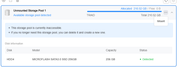
However, the Storage Management interface should be capable of detecting the storage pools and volumes present on these HDDs. You may select and mount them via the Storage Pool interface to make the pools and volumes accessible.
"Mounting allows you to mount a Storage Pool created on another device (TOS system) and restore it to an available state without restarting the system."
We hope this is helpful. If so, please let us know.
However, the Storage Management interface should be capable of detecting the storage pools and volumes present on these HDDs. You may select and mount them via the Storage Pool interface to make the pools and volumes accessible.
"Mounting allows you to mount a Storage Pool created on another device (TOS system) and restore it to an available state without restarting the system."
We hope this is helpful. If so, please let us know.
To contact our team, please send email to following addresses, remember to replace (at) with @:
Technical team: support(at)terra-master.com (for technical support)
Service team: service(at)terra-master.com (for purchasing, return, replacement, RMA service)
Technical team: support(at)terra-master.com (for technical support)
Service team: service(at)terra-master.com (for purchasing, return, replacement, RMA service)
Re: Can not see data volumes after replacing system disk
Possibly because I have never had occasion to install "other system" drives (particularly in Tos7), but I don't see this. Where is the mount option in Storage Pool interface? I only see "Add" (+), "Edit" and "Delete". Does it only appear when there is a valid Pool available to mount? Conversely, if "Mount" is allowed, is there no option to unmount an existing Pool. (Supposing someone wished to replace one pool with another from a different device,for example.)
F5-221 TOS7.0.1278 - 4x4TB (Ironwolf) Traid
F2-424 TOS7.0.1278 - 2x500GB nvme (P3) Traid, 2x6TB HDD (HGST) Traid
F2-221 TOS7.0.1278 - 1x3TB Ext4, 1x4TB Btrfs
F2-425+ TOS7.0.1278 - 2x500GB nvme (P3) Traid, 2x6TB HDD (EXOS) Traid
F2-424 TOS7.0.1278 - 2x500GB nvme (P3) Traid, 2x6TB HDD (HGST) Traid
F2-221 TOS7.0.1278 - 1x3TB Ext4, 1x4TB Btrfs
F2-425+ TOS7.0.1278 - 2x500GB nvme (P3) Traid, 2x6TB HDD (EXOS) Traid
Re: Can not see data volumes after replacing system disk
I understood what he meant. My problem was I could not see my volumes because I reseated the HDDs while the NAS was on. As soon as I rebooted everything was recognized and restored. I have two NVMes available that I can mount and unmount in Storage Manager though. I will leave them that way until I have a dedicated purpose for them.
Re: Can not see data volumes after replacing system disk
Like this:Gremlin wrote: ↑25 Jul 2026, 18:38 Possibly because I have never had occasion to install "other system" drives (particularly in Tos7), but I don't see this. Where is the mount option in Storage Pool interface? I only see "Add" (+), "Edit" and "Delete". Does it only appear when there is a valid Pool available to mount? Conversely, if "Mount" is allowed, is there no option to unmount an existing Pool. (Supposing someone wished to replace one pool with another from a different device,for example.)
To contact our team, please send email to following addresses, remember to replace (at) with @:
Technical team: support(at)terra-master.com (for technical support)
Service team: service(at)terra-master.com (for purchasing, return, replacement, RMA service)
Technical team: support(at)terra-master.com (for technical support)
Service team: service(at)terra-master.com (for purchasing, return, replacement, RMA service)
Re: Can not see data volumes after replacing system disk
F5-221 TOS7.0.1278 - 4x4TB (Ironwolf) Traid
F2-424 TOS7.0.1278 - 2x500GB nvme (P3) Traid, 2x6TB HDD (HGST) Traid
F2-221 TOS7.0.1278 - 1x3TB Ext4, 1x4TB Btrfs
F2-425+ TOS7.0.1278 - 2x500GB nvme (P3) Traid, 2x6TB HDD (EXOS) Traid
F2-424 TOS7.0.1278 - 2x500GB nvme (P3) Traid, 2x6TB HDD (HGST) Traid
F2-221 TOS7.0.1278 - 1x3TB Ext4, 1x4TB Btrfs
F2-425+ TOS7.0.1278 - 2x500GB nvme (P3) Traid, 2x6TB HDD (EXOS) Traid