

I have noticed that all my shared folders that are assigned to my login are hidden from view, I have the read/write permissions set to me but can't understand why they are all hidden from view.
As you can see in the below image, there is a total of 11 and i'm on the 1st page, 2nd page only shows 1 called Virtual Box - permissions not set to me)
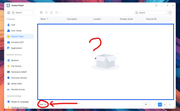
The help page seems to refer to a 'advance setting' in the top right corner of the shared file page, I assume this is in regard to older software perhaps because as you can see, there is nothing of the sort.
I'm on the most recent update version: 7.0.0791
It was like this in the main V7 release.
How do I get the shared folders to be visible?
Regards
Daz
