

I am new to this board and nas use
I have a 423 nas - with 1 x 2tb, 1tb, and 500gb -
Its small storage but just fits my media requirements at the present time.
so i dont need raid - just single disk which i have created as storage pool but they are taking a long time to process ?????
there doesnt appear to be any way of finding out how long it takes. the log says the storage pool has been succesfully created but does not up on the main menu page ??
[Help]

Re: [Help]
Could you please specify the type of storage pool you have created?
You may also open a terminal and execute the following command to review the current storage configuration and what's mounted:
You may also open a terminal and execute the following command to review the current storage configuration and what's mounted:
Code: Select all
cat /proc/mdstat
Code: Select all
pvs
Code: Select all
vgs
Code: Select all
lvs
Code: Select all
findmnt
To contact our team, please send email to following addresses, remember to replace (at) with @:
Technical team: support(at)terra-master.com (for technical support)
Service team: service(at)terra-master.com (for purchasing, return, replacement, RMA service)
Technical team: support(at)terra-master.com (for technical support)
Service team: service(at)terra-master.com (for purchasing, return, replacement, RMA service)
Re: [Help]
i created a storage pool on each seperate hard disk ive put in my nas. The storage pool is for the size of each disk. i dont need raid.
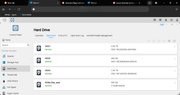
above is the list of my drives
the 2tb is a trad drive with various media on it
i want to just have the additional 1tb and 500gb as simple drives only - but seem to take ages
above is the list of my drives
the 2tb is a trad drive with various media on it
i want to just have the additional 1tb and 500gb as simple drives only - but seem to take ages

Re: [Help]
Do you mean you have created storage pools and volumes, but they don't appear on the page?
To contact our team, please send email to following addresses, remember to replace (at) with @
Technical team: support(at)terra-master.com(for technical support)
Service team: service(at)terra-master.com(for purchasing, return, replacement, RMA service)
Technical team: support(at)terra-master.com(for technical support)
Service team: service(at)terra-master.com(for purchasing, return, replacement, RMA service)


Re: [Help]
Would you show a screenshot for the section "volume" and "storage pool".
To contact our team, please send email to following addresses, remember to replace (at) with @:
Support team: support(at)terra-master.com (for technical support only)
Service team: service(at)terra-master.com (for purchasing, return, replacement, RMA service)
Support team: support(at)terra-master.com (for technical support only)
Service team: service(at)terra-master.com (for purchasing, return, replacement, RMA service)