OS Version: TOS 6.0
App: CloudSync (Version 3.2.039)
Issue Description:
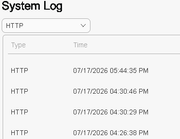
After setting the system-wide date format under Control Panel $\rightarrow$ Region & Language (e.g., to MM/DD/YYYY HH:MM:SS AM/PM), system features like System Log correctly update their display timestamps.
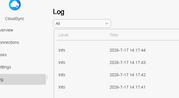
However, the CloudSync app GUI log table does not inherit these regional preferences and continues to display timestamps hardcoded as YYYY-M-D H:mm:ss (e.g., 2026-7-17 0:07:43).
Expected Behavior:
CloudSync log timestamps in the Web GUI should respect and inherit the user's regional date/time display format configured in TOS 6 Control Panel settings.
Request:
Please update the CloudSync app frontend in a future release so log table timestamps match system-wide regional settings.