[Share] [Condividere] Initialization F4-423

Initialization of newly purchased TNAS or re-installation of your TNAS
Post Reply
User avatar
sound
Posts: 24
Joined: 01 Jan 2021, 01:19
Italy

[Share] [Condividere] Initialization F4-423

Post by sound »

Hi everyone.....
I understand it takes time to initialize a RAID 5 with four 6TB hard drives, but is it possible that it's still at 6.78% in a day?
It's been running since yesterday at noon, and it's not stuck....but this way it'll take two weeks to finish... :shock:
Is there anything I can do to speed this up? :?:

Fabio
F4-210 - F4-423 - D5-300
User avatar
EriChan
TM Support
Posts: 245
Joined: 06 Jan 2026, 12:27
United States of America

Re: [Share] [Condividere] Initialization F4-423

Post by EriChan »

Are you creating an array for the first time? After setting up an array with multiple drives, synchronization is a necessary process. This process takes a long time, and the larger the drive capacity, the longer it will take. For a 10TB drive, the estimated synchronization time is approximately 20 hours.

What is the current progress? You can open the terminal and enter the following command to check the synchronization speed:

Code: Select all

cat /proc/mdstat
To better assist you, I need to know a few key details:
  • What is the specific model of the hard drives? (This is critical: please check the "Model" on the drive label, e.g., WD60EFAX or ST6000VN001)
  • During initialization, are you copying large amounts of data to the NAS or running high-load applications?
  • Are the drives brand new? Does any drive show warnings or anomalies in the "Drive Status"?
User avatar
nikolasalexander1
Posts: 3
Joined: 26 Jun 2026, 08:25
United States of America

Re: [Share] [Condividere] Initialization F4-423

Post by nikolasalexander1 »

RAID 5 initialization on large 6TB drives can be bottlenecked by low default sync speeds in Linux. You can often speed this up significantly via SSH by increasing the speed_limit_max and speed_limit_min values in /proc/sys/dev/raid/. Increasing the minimum sync speed gives the rebuilding process higher priority.
User avatar
Felix
TM Support
Posts: 139
Joined: 28 Jan 2026, 15:24
China

Re: [Share] [Condividere] Initialization F4-423

Post by Felix »

nikolasalexander1 wrote: 28 Jun 2026, 15:57 RAID 5 initialization on large 6TB drives can be bottlenecked by low default sync speeds in Linux. You can often speed this up significantly via SSH by increasing the speed_limit_max and speed_limit_min values in /proc/sys/dev/raid/. Increasing the minimum sync speed gives the rebuilding process higher priority.
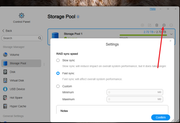
You can adjust the RAID sync speed directly from the TOS interface.

Please go to Control Panel → Storage Manager → Storage Pool, then click the Settings icon (as shown in the screenshot) and select the appropriate RAID sync speed option.

- Slow sync: Reduces the impact on system performance, but the synchronization process will take longer.
- Fast sync: Increases the synchronization speed, but may affect overall system performance.
- Custom: Allows you to manually configure the sync speed according to your requirements.

For large-capacity RAID 5 arrays (for example, 6TB drives), selecting Fast sync or setting a higher value under Custom can help reduce the RAID initialization/rebuild time.

Please note that increasing the sync speed will consume more system resources and may affect normal NAS performance while the RAID synchronization is running.
Image
To contact our team, please send email to following addresses, remember to replace (at) with @:
Support team: support(at)terra-master.com (for technical support only)
Post Reply

Return to “Initialization”