

Are you working for Terramaster or are you just a fanboy?
''Herewerare2024'' above has provided more information.
[Help] Tos 6 424 pro keeps forgetting my UPS
Re: [Help] Tos 6 424 pro keeps forgetting my UPS
F4-424 Pro, TOS 6.0.694


Re: [Help] Tos 6 424 pro keeps forgetting my UPS
Hi, same problem here with a newest APC Back-UPS BGM2200-GR it's correctly identified but after a while the system disappear from the Control Panel which shows no UPS found. I need to unplug and plug again the USB.
I have TOS 7.0 and /etc/ups.conf is not present, there is a similar file under /etc/nut/ups.conf but changes are replaced with default. Any ideas?
I have TOS 7.0 and /etc/ups.conf is not present, there is a similar file under /etc/nut/ups.conf but changes are replaced with default. Any ideas?


Re: [Help] Tos 6 424 pro keeps forgetting my UPS
Thank you for your feedback.rvescovi wrote: ↑14 Jul 2026, 03:21 Hi, same problem here with a newest APC Back-UPS BGM2200-GR it's correctly identified but after a while the system disappear from the Control Panel which shows no UPS found. I need to unplug and plug again the USB.
I have TOS 7.0 and /etc/ups.conf is not present, there is a similar file under /etc/nut/ups.conf but changes are replaced with default. Any ideas?
The behavior you mentioned regarding the UPS configuration file does exist. However, this is an automatic management mechanism used by the system to ensure that the UPS service can start and run properly. Currently, manual modification of this configuration is not supported.
Regarding the issue where the UPS is correctly detected initially but later disappears from Control Panel, please help us collect more information.
Please open the Terminal application from the TOS 7 desktop and run the following command:
Code: Select all
lsusb
To contact our team, please send email to following addresses, remember to replace (at) with @:
Support team: support(at)terra-master.com (for technical support only)
Support team: support(at)terra-master.com (for technical support only)
Re: [Help] Tos 6 424 pro keeps forgetting my UPS
Hi,
now the USB is no more visibile in the CONTROL PANEL
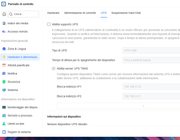
and this is the output of the LSUSB command
Bus 002 Device 001: ID 1d6b:0003 Linux Foundation 3.0 root hub
Bus 001 Device 003: ID 058f:6387 Alcor Micro Corp. Flash Drive
Bus 001 Device 002: ID 051d:0002 American Power Conversion Uninterruptible Power Supply
Bus 001 Device 001: ID 1d6b:0002 Linux Foundation 2.0 root hub
now the USB is no more visibile in the CONTROL PANEL
and this is the output of the LSUSB command
Bus 002 Device 001: ID 1d6b:0003 Linux Foundation 3.0 root hub
Bus 001 Device 003: ID 058f:6387 Alcor Micro Corp. Flash Drive
Bus 001 Device 002: ID 051d:0002 American Power Conversion Uninterruptible Power Supply
Bus 001 Device 001: ID 1d6b:0002 Linux Foundation 2.0 root hub
Re: [Help] Tos 6 424 pro keeps forgetting my UPS
Thank you for providing the `lsusb` output.rvescovi wrote: ↑15 Jul 2026, 17:33 Hi,
now the USB is no more visibile in the CONTROL PANEL
and this is the output of the LSUSB command
Bus 002 Device 001: ID 1d6b:0003 Linux Foundation 3.0 root hub
Bus 001 Device 003: ID 058f:6387 Alcor Micro Corp. Flash Drive
Bus 001 Device 002: ID 051d:0002 American Power Conversion Uninterruptible Power Supply
Bus 001 Device 001: ID 1d6b:0002 Linux Foundation 2.0 root hub
According to the result, the UPS USB device is still detected by the system:
Code: Select all
Bus 001 Device 002: ID 051d:0002 American Power Conversion Uninterruptible Power SupplyPlease open the Terminal application from the TOS 7 desktop and run the following command after the UPS disappears from Control Panel:
Code: Select all
journalctl -u [email protected]In addition, we checked the NUT hardware compatibility list:
https://networkupstools.org/stable-hcl.html
The APC Back-UPS BGM2200-GR model is currently not listed in the official NUT compatibility database, so there may be compatibility issues between this UPS model and the UPS service.
We will continue to analyze the issue based on the logs you provide. Thank you for your cooperation.
To contact our team, please send email to following addresses, remember to replace (at) with @:
Support team: support(at)terra-master.com (for technical support only)
Support team: support(at)terra-master.com (for technical support only)
Re: [Help] Tos 6 424 pro keeps forgetting my UPS
Hi all,
here below the result of the command it's full of these lines: (I removed only time and my NAS name)
usbhid-ups[14780]: device->Product is NULL so it is not possible to determine whether to activate max_report_size workaround
usbhid-ups[14780]: libusb1: Could not open any HID devices: insufficient permissions on everything
usbhid-ups[14780]: libusb1: except 1 devices tried but not matching the requested criteria
usbhid-ups[14780]: Reconnecting. If you saw "nut_libusb_get_interrupt: Input/Output Error" or similar message in the log above, try setting "pollonly" flag in "ups.conf" options section for this driver!
usbhid-ups[14780]: device->Product is NULL so it is not possible to determine whether to activate max_report_size workaround
usbhid-ups[14780]: libusb1: Could not open any HID devices: insufficient permissions on everything
usbhid-ups[14780]: libusb1: except 1 devices tried but not matching the requested criteria
usbhid-ups[14780]: Reconnecting. If you saw "nut_libusb_get_interrupt: Input/Output Error" or similar message in the log above, try setting "pollonly" flag in "ups.conf" options section for this driver!
usbhid-ups[14780]: device->Product is NULL so it is not possible to determine whether to activate max_report_size workaround
usbhid-ups[14780]: libusb1: Could not open any HID devices: insufficient permissions on everything
usbhid-ups[14780]: libusb1: except 1 devices tried but not matching the requested criteria
usbhid-ups[14780]: Reconnecting. If you saw "nut_libusb_get_interrupt: Input/Output Error" or similar message in the log above, try setting "pollonly" flag in "ups.conf" options section for this driver!
here below the result of the command it's full of these lines: (I removed only time and my NAS name)
usbhid-ups[14780]: device->Product is NULL so it is not possible to determine whether to activate max_report_size workaround
usbhid-ups[14780]: libusb1: Could not open any HID devices: insufficient permissions on everything
usbhid-ups[14780]: libusb1: except 1 devices tried but not matching the requested criteria
usbhid-ups[14780]: Reconnecting. If you saw "nut_libusb_get_interrupt: Input/Output Error" or similar message in the log above, try setting "pollonly" flag in "ups.conf" options section for this driver!
usbhid-ups[14780]: device->Product is NULL so it is not possible to determine whether to activate max_report_size workaround
usbhid-ups[14780]: libusb1: Could not open any HID devices: insufficient permissions on everything
usbhid-ups[14780]: libusb1: except 1 devices tried but not matching the requested criteria
usbhid-ups[14780]: Reconnecting. If you saw "nut_libusb_get_interrupt: Input/Output Error" or similar message in the log above, try setting "pollonly" flag in "ups.conf" options section for this driver!
usbhid-ups[14780]: device->Product is NULL so it is not possible to determine whether to activate max_report_size workaround
usbhid-ups[14780]: libusb1: Could not open any HID devices: insufficient permissions on everything
usbhid-ups[14780]: libusb1: except 1 devices tried but not matching the requested criteria
usbhid-ups[14780]: Reconnecting. If you saw "nut_libusb_get_interrupt: Input/Output Error" or similar message in the log above, try setting "pollonly" flag in "ups.conf" options section for this driver!


Re: [Help] Tos 6 424 pro keeps forgetting my UPS
According to APC web site
https://www.se.com/uk/en/product/BGM220 ... tic-white/
This model has been discontinued, so may never appear on compatibility list(s).
F5-221 TOS7.0.1278 - 4x4TB (Ironwolf) Traid
F2-424 TOS7.0.1278 - 2x500GB nvme (P3) Traid, 2x6TB HDD (HGST) Traid
F2-221 TOS7.0.1278 - 1x3TB Ext4, 1x4TB Btrfs
F2-425+ TOS7.0.1278 - 2x500GB nvme (P3) Traid, 2x6TB HDD (EXOS) Traid
F2-424 TOS7.0.1278 - 2x500GB nvme (P3) Traid, 2x6TB HDD (HGST) Traid
F2-221 TOS7.0.1278 - 1x3TB Ext4, 1x4TB Btrfs
F2-425+ TOS7.0.1278 - 2x500GB nvme (P3) Traid, 2x6TB HDD (EXOS) Traid
Re: [Help] Tos 6 424 pro keeps forgetting my UPS
Have you tried checking/adjusting the ups configuration via APC Powerchute software?
Correct data cable for the device?
Damaged cable?
F5-221 TOS7.0.1278 - 4x4TB (Ironwolf) Traid
F2-424 TOS7.0.1278 - 2x500GB nvme (P3) Traid, 2x6TB HDD (HGST) Traid
F2-221 TOS7.0.1278 - 1x3TB Ext4, 1x4TB Btrfs
F2-425+ TOS7.0.1278 - 2x500GB nvme (P3) Traid, 2x6TB HDD (EXOS) Traid
F2-424 TOS7.0.1278 - 2x500GB nvme (P3) Traid, 2x6TB HDD (HGST) Traid
F2-221 TOS7.0.1278 - 1x3TB Ext4, 1x4TB Btrfs
F2-425+ TOS7.0.1278 - 2x500GB nvme (P3) Traid, 2x6TB HDD (EXOS) Traid
Re: [Help] Tos 6 424 pro keeps forgetting my UPS
BGM2200 is not discontinued, but there are several versions (based on the rear plugs) and in the UK site the GR (with Schuko) is not sold anymore rather the UK version it's now the best seller.Gremlin wrote: ↑16 Jul 2026, 15:44According to APC web site
https://www.se.com/uk/en/product/BGM220 ... tic-white/
This model has been discontinued, so may never appear on compatibility list(s).
Anyway, I don't think it's a wiring issue, I'm using the original cable and the LSUSB is showing still plugged it the USB port. But the recent log I attached highlight a permission issue. I don't know what does it means.
I'm leaving in this state, if you have some other tests to perform.
Re: [Help] Tos 6 424 pro keeps forgetting my UPS
Hi all, don't waste time on this thread, I found similar web issues on APC installations, even few with my model too. Seems that for unknown reason USB data connection is lost after one or more hours, and to fix you need to restart the NAS or unplug / plug the UPS. Someone solved the issue replacing the original cable adding two cables, one APC UPS -> serial and next serial -> NAS USB.
It's really strange that I can obtain few UPS information from net-scanner even not working, but starting "/lib/nut/usbhid-ups -a ups -DD" it shows that UPS didn't send other data like manufacturer, product, serial number which is the reason it doesn't start
It's really strange that I can obtain few UPS information from net-scanner even not working, but starting "/lib/nut/usbhid-ups -a ups -DD" it shows that UPS didn't send other data like manufacturer, product, serial number which is the reason it doesn't start