[Help] F4-424 — Web interface issue after upgrading to TOS 7.0.0765  [SOLVED]

Initialization of newly purchased TNAS or re-installation of your TNAS
Post Reply
User avatar
bershackyjaroslav
Posts: 1
Joined: 04 Jul 2026, 18:52
Aruba

[Help] F4-424 — Web interface issue after upgrading to TOS 7.0.0765

Post by bershackyjaroslav »

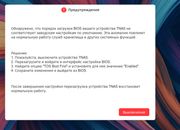
Subject: F4-424 — Web interface issue after upgrading to TOS 7.0.0765 (SMB and mobile app work normally)
Model: F4-424
TOS Version:
* Previously: TOS 7.0.0747 (worked normally)
* Current: TOS 7.0.0765
BIOS Version:
* Originally V06
* Updated to **MADN0101.V08** (issue persists)
Storage Configuration:
* 1× NVMe SSD 500 GB (system drive)
* 2× 4 TB Seagate IronWolf HDDs configured as RAID 1

Issue:

After updating from TOS 7.0.0747 to 7.0.0765, I started experiencing problems when accessing the NAS through the web interface. The system worked perfectly before the update, and I did not notice any issues prior to upgrading.

The problem appeared immediately after installing TOS 7.0.0765 and has persisted ever since.

Interestingly, the issue only affects the web interface. The mobile application connects and works normally, and SMB file sharing also functions without any problems. The NAS itself appears to be operating normally, and all data is accessible over SMB.

I initially suspected the BIOS because the system was still running BIOS V06, so I upgraded it to MADN0101.V08, but this made no difference.

I also contacted TerraMaster support and tried every solution they suggested, but none resolved the issue.

Steps already taken:
* Updated BIOS from V06 to MADN0101.V08
* Removed the internal USB device from the motherboard as instructed by support
* Disabled the corresponding BIOS option (boot-related flag) and manually configured the boot priority
* Repeated multiple reboots after each change

None of these steps fixed the problem.

Interesting observation:
If I disconnect both HDDs, leaving only the NVMe system SSD installed, the NAS works normally and the web interface is accessible without any issues.
As soon as the RAID 1 HDDs are connected again, after reboot the problem returns.

Question:
Has anyone experienced a similar issue after updating to TOS 7.0.0765? Is there anything else I can try to diagnose or fix this issue? Any suggestions would be greatly appreciated.
Image
User avatar
Gremlin
Gold Member
Posts: 1620
Joined: 02 Dec 2022, 22:31
Great Britain

Re: [Help] F4-424 — Web interface issue after upgrading to TOS 7.0.0765

Post by Gremlin »

Is your 'system disk' set to include both an nvme and an hdd. This can cause problems. Alternatively the system disk may not have
migrated to nvme cleanly and there is some remnant(s) on the hdd. {There are steps you can take to remove any partitions on the hdd relevant to the o/s but that depends on your capabilities and preparedness to intervene manually.}
F5-221 TOS7.0.0777 - 4x4TB (Ironwolf) Traid
F2-424 TOS7.0.0777 - 2x500GB nvme (P3) Traid, 2x6TB HDD (HGST) Traid
F2-221 TOS7.0.0777 - 1x3TB Ext4, 1x4TB Btrfs
F2-425+ TOS7.0.0777 - 2x500GB nvme (P3) Traid, 2x6TB HDD (EXOS) Traid
User avatar
TMzethar
TM Support
Posts: 2815
Joined: 27 Oct 2020, 16:43

Re: [Help] F4-424 — Web interface issue after upgrading to TOS 7.0.0765  [SOLVED]

Post by TMzethar »

Hello. The issue you mentioned has also been reported by other customers. We have identified the cause: there is a mismatch between the kernel in the boot partition and the system partition on the drive.
This is also corroborated by the phenomenon you described—that “As soon as the RAID 1 HDDs are connected again, after reboot the problem returns.”
Additionally, this has nothing to do with the BIOS, and it cannot be resolved by adjusting the BIOS boot order.

Solution:
First, boot the system without any HDDs installed. Once it has booted successfully, hot-plug the two HDDs.
Go to “Storage Management > Disks > System Disk,” migrate the system from your SSD to HDD1, and then migrate it to HDD2. This process will copy the correct boot partition, kernel, and system partition from the SSD to both HDDs. Once complete, migrate the system back from HDD2 to the SSD. Manually activate and mount the storage pools and volumes on both HDDs, or restart the NAS to resume normal operation.
To contact our team, please send email to following addresses, remember to replace (at) with @:
Technical team: support(at)terra-master.com (for technical support)
Service team: service(at)terra-master.com (for purchasing, return, replacement, RMA service)
Post Reply

Return to “Initialization”