

Several days ago I noticed there was an update for TerraSync. After the update process completed my TNAS hard drives immediately became very active. I assumed this was a TerraSync process activated by the update so I let it run its course.
Over 48 hours later and the hard drives were still noisily clacking away and the ‘load’ on the NAS sitting continuously between 30% to 50%. CPU usage was under 10% but memory usage is generally around 25%. As all my TerraSync tasks were ‘up to date’ I decided to reboot the TNAS and see if the hard drive activity continued.
When the Nas rebooted indexing started and lasted about 3 hours. I hoped the hard drive activity would then stop but it continued with similar intensity to when it was indexing.
It has now been 14 hours since indexing finished and the hard drives are still working hard. Again, all my TerraSync tasks are ‘up to date’ and there are no other users on the network.
The ‘Process’ list indicates that ‘TerraSyncServer’ is causing the highest CPU usage at around 10% and when I disabel TerraSync via the ‘App Centre’ the hard drive activity stops.
I have a F4-425 Plus with 4 x 12 TB drives set up in TRAID with 15 TB of used space.
Over 48 hours of continual intense hard drive activity because of an app update and no active TerraSync tasks seems unusual to me. But I am no expert.
Is this normal/expected hard drive usage/activity following an app update and, if so, when is it likely to stop?
TerraSync update causing hard drives to operate continuously for days despite all sync tasks being ‘up to date’.

Re: TerraSync update causing hard drives to operate continuously for days despite all sync tasks being ‘up to date’.
Please rest assured: this phenomenon is not normal behavior after a TerraSync update. Under normal circumstances, an application with no active synchronization tasks and all files "up to date" will not allow the hard drive to run under high load continuously for more than 48 hours.
We suggest you try the following steps in order (this will not result in data loss):
1. Gather diagnostic information (preferably first)
Go to TOS → Control Panel → System Information → Process List, and check the specific I/O read/write volume of TerraSyncServer (if displayed).
Open the TOS system terminal, and enter `iotop` or `iostat -x 1` to confirm which process is performing read/write operations and the read/write mode.
2. Safely restart the TerraSync service
Disable TerraSync in App Center → Wait 1 minute → Re-enable.
Observe whether hard drive activity returns to normal.
If the high load persists, go to TerraSync settings and temporarily disconnect all sync tasks (without deleting them) to see if the activity stops.
3. Check for hidden sync tasks or version conflicts. After an update, sometimes the "fingerprint" of all synced files is re-verified by default. Please check in the TerraSync client (PC) to see if any task status shows "Verifying" or "Scanning".
Try creating a completely new empty sync task on TNAS and observe if it still triggers high load.
To contact our team, please send email to following addresses, remember to replace (at) with @
Technical team: support(at)terra-master.com(for technical support)
Service team: service(at)terra-master.com(for purchasing, return, replacement, RMA service)
Technical team: support(at)terra-master.com(for technical support)
Service team: service(at)terra-master.com(for purchasing, return, replacement, RMA service)


Re: TerraSync update causing hard drives to operate continuously for days despite all sync tasks being ‘up to date’.
I will do the same. #1 sure
#2 well I only have three clients backing up to TerraSync and they are set to manual/on demand, whatever it is.
#3 the TNAS PC will always display scanning or verifying I forget which, I can't do anything. Any Terrasync option shows that Verfy/Scan message. I can't even see list of servers or tasks.
Temporarily I have the app disabled since every boot starts that process going. Again since I'm only using the backup option (presently) I can hold off.
#2 well I only have three clients backing up to TerraSync and they are set to manual/on demand, whatever it is.
#3 the TNAS PC will always display scanning or verifying I forget which, I can't do anything. Any Terrasync option shows that Verfy/Scan message. I can't even see list of servers or tasks.
Temporarily I have the app disabled since every boot starts that process going. Again since I'm only using the backup option (presently) I can hold off.
F6-424 & F4-425 Plus at 7.0.1298
F4-424 Pro (x2) at 7.0.1298
D4-320 (Offline until I can afford more HDDs)
F4-424 Pro (x2) at 7.0.1298
D4-320 (Offline until I can afford more HDDs)
Re: TerraSync update causing hard drives to operate continuously for days despite all sync tasks being ‘up to date’.
Thank you for your reply Mike.
I followed the steps you suggested and here’s what happened.
1. In the process list I have (TOS version 6.0.794) the only information displayed is: Process name, User, ID, CPU Usage and Memory Usage
TerraSyncServer has an ID: 224124 CPU Usage: 8.3% and Memory Usage: 2%
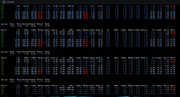
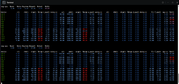
`iotop` wasn’t recognised by my version of Terminal but when I entered `iostat -x 1` I got the following: (sorry but I don’t know how to interpret the information shown other than I assume the numbers in red are not good)
2. I disabled the TerraSync Service and waited about 15 minutes before enabling it again. Within about 60 seconds of stopping the service all hard drive activity stopped completely and the ‘Load’ indicator on the dashboard dropped to 1%.
Upon restarting the service hard drive activity started immediately and the ‘Load’ indicator jumped to 50%.
3. I assume here you are referring to TNAS PC app and the section TerraSync Sync Tasks. All my sync tasks were saying ‘up to date’ and not giving any indication of a problem. None of the tasks were saying ‘verifying’ or ‘scanning’.
I paused all of my sync tasks but there was no change in the load indicated on the NAS (it remained high at 40 to 50%). I left all of my sync tasks paused, rebooted the NAS, waited for indexing to complete and the high hard drive activity persisted with high NAS loads. There was no point setting up a new sync task as the loads were still high but I did it anyway and the task completed successfully. But the only way I can stop the hard drives intense activity is to pause TerraSync via the App Center.
I followed the steps you suggested and here’s what happened.
1. In the process list I have (TOS version 6.0.794) the only information displayed is: Process name, User, ID, CPU Usage and Memory Usage
TerraSyncServer has an ID: 224124 CPU Usage: 8.3% and Memory Usage: 2%
`iotop` wasn’t recognised by my version of Terminal but when I entered `iostat -x 1` I got the following: (sorry but I don’t know how to interpret the information shown other than I assume the numbers in red are not good)
2. I disabled the TerraSync Service and waited about 15 minutes before enabling it again. Within about 60 seconds of stopping the service all hard drive activity stopped completely and the ‘Load’ indicator on the dashboard dropped to 1%.
Upon restarting the service hard drive activity started immediately and the ‘Load’ indicator jumped to 50%.
3. I assume here you are referring to TNAS PC app and the section TerraSync Sync Tasks. All my sync tasks were saying ‘up to date’ and not giving any indication of a problem. None of the tasks were saying ‘verifying’ or ‘scanning’.
I paused all of my sync tasks but there was no change in the load indicated on the NAS (it remained high at 40 to 50%). I left all of my sync tasks paused, rebooted the NAS, waited for indexing to complete and the high hard drive activity persisted with high NAS loads. There was no point setting up a new sync task as the loads were still high but I did it anyway and the task completed successfully. But the only way I can stop the hard drives intense activity is to pause TerraSync via the App Center.


Re: TerraSync update causing hard drives to operate continuously for days despite all sync tasks being ‘up to date’.
Thank you for your detailed feedback. Our local tests have not reproduced your issue so far. Please enable debug mode in the "Support and Help" section, generate a log when the issue occurs again, and send it to our email support(at)terra-master.com. We will analyze your log and address your issue accordingly.SteveJ wrote: ↑10 Jun 2026, 15:55 Thank you for your reply Mike.
I followed the steps you suggested and here’s what happened.
1. In the process list I have (TOS version 6.0.794) the only information displayed is: Process name, User, ID, CPU Usage and Memory Usage
TerraSyncServer has an ID: 224124 CPU Usage: 8.3% and Memory Usage: 2%
`iotop` wasn’t recognised by my version of Terminal but when I entered `iostat -x 1` I got the following: (sorry but I don’t know how to interpret the information shown other than I assume the numbers in red are not good)
2. I disabled the TerraSync Service and waited about 15 minutes before enabling it again. Within about 60 seconds of stopping the service all hard drive activity stopped completely and the ‘Load’ indicator on the dashboard dropped to 1%.
Upon restarting the service hard drive activity started immediately and the ‘Load’ indicator jumped to 50%.
3. I assume here you are referring to TNAS PC app and the section TerraSync Sync Tasks. All my sync tasks were saying ‘up to date’ and not giving any indication of a problem. None of the tasks were saying ‘verifying’ or ‘scanning’.
I paused all of my sync tasks but there was no change in the load indicated on the NAS (it remained high at 40 to 50%). I left all of my sync tasks paused, rebooted the NAS, waited for indexing to complete and the high hard drive activity persisted with high NAS loads. There was no point setting up a new sync task as the loads were still high but I did it anyway and the task completed successfully. But the only way I can stop the hard drives intense activity is to pause TerraSync via the App Center.
Re: TerraSync update causing hard drives to operate continuously for days despite all sync tasks being ‘up to date’.
Re-enabled terrasync after being disabled for a week or so. CPU % did drop within just a few minutes but this morning it's still busy.

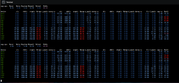
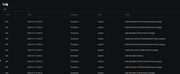
took a peek at the log
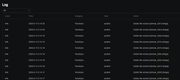
took a peek at the log
F6-424 & F4-425 Plus at 7.0.1298
F4-424 Pro (x2) at 7.0.1298
D4-320 (Offline until I can afford more HDDs)
F4-424 Pro (x2) at 7.0.1298
D4-320 (Offline until I can afford more HDDs)
Re: TerraSync update causing hard drives to operate continuously for days despite all sync tasks being ‘up to date’.
What in the world is this doing?
Edit: TerraSync isn't that urgent for me, but it would be nice that my NAS doesn't sound like a rock tumbler.
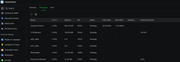
Edit: TerraSync isn't that urgent for me, but it would be nice that my NAS doesn't sound like a rock tumbler.
F6-424 & F4-425 Plus at 7.0.1298
F4-424 Pro (x2) at 7.0.1298
D4-320 (Offline until I can afford more HDDs)
F4-424 Pro (x2) at 7.0.1298
D4-320 (Offline until I can afford more HDDs)

Re: TerraSync update causing hard drives to operate continuously for days despite all sync tasks being ‘up to date’.
We have released the new TerrsSync 2.1.548, please try updating.
To contact our team, please send email to following addresses, remember to replace (at) with @
Technical team: support(at)terra-master.com(for technical support)
Service team: service(at)terra-master.com(for purchasing, return, replacement, RMA service)
Technical team: support(at)terra-master.com(for technical support)
Service team: service(at)terra-master.com(for purchasing, return, replacement, RMA service)
Re: TerraSync update causing hard drives to operate continuously for days despite all sync tasks being ‘up to date’.
Ok I updated mine, well it is doing what I would say post update updating. When it's finished I reboot the NAS when possible and see what happens.
F6-424 & F4-425 Plus at 7.0.1298
F4-424 Pro (x2) at 7.0.1298
D4-320 (Offline until I can afford more HDDs)
F4-424 Pro (x2) at 7.0.1298
D4-320 (Offline until I can afford more HDDs)
Re: TerraSync update causing hard drives to operate continuously for days despite all sync tasks being ‘up to date’.
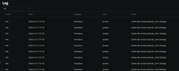
This is what it's doing now, post applying the update. Is this to be expected?
F6-424 & F4-425 Plus at 7.0.1298
F4-424 Pro (x2) at 7.0.1298
D4-320 (Offline until I can afford more HDDs)
F4-424 Pro (x2) at 7.0.1298
D4-320 (Offline until I can afford more HDDs)