As the title says, i want to configure on the (bit) older macbook pro of my dad, but oddly enough i can only find the public share.
Is there something i need to do on TOS 7 to enable timecapsule properly?
I did already login through the network tab on the macbook and can read/write to the share i made for him!
[Help] How to setup timecapsule for a macbook user TOS 7? [SOLVED]
-
How2UpdateDocker

- Posts: 13
- Joined: 22 Feb 2026, 21:35


Re: [Help] How to setup timecapsule for a macbook user TOS 7?
Sorry, I didn't fully understand your usage scenario. Could you describe it in detail with screenshots?
If you need to connect to a MacBook, you need to enable the corresponding file service, such as SMB service.
If you need to connect to a MacBook, you need to enable the corresponding file service, such as SMB service.
To contact our team, please send email to following addresses, remember to replace (at) with @
Technical team: support(at)terra-master.com(for technical support)
Service team: service(at)terra-master.com(for purchasing, return, replacement, RMA service)
Technical team: support(at)terra-master.com(for technical support)
Service team: service(at)terra-master.com(for purchasing, return, replacement, RMA service)
-
How2UpdateDocker
- Posts: 13
- Joined: 22 Feb 2026, 21:35
Re: [Help] How to setup timecapsule for a macbook user TOS 7?
Hi!
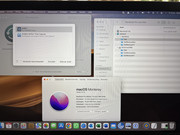
So basically i try to add the Macbook share as a timecapsule/way to backup on a macbook:
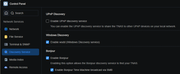
I do have Bonjour turned on:
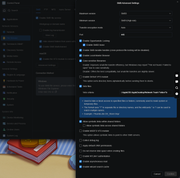
And everything i think is needed to get the share visable? Oddly enough it sees the share directory (but it can't connect to it, even if i submit the right username and password that worked when i navigate to the nas through network)
One thing i simply can't find is a specific settings option related to time machine: https://www.terra-master.com/blogs/news/time-machine . Perhaps because i'm on TOS 7, so maybe things changed?
So basically i try to add the Macbook share as a timecapsule/way to backup on a macbook:
I do have Bonjour turned on:
And everything i think is needed to get the share visable? Oddly enough it sees the share directory (but it can't connect to it, even if i submit the right username and password that worked when i navigate to the nas through network)
One thing i simply can't find is a specific settings option related to time machine: https://www.terra-master.com/blogs/news/time-machine . Perhaps because i'm on TOS 7, so maybe things changed?
-
How2UpdateDocker
- Posts: 13
- Joined: 22 Feb 2026, 21:35
Re: [Help] How to setup timecapsule for a macbook user TOS 7?
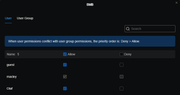
Also have the user added to the SMB protocol, but didn't make a change sadly
Sorry i noticed i didn't reply to your suggestion!
Sorry i noticed i didn't reply to your suggestion!
-
How2UpdateDocker
- Posts: 13
- Joined: 22 Feb 2026, 21:35
Re: [Help] How to setup timecapsule for a macbook user TOS 7?
Small update:
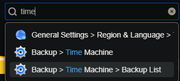
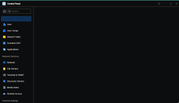
The problem seems to be that the Time Machine settings page in TOS 7 does not load.
I can find it via:
Control Panel / search > Backup > Time Machine
But when I open it, the page is completely blank. So I cannot enable Time Machine Backup or set the Authorized Directory.
SMB works normally. The Mac user can mount the share and read/write files.
Bonjour is enabled.
SMB is enabled and the user is allowed to use SMB.
The Mac only sees the Public share in Time Machine disk selection.
According to the TOS 7 help page, I should be able to enable Time Machine Backup and set an Authorized Directory, but this UI is blank for me.
Can TerraMaster confirm whether this is a TOS 7 bug, missing package, or permission issue?
The problem seems to be that the Time Machine settings page in TOS 7 does not load.
I can find it via:
Control Panel / search > Backup > Time Machine
But when I open it, the page is completely blank. So I cannot enable Time Machine Backup or set the Authorized Directory.
SMB works normally. The Mac user can mount the share and read/write files.
Bonjour is enabled.
SMB is enabled and the user is allowed to use SMB.
The Mac only sees the Public share in Time Machine disk selection.
According to the TOS 7 help page, I should be able to enable Time Machine Backup and set an Authorized Directory, but this UI is blank for me.
Can TerraMaster confirm whether this is a TOS 7 bug, missing package, or permission issue?

Re: [Help] How to setup timecapsule for a macbook user TOS 7?
You can click fourth icon of TOS desktop dock bar, then you will see TimeMachine Backup option
Then you will be able to enable Time Machine Backup and set an Authorized Directory
To contact our team, please send email to following addresses, remember to replace (at) with @
Technical team: support(at)terra-master.com(for technical support)
Service team: service(at)terra-master.com(for purchasing, return, replacement, RMA service)
Technical team: support(at)terra-master.com(for technical support)
Service team: service(at)terra-master.com(for purchasing, return, replacement, RMA service)
-
How2UpdateDocker
- Posts: 13
- Joined: 22 Feb 2026, 21:35
Re: [Help] How to setup timecapsule for a macbook user TOS 7?
oh yea it's in there! Thanks that did it!
I though i had to look into the settings, as the previous pic showed the entry but ended up at a blank page! Maybe a bug in TOS7?
I though i had to look into the settings, as the previous pic showed the entry but ended up at a blank page! Maybe a bug in TOS7?

Re: [Help] How to setup timecapsule for a macbook user TOS 7?
What is your current TOS 7 version number? Could you try using a different browser?
-
How2UpdateDocker
- Posts: 13
- Joined: 22 Feb 2026, 21:35
Re: [Help] How to setup timecapsule for a macbook user TOS 7?
Im using the latest TOS 7build and I did use chrome. I tried Firefox besides chrome but still shows the same weird visual bug
But nonetheless the issue is resolved!
But nonetheless the issue is resolved!