

Hi,
I've tried to mount a remote SMB folder (from my Freebox CPE) via the file manager -> Remote Folder. without succes
the remote SMB mount is with login and password.
When I try to mount it through the terminal , it works ...
command : mount -t cifs //192.168.1.254/Freebox /home/toto/test -o username=toto
(password is asked bythe prompt, and the folder is mounted)
is there an issue with login / password SMB mount on TOS 7 ?
[Help] TOS 7 : impossible to mount a SMB folder via the file manager


Re: [Help] TOS 7 : impossible to mount a SMB folder via the file manager
I don't see any issue. I have remote folder mounts between Tos7-Tos7 nas, Tos7-Tos6 nas and Tos7 -Windows11. Compatible SMB versions?
F5-221 TOS7.0.1278 - 4x4TB (Ironwolf) Traid
F2-424 TOS7.0.1278 - 2x500GB nvme (P3) Traid, 2x6TB HDD (HGST) Traid
F2-221 TOS7.0.1278 - 1x3TB Ext4, 1x4TB Btrfs
F2-425+ TOS7.0.1278 - 2x500GB nvme (P3) Traid, 2x6TB HDD (EXOS) Traid
F2-424 TOS7.0.1278 - 2x500GB nvme (P3) Traid, 2x6TB HDD (HGST) Traid
F2-221 TOS7.0.1278 - 1x3TB Ext4, 1x4TB Btrfs
F2-425+ TOS7.0.1278 - 2x500GB nvme (P3) Traid, 2x6TB HDD (EXOS) Traid


Re: [Help] TOS 7 : impossible to mount a SMB folder via the file manager
To accurately identify the issue, please provide the following information to assist with analysis:
- What is the exact version number of the currently running TOS 7?
- Does your remote SMB account password contain any special characters (such as &, $, #, @, single quotes ' or double quotes ")?
- Which SMB protocol version (SMBv1, SMBv2, or SMBv3) is currently configured on your Freebox CPE?
- What is the specific error message displayed by the system when you try to mount in the TOS 7 interface? (For example: credential error, connection timeout, or path does not exist?)
To contact our team, please send email to following addresses, remember to replace (at) with @
Technical team: support(at)terra-master.com(for technical support)
Service team: service(at)terra-master.com(for purchasing, return, replacement, RMA service)
Technical team: support(at)terra-master.com(for technical support)
Service team: service(at)terra-master.com(for purchasing, return, replacement, RMA service)
Re: [Help] TOS 7 : impossible to mount a SMB folder via the file manager
Hi,
thanks for answering ! Here are the info :
What is the exact version number of the currently running TOS 7? --> 7.0.0612
Does your remote SMB account password contain any special characters (such as &, $, #, @, single quotes ' or double quotes ")? --> No only letters
Which SMB protocol version (SMBv1, SMBv2, or SMBv3) is currently configured on your Freebox CPE? --> SMBv2 and SMBv3
What is the specific error message displayed by the system when you try to mount in the TOS 7 interface? (For example: credential error, connection timeout, or path does not exist?) --> "Connection failed"
thanks for answering ! Here are the info :
What is the exact version number of the currently running TOS 7? --> 7.0.0612
Does your remote SMB account password contain any special characters (such as &, $, #, @, single quotes ' or double quotes ")? --> No only letters
Which SMB protocol version (SMBv1, SMBv2, or SMBv3) is currently configured on your Freebox CPE? --> SMBv2 and SMBv3
What is the specific error message displayed by the system when you try to mount in the TOS 7 interface? (For example: credential error, connection timeout, or path does not exist?) --> "Connection failed"
Re: [Help] TOS 7 : impossible to mount a SMB folder via the file manager
Thank you for providing such precise feedback.
Please confirm whether you have mounted the SMB remote folder using the UI path input format shown in the image below:
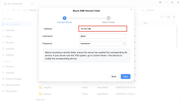
If so, please contact our technical support staff through the following link to schedule a remote technical support session for diagnosis:
https://salesiq.zohopublic.com/signatur ... 97d0be8892
Please confirm whether you have mounted the SMB remote folder using the UI path input format shown in the image below:
If so, please contact our technical support staff through the following link to schedule a remote technical support session for diagnosis:
https://salesiq.zohopublic.com/signatur ... 97d0be8892
To contact our team, please send email to following addresses, remember to replace (at) with @
Technical team: support(at)terra-master.com(for technical support)
Service team: service(at)terra-master.com(for purchasing, return, replacement, RMA service)
Technical team: support(at)terra-master.com(for technical support)
Service team: service(at)terra-master.com(for purchasing, return, replacement, RMA service)
Re: [Help] TOS 7 : impossible to mount a SMB folder via the file manager
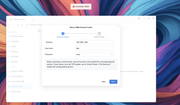
yes that's correct

Re: [Help] TOS 7 : impossible to mount a SMB folder via the file manager
We need to check this issue remotely. It might be related to SMB compatibility. Please visit the link and schedule a remote appointment with online customer service:
https://salesiq.zohopublic.com/signatur ... 97d0be8892
https://salesiq.zohopublic.com/signatur ... 97d0be8892
To contact our team, please send email to following addresses, remember to replace (at) with @
Technical team: support(at)terra-master.com(for technical support)
Service team: service(at)terra-master.com(for purchasing, return, replacement, RMA service)
Technical team: support(at)terra-master.com(for technical support)
Service team: service(at)terra-master.com(for purchasing, return, replacement, RMA service)


Re: [Help] TOS 7 : impossible to mount a SMB folder via the file manager
Hi,
I can confirm this issue. Same Remote SMB source mounts perfectly on TOS6 (latest). SMB Server is Windows 2019 in my case.
Syslog output:
un 1 10:47:02 TNAS11 filemanager[15976]: [DEBUG /bin/bash -c /etc/tos/scripts/remotefolder mount _89d02f126d0146388dc8fb8207b3ab5b]
Jun 1 10:47:02 TNAS11 filemanager[15976]: ERROR Remove xattr failed: err="no data available"
Jun 1 10:47:02 TNAS11 filemanager[15976]: ERROR DelFileAttr failed path=/Volume1/public/M ok=false
Jun 1 10:47:02 TNAS11 filemanager[15976]: ERROR MOUNT err="source path can not be used: This program is not installed setuid root - \"user\" CIFS mounts not supported.\nThis program is not installed setuid root - \"user\" CIFS mounts not supported.\nThis program is not installed setuid root - \"user\" CIFS mounts not supported.\nThis program is not installed setuid root - \"user\" CIFS mounts not supported.\nThis program is not installed setuid root - \"user\" CIFS mounts not supported.\n: exit status 1\n1. source path can not be used: This program is not installed setuid root - \"user\" CIFS mounts not supported.\nThis program is not installed setuid root - \"user\" CIFS mounts not supported.\nThis program is not installed setuid root - \"user\" CIFS mounts not supported.\nThis program is not installed setuid root - \"user\" CIFS mounts not supported.\nThis program is not installed setuid root - \"user\" CIFS mounts not supported.\n: exit status 1\n 1). gitlab.local/DO-module/new-filemanage-module/src/service/remotefolder.mountRemoter\n \t/buildAgent/work/ab67c8b4601f5cef/src/service/remotefolder/remotefolder_model.go:658\n..
Rest cut: Your message contains 16099 characters.
The maximum number of allowed characters is 10000.
I can confirm this issue. Same Remote SMB source mounts perfectly on TOS6 (latest). SMB Server is Windows 2019 in my case.
Syslog output:
un 1 10:47:02 TNAS11 filemanager[15976]: [DEBUG /bin/bash -c /etc/tos/scripts/remotefolder mount _89d02f126d0146388dc8fb8207b3ab5b]
Jun 1 10:47:02 TNAS11 filemanager[15976]: ERROR Remove xattr failed: err="no data available"
Jun 1 10:47:02 TNAS11 filemanager[15976]: ERROR DelFileAttr failed path=/Volume1/public/M ok=false
Jun 1 10:47:02 TNAS11 filemanager[15976]: ERROR MOUNT err="source path can not be used: This program is not installed setuid root - \"user\" CIFS mounts not supported.\nThis program is not installed setuid root - \"user\" CIFS mounts not supported.\nThis program is not installed setuid root - \"user\" CIFS mounts not supported.\nThis program is not installed setuid root - \"user\" CIFS mounts not supported.\nThis program is not installed setuid root - \"user\" CIFS mounts not supported.\n: exit status 1\n1. source path can not be used: This program is not installed setuid root - \"user\" CIFS mounts not supported.\nThis program is not installed setuid root - \"user\" CIFS mounts not supported.\nThis program is not installed setuid root - \"user\" CIFS mounts not supported.\nThis program is not installed setuid root - \"user\" CIFS mounts not supported.\nThis program is not installed setuid root - \"user\" CIFS mounts not supported.\n: exit status 1\n 1). gitlab.local/DO-module/new-filemanage-module/src/service/remotefolder.mountRemoter\n \t/buildAgent/work/ab67c8b4601f5cef/src/service/remotefolder/remotefolder_model.go:658\n..
Rest cut: Your message contains 16099 characters.
The maximum number of allowed characters is 10000.
Re: [Help] TOS 7 : impossible to mount a SMB folder via the file manager
Even with version 1.2 of filemanager the problem persists:
Jun 3 10:04:16 TNAS11 filemanager[2160621]: [DEBUG /bin/bash -c /etc/tos/scripts/remotefolder mount _a403ace3541a4b558a6d6eddd2403206]
Jun 3 10:04:16 TNAS11 filemanager[2160621]: ERROR Remove xattr failed: err="no data available"
Jun 3 10:04:16 TNAS11 filemanager[2160621]: ERROR DelFileAttr failed path=/Volume1/public/M ok=false
Jun 3 10:04:16 TNAS11 filemanager[2160621]: ERROR MOUNT err="source path can not be used: This program is not installed setuid root - \"user\" CIFS mounts not supported.\nThis program is not installed setuid root - \"user\" CIFS mounts not supported.\nThis program is not installed setuid root - \"user\" CIFS mounts not supported.\nThis program is not installed setuid root - \"user\" CIFS mounts not supported.\nThis program is not installed setuid root - \"user\" CIFS mounts not supported.\n: exit status 1\n1. source path can not be used: This program is not installed setuid root - \"user\" CIFS mounts not supported.\nThis program is not installed setuid root - \"user\" CIFS mounts not supported.\nThis program is not installed setuid root - \"user\" CIFS mounts not supported.\nThis program is not installed setuid root - \"user\" CIFS mounts not supported.\nThis program is not installed setuid root - \"user\" CIFS mounts not supported.\n: exit status 1\n 1). gitlab.local/DO-module/new-filemanage-module/src/service/remotefolder.mountRemoter\n \t/buildAgent/work/ab67c8b4601f5cef/src/service/remotefolder/remotefolder_model.go:658\n 2). gitlab.local/DO-module/new-filemanage-module/src/service/remotefolder.(*RemoteFolder).MountRemoter\n \t/buildAgent/work/ab67c8b4601f5cef/src/service/remotefolder/remotefolder_model.go:317\n 3). gitlab.local/DO-module/new-filemanage-module/src/controller/remotefolder.(*RemoteFolderController).mount\n \t/buildAgent/work/ab67c8b4601f5cef/src/controller/remotefolder/RemoteFolderController.go:426\n
etc.
Jun 3 10:04:16 TNAS11 filemanager[2160621]: [DEBUG /bin/bash -c /etc/tos/scripts/remotefolder mount _a403ace3541a4b558a6d6eddd2403206]
Jun 3 10:04:16 TNAS11 filemanager[2160621]: ERROR Remove xattr failed: err="no data available"
Jun 3 10:04:16 TNAS11 filemanager[2160621]: ERROR DelFileAttr failed path=/Volume1/public/M ok=false
Jun 3 10:04:16 TNAS11 filemanager[2160621]: ERROR MOUNT err="source path can not be used: This program is not installed setuid root - \"user\" CIFS mounts not supported.\nThis program is not installed setuid root - \"user\" CIFS mounts not supported.\nThis program is not installed setuid root - \"user\" CIFS mounts not supported.\nThis program is not installed setuid root - \"user\" CIFS mounts not supported.\nThis program is not installed setuid root - \"user\" CIFS mounts not supported.\n: exit status 1\n1. source path can not be used: This program is not installed setuid root - \"user\" CIFS mounts not supported.\nThis program is not installed setuid root - \"user\" CIFS mounts not supported.\nThis program is not installed setuid root - \"user\" CIFS mounts not supported.\nThis program is not installed setuid root - \"user\" CIFS mounts not supported.\nThis program is not installed setuid root - \"user\" CIFS mounts not supported.\n: exit status 1\n 1). gitlab.local/DO-module/new-filemanage-module/src/service/remotefolder.mountRemoter\n \t/buildAgent/work/ab67c8b4601f5cef/src/service/remotefolder/remotefolder_model.go:658\n 2). gitlab.local/DO-module/new-filemanage-module/src/service/remotefolder.(*RemoteFolder).MountRemoter\n \t/buildAgent/work/ab67c8b4601f5cef/src/service/remotefolder/remotefolder_model.go:317\n 3). gitlab.local/DO-module/new-filemanage-module/src/controller/remotefolder.(*RemoteFolderController).mount\n \t/buildAgent/work/ab67c8b4601f5cef/src/controller/remotefolder/RemoteFolderController.go:426\n
etc.
Re: [Help] TOS 7 : impossible to mount a SMB folder via the file manager
Hi,
I need more time to arrange the remote debug.
In the meantime here are the logs of /var/log/syslog when trying to add a remote SMB connection
Jun 3 16:01:25 TNAS filemanager[2746476]: [GIN] 2026/06/03 - 16:01:25 | 200 | 1.790043ms | | GET "/fileManage/GetDirTrees?path=remotefolder&type=5"
Jun 3 16:01:25 TNAS filemanager[2746476]: ERROR GetAllRemoteFolders ReadRemoteConfig err="open /etc/remotefolder/remotefolder.conf: no such file or directory"
Jun 3 16:01:25 TNAS filemanager[2746476]: [GIN] 2026/06/03 - 16:01:25 | 200 | 995.37µs | | GET "/remotefolder/list"
Jun 3 16:01:25 TNAS filemanager[2746476]: ERROR GetAllRemoteFolders ReadRemoteConfig err="open /etc/remotefolder/remotefolder.conf: no such file or directory"
Jun 3 16:01:25 TNAS filemanager[2746476]: [GIN] 2026/06/03 - 16:01:25 | 200 | 1.005211ms | | GET "/remotefolder/list"
Jun 3 16:01:55 TNAS filemanager[2746476]: ERROR GetSmbDirs failed host=192.168.1.254 err="exec failed: exit status 1, stderr: "
Jun 3 16:01:55 TNAS filemanager[2746476]: [GIN] 2026/06/03 - 16:01:55 | 200 | 122.156197ms | | POST "/remotefolder/smb/dirs"
I need more time to arrange the remote debug.
In the meantime here are the logs of /var/log/syslog when trying to add a remote SMB connection
Jun 3 16:01:25 TNAS filemanager[2746476]: [GIN] 2026/06/03 - 16:01:25 | 200 | 1.790043ms | | GET "/fileManage/GetDirTrees?path=remotefolder&type=5"
Jun 3 16:01:25 TNAS filemanager[2746476]: ERROR GetAllRemoteFolders ReadRemoteConfig err="open /etc/remotefolder/remotefolder.conf: no such file or directory"
Jun 3 16:01:25 TNAS filemanager[2746476]: [GIN] 2026/06/03 - 16:01:25 | 200 | 995.37µs | | GET "/remotefolder/list"
Jun 3 16:01:25 TNAS filemanager[2746476]: ERROR GetAllRemoteFolders ReadRemoteConfig err="open /etc/remotefolder/remotefolder.conf: no such file or directory"
Jun 3 16:01:25 TNAS filemanager[2746476]: [GIN] 2026/06/03 - 16:01:25 | 200 | 1.005211ms | | GET "/remotefolder/list"
Jun 3 16:01:55 TNAS filemanager[2746476]: ERROR GetSmbDirs failed host=192.168.1.254 err="exec failed: exit status 1, stderr: "
Jun 3 16:01:55 TNAS filemanager[2746476]: [GIN] 2026/06/03 - 16:01:55 | 200 | 122.156197ms | | POST "/remotefolder/smb/dirs"