[Help] No Web or SMB access on F4-210 TerraMaster NAS after reboot

SMB, NFS, FTP, web file manager and Rsync server.
Post Reply
User avatar
reinaldotorrales
Posts: 3
Joined: 02 Jun 2026, 14:29
United States of America

[Help] No Web or SMB access on F4-210 TerraMaster NAS after reboot

Post by reinaldotorrales »

Hello Everyone,

Thanks for taking the time to read my post and my advanced apologies if the question has been asked before.
I own a TerraMaster F4-210 and it has been working great for the past 2 years give or take.

Today I had the need to power down the unit, which I did by connecting to the device on my Windows 11 machine and
using the TNAS app, I logged into the web interface and properly power down the device.
After restarting the device I am no longer able to access my files via SMB.
On the TNAS PC for Windows app, I am able to see my NAS under TNAS Devices, but if I click to open the web admin page
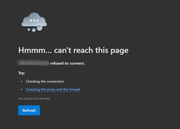
I get a browser error saying "refused to connect". I am able to connect to the via DLNA/UPNP to playback files and also via FTP to upload and download files, but no access to admin or to SMB protocol. I've shutdown 2-3 times using the hardware power button hold for 4 sec to properly shutdown, but no results. I also tried access the NAS from either wired and wireless computer to no avail.

Do you guys have any suggestions, ideas or work around?

Thanks in advance!
Image
User avatar
CursaYang
TM Support
Posts: 740
Joined: 06 Jan 2025, 16:34
China

Re: [Help] No Web or SMB access on F4-210 TerraMaster NAS after reboot

Post by CursaYang »

This might be related to a system malfunction or a problem with web-related services. Can you log in to the NAS via SSH? If so, we can arrange a remote troubleshooting session.

If not, you can consider restoring access by reinstalling the system.
To contact our team, please send email to following addresses, remember to replace (at) with @

Technical team: support(at)terra-master.com(for technical support)
Service team: service(at)terra-master.com(for purchasing, return, replacement, RMA service)
User avatar
reinaldotorrales
Posts: 3
Joined: 02 Jun 2026, 14:29
United States of America

Re: [Help] No Web or SMB access on F4-210 TerraMaster NAS after reboot

Post by reinaldotorrales »

CursaYang wrote: 02 Jun 2026, 22:44 This might be related to a system malfunction or a problem with web-related services. Can you log in to the NAS via SSH? If so, we can arrange a remote troubleshooting session.

If not, you can consider restoring access by reinstalling the system.
Hello and thanks for the quick response. Yes, I've installed Putty and I got SSH access to the device.
Please indicate the next steps for a remote session.

Thanks!
User avatar
MikeZhang
TM Support
Posts: 381
Joined: 05 Sep 2023, 22:21

Re: [Help] No Web or SMB access on F4-210 TerraMaster NAS after reboot

Post by MikeZhang »

reinaldotorrales wrote: 03 Jun 2026, 07:17
Please click below link to book remote session
https://salesiq.zohopublic.com/signatur ... 97d0be8892
To contact our team, please send email to following addresses, remember to replace (at) with @

Technical team: support(at)terra-master.com(for technical support)
Service team: service(at)terra-master.com(for purchasing, return, replacement, RMA service)
User avatar
reinaldotorrales
Posts: 3
Joined: 02 Jun 2026, 14:29
United States of America

Re: [Help] No Web or SMB access on F4-210 TerraMaster NAS after reboot

Post by reinaldotorrales »

MikeZhang wrote: 03 Jun 2026, 07:52
reinaldotorrales wrote: 03 Jun 2026, 07:17
Please click below link to book remote session
https://salesiq.zohopublic.com/signatur ... 97d0be8892

Hello Mike,

Thanks for the link. It took me while to get back to you as I was working on backing up the unit via FTP.
By now the link has expired. Please send another link at your earliest convenience.

Thanks!
User avatar
CursaYang
TM Support
Posts: 740
Joined: 06 Jan 2025, 16:34
China

Re: [Help] No Web or SMB access on F4-210 TerraMaster NAS after reboot

Post by CursaYang »

reinaldotorrales wrote: 21 Jun 2026, 10:19
The link is valid; please copy the complete link and try again:

https://salesiq.zohopublic.com/signatur ... 97d0be8892

You can also find customer service in the bottom right corner of the official website:

https://www.terra-master.com/
To contact our team, please send email to following addresses, remember to replace (at) with @

Technical team: support(at)terra-master.com(for technical support)
Service team: service(at)terra-master.com(for purchasing, return, replacement, RMA service)
Post Reply

Return to “File Services”