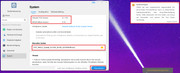
Updating from a 2GB system partition to an 8GB system partition will format the existing system partition, resulting in the loss of all data on the system drive. Therefore, you must back up all important data before proceeding.Dennis_H wrote: ↑18 Mar 2026, 01:22 I asked a similar question in another thread, but now that I found this one, it seems to be a more natural place...
I have a F2-221 with 10GB and running 4.2.44 with the V17 BIOS.
I would like to update to TOS 6 and it seems possible with this config.
Do I follow the instructions like
1. If your TOS version is below TOS 4.2.44, you need to first update to TOS 4.2.44.
2. If your TOS version is TOS 4.2.44, you cannot upgrade to TOS 5.0 via the update method and must install TOS 5.0.
3. If your TOS version is between TOS 5.0.93 and TOS 5.0.176, you need to first update to TOS 5.0.176.
4. If your TOS version is TOS 5.0.176, you need to update to TOS 5.1.24.
5. If your TOS version is between TOS 5.1.24 and TOS 5.1.145, you need to first update to TOS 5.1.145.
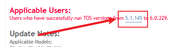
6. If your TOS version is between TOS 5.1.145 and TOS 6.0.229, you need to first update to TOS 6.0.530.
Will I lose data since I should be on the 2GB system now? Does it update it to 8GB and still work, or will I lose data? If I'm going to lose data, do I just flash a new initdisk for TOS6 and start fresh and have to re-init my drives and copy info back from external USB?
You can then create a USB bootable drive for TOS6, install TOS6 directly, and then import the data from an external device.
For instructions on creating a USB bootloader, please refer to this link: viewtopic.php?t=6433