How to Add Disks to an Array, Migrate Arrays, or Expand an Array Online?

Hard Drive, volume, storage pool, RAID
User avatar
ShoutingMan
Posts: 17
Joined: 07 Apr 2026, 01:07
United States of America

Re: How to Add Disks to an Array, Migrate Arrays, or Expand an Array Online?

Post by ShoutingMan »

Gremlin wrote: 08 Apr 2026, 00:00
ShoutingMan wrote: 07 Apr 2026, 20:35
That would give you 18TB of USABLE capacity. FYI adding a further 8TB drive would give 26TB. You can check the calculations here:
https://support.terra-master.com/raidca ... n/?lang=en
Yes, I’ve used the calculator. But that’s what lead me to believe I could build starting with a 16TB drive and then add the other smaller drives to build up to the 18TB total capacity with TRAID. Turns out, that’s not supported, but that info is buried in a forum post deep in the user forum.

I’m asking not what the capacity would be, but if there’s any other ‘gotcha’ buried in a forum that means building up my RAID with mixed-capacity drives will not work as expected.

Thanks :)
User avatar
Felix
TM Support
Posts: 105
Joined: 28 Jan 2026, 15:24
China

Re: How to Add Disks to an Array, Migrate Arrays, or Expand an Array Online?

Post by Felix »

ShoutingMan wrote: 08 Apr 2026, 04:31
https://toshelp.terra-master.com/web/#/en/storage_pool
The help documentation clearly states:
Migration requires adding disks to the TNAS, and the capacity of the newly added disks must be no less than the smallest disk in the current array.
To ensure your data security and the smooth operation of your array migration, please understand and adhere to the following capacity rules before adding a new disk.
As you can see from the calculator, when using a single 16TB hard drive, the available space is 16TB. Assuming a 16TB volume has already been partitioned, if a 2TB disk is added at this time, the available space shrinks to 2TB (this is due to the RAID logic). The new RAID space cannot accommodate the original 16TB of data, so we do not support choosing a smaller hard drive when expanding capacity.
When performing an online array migration (e.g., upgrading from Single mode to RAID 1), the capacity of any new disk you add must be greater than or equal to the minimum capacity of all disks in the current array.
The fundamental reason for this rule lies in the working mechanism of RAID arrays. When performing data mirroring or redundancy calculations, RAID arrays build a unified logical storage space based on the smallest capacity hard drive in the array. This is similar to the "barrel effect," where the effective capacity of the entire array depends on the shortest stave.
When you attempt to add a smaller capacity hard drive to an array composed of larger capacity hard drives, the system cannot accommodate the complete array data structure and file information within the smaller drive. Forcing this will result in data truncation, file system corruption, and ultimately irreversible data loss. Therefore, the system performs strict verification before operation; if the new disk's capacity does not meet the requirements, the migration will be automatically prevented to protect the security of your existing data.
For example: If your current array consists of a 16TB hard drive, then the new hard drive you use for the upgrade must be at least 16TB. Attempting to migrate using a 2TB hard drive will be considered non-compliant and rejected by the system.
We strongly recommend that you back up important data and choose hard drives with matching capacity and model before making any storage pool changes to ensure optimal compatibility and stability.
User avatar
ShoutingMan
Posts: 17
Joined: 07 Apr 2026, 01:07
United States of America

Re: How to Add Disks to an Array, Migrate Arrays, or Expand an Array Online?

Post by ShoutingMan »

Thanks. (I don’t know why this is a new thread. I was trying to reply to posts in the original thread. Been a bad tech week for me. :) )
User avatar
sianderson
Silver Member
Posts: 417
Joined: 02 Aug 2020, 03:42
Great Britain

Re: How to Add Disks to an Array, Migrate Arrays, or Expand an Array Online?

Post by sianderson »

i'm still not 100% sure i get it so just a bit of clarification

i have a 5tb hard drive and a 2tb hard drive
i have 6tb worth of data

can i create a single 7tb volume or not? as i get the feeling i could use a single drive and 5tb, or both drives and end up with 4tb is that correct?

but you cant literally just add two drives of different sizes together to give you one big partition?

so to achieve what i want i would need a 3tb drive?

i.e 3tb out of the 5tb and 3tb from the additional drive to give me 1 partition of 6tb?
F2-424 TOS 7.0.0765
F2-423 TOS 7.0.0765
F2-210 TOS 4.2.44
D4-320

C/O
F4-424 TOS 6.0.794
User avatar
Felix
TM Support
Posts: 105
Joined: 28 Jan 2026, 15:24
China

Re: How to Add Disks to an Array, Migrate Arrays, or Expand an Array Online?

Post by Felix »

sianderson wrote: 18 Apr 2026, 18:30
If you absolutely must mix a 5TB and a 2TB drive:
• RAID 0 (Max Space): Gives you 7TB, but the risk is extremely high.
• RAID 1 / TRAID (Data Security): Gives you only 2TB. You will permanently lose the remaining 3TB on the larger drive.
Recommended Solution: Don’t mix drives. Use two 5TB drives in RAID 1 for a safe, fully usable 5TB capacity.
User avatar
sianderson
Silver Member
Posts: 417
Joined: 02 Aug 2020, 03:42
Great Britain

Re: How to Add Disks to an Array, Migrate Arrays, or Expand an Array Online?

Post by sianderson »

please confirm RAID 0 i would get 7TB

"Requirements: Requires at least two drives. If drives are of different sizes, the capacity is limited to the smallest drive multiplied by the number of drives."

this to me tells me RAID 0 would equal 4TB not 7TB i.e the capacity of 2TB x 2
F2-424 TOS 7.0.0765
F2-423 TOS 7.0.0765
F2-210 TOS 4.2.44
D4-320

C/O
F4-424 TOS 6.0.794
User avatar
Felix
TM Support
Posts: 105
Joined: 28 Jan 2026, 15:24
China

Re: How to Add Disks to an Array, Migrate Arrays, or Expand an Array Online?

Post by Felix »

sianderson wrote: 18 Apr 2026, 20:36 please confirm RAID 0 i would get 7TB

"Requirements: Requires at least two drives. If drives are of different sizes, the capacity is limited to the smallest drive multiplied by the number of drives."

this to me tells me RAID 0 would equal 4TB not 7TB i.e the capacity of 2TB x 2
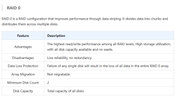
As stated in our official documentation, RAID 0 is the sum of the capacities of all hard drives, which is 5TB + 2TB = 7TB.
https://toshelp.terra-master.com/web/#/en/storage_pool

Image
User avatar
sianderson
Silver Member
Posts: 417
Joined: 02 Aug 2020, 03:42
Great Britain

Re: How to Add Disks to an Array, Migrate Arrays, or Expand an Array Online?

Post by sianderson »

ahh i think the confusion is because you said it will shrink a 16tb to 2tb if you try and add a 2tb (plus lots of external sources say raid 0 operates this way that you would lose 14tb not gain 2tb)

im guessing the Terramaster Raid 0 doesnt work like this and goes against other RAID designs?, but in order for anyone to do this they have to lose all their data on the drive first to set it up?

i.e you prevent me from having a 5tb hard drive to start with and adding 2tb to it (which is a natural upgrade path), despite you saying that it would give me 7tb
F2-424 TOS 7.0.0765
F2-423 TOS 7.0.0765
F2-210 TOS 4.2.44
D4-320

C/O
F4-424 TOS 6.0.794
User avatar
CursaYang
TM Support
Posts: 740
Joined: 06 Jan 2025, 16:34
China

Re: How to Add Disks to an Array, Migrate Arrays, or Expand an Array Online?

Post by CursaYang »

sianderson wrote: 20 Apr 2026, 23:27 ahh i think the confusion is because you said it will shrink a 16tb to 2tb if you try and add a 2tb (plus lots of external sources say raid 0 operates this way that you would lose 14tb not gain 2tb)

im guessing the Terramaster Raid 0 doesnt work like this and goes against other RAID designs?, but in order for anyone to do this they have to lose all their data on the drive first to set it up?

i.e you prevent me from having a 5tb hard drive to start with and adding 2tb to it (which is a natural upgrade path), despite you saying that it would give me 7tb
RAID 0 does not support retrofitting with additional hard drives.

If you want to change the current array type, or need to add hard drives to a RAID 0 array, you need to back up your current data and then rebuild the storage pool.
To contact our team, please send email to following addresses, remember to replace (at) with @

Technical team: support(at)terra-master.com(for technical support)
Service team: service(at)terra-master.com(for purchasing, return, replacement, RMA service)
User avatar
Gremlin
Gold Member
Posts: 1628
Joined: 02 Dec 2022, 22:31
Great Britain

Re: How to Add Disks to an Array, Migrate Arrays, or Expand an Array Online?

Post by Gremlin »

Quite often I believe that users (particularly those new to TM/TOS) will allow the system to build the default TRAID array(s) - knowingly or otherwise :!: .
Maybe some consideration should be given to providing a direct mechanism to:
1) Convert single disk Traid to JBOD or RAID-0
2) Convert Traid (mirror) to RAID-0 or JBOD as a user choice after original installation.
3) Convert RAID-0 to JBOD (to provide an exit point for further changes)
I'm sure there are others that can be imagined.
I am aware of some of the constraints and pitfalls that might affect any or all of the above - so just thoughts on what users might be trying to do :|
- particularly on fully utilised F2-xxx systems.

I'm not a user that choses either raid-0 or jbod normally but, like many others I have (or acquire!) old drives that I might like to throw in a device for testing. RAID-0 and JBOD do not seem to be very well covered in the help notes nor the mechanisms employed in TOS - Linux allows 'more than one way to skin a cat' - and/or the impact {on/caused by} varying file system types.
F5-221 TOS7.0.0777 - 4x4TB (Ironwolf) Traid
F2-424 TOS7.0.0777 - 2x500GB nvme (P3) Traid, 2x6TB HDD (HGST) Traid
F2-221 TOS7.0.0777 - 1x3TB Ext4, 1x4TB Btrfs
F2-425+ TOS7.0.0777 - 2x500GB nvme (P3) Traid, 2x6TB HDD (EXOS) Traid
Post Reply

Return to “Storage”