

I recently updated my F210 NAS to TOS Version 4.2.44
Since the upgrade the F210 randomly drops the connection with Windows 11 PC - a reboot of the F210 is required to reestablish connection to a shared folder.
Has anyone else experienced this problem?
[Help] System update?
-
sianderson

- Silver Member
- Posts: 453
- Joined: 02 Aug 2020, 03:42

Re: [Help] System update?
what make and model hard drives are you using? its possible that the drives you are using arent compatible with the nas drive causing instability
F2-424 TOS 7.0.1298
F2-423 TOS 7.0.1298
F2-210 TOS 4.2.44
D4-320
C/O
F4-424 TOS 6.0.794
F2-423 TOS 7.0.1298
F2-210 TOS 4.2.44
D4-320
C/O
F4-424 TOS 6.0.794


Re: [Help] System update?
Your issue may be caused by Windows 11 disabling the SMB1 protocol by default. You can try the following steps:
In the Windows 11 search bar, type "Turn Windows features on or off" and open it.
In the pop-up window, find "SMB 1.0/CIFS file sharing support".
Expand this item and check "SMB 1.0/CIFS client".
Click "OK" and restart your computer as prompted.
After restarting, try remapping the network drive or accessing the shared folder to see if the connection stability improves.
Re: [Help] System update?
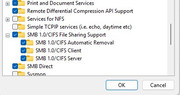
SMB is not the issue - see pic - this was working without issue prior to recent Terramaster update to version 4.2.44
Connection to NAS is dropped and a reboot of NAS re-establishes connection temporarily
Re: [Help] System update?
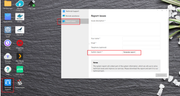
Please refer to the image to generate a system log and send it to our email address: support(at)terra-master.com. We will locate and resolve the issue for you as soon as possible based on your log information.
Re: [Help] System update?
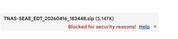
Report zip file is being blocked in email - please advise

Re: [Help] System update?
Gmail scans the files inside ZIP files and blocks any that appear to be dangerous. You can try changing the file extension before sending the attachment.
To contact our team, please send email to following addresses, remember to replace (at) with @:
Technical team: support(at)terra-master.com (for technical support)
Service team: service(at)terra-master.com (for purchasing, return, replacement, RMA service)
Technical team: support(at)terra-master.com (for technical support)
Service team: service(at)terra-master.com (for purchasing, return, replacement, RMA service)