How to manually install 3rd Party Apps and the list with available apps

Discussion on apps, protocols, APIs, specifications, and more. You are welcome to join us as a TOS app developer!
User avatar
JamesD
Posts: 1
Joined: 20 Mar 2026, 02:46
Ukraine

Re: How to manually install 3rd Party Apps and the list with available apps

Post by JamesD »

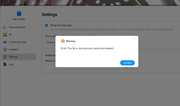
Hello, I am quite new to Terramaster. I am trying to install Tailscale on my F6424Max. It gives me an error "file is incorrect and cannot be installed"
My intention is to connect my TM here to a synology in another locat (LAN) so I can use RSYNC securely.

I have downloaded Tailscale TOS6 194 .2.0 aarch64.tpk for the TM and have installed Tailscale on the Win11 pc in the same LAN as the TM.

I was wondering if I should another linux tailscalle installation package, or any recommendations would be greatly appreciated.
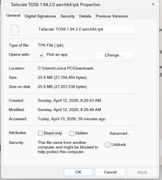
Image

Image
User avatar
outkastm
Gold Member
Posts: 1458
Joined: 29 Dec 2020, 23:52

Re: How to manually install 3rd Party Apps and the list with available apps

Post by outkastm »

Your NAS is based on x86 architecture, download the correct file with x86_64 in the filename
User avatar
crisisacting
Silver Member
Posts: 500
Joined: 20 Jan 2022, 16:42

Re: How to manually install 3rd Party Apps and the list with available apps

Post by crisisacting »

JamesD wrote: 14 Apr 2026, 00:16 … have downloaded Tailscale TOS6 194 .2.0 aarch64.tpk for the TM …
That's the build meant for TOS 6 ARM builds, not for your ×86/×64 TNAS model.

Follow what @outkastm posted to get the correct one.
Post Reply

Return to “Developer Discussion Room”